Maintenance
3A2098S 83
Upgrade Fluid Control Module
(FCM) Software (16K743)
NOTE: The FCM connection is temporarily disabled
during the use of the upgrade token.
1. Turn off power to the system.
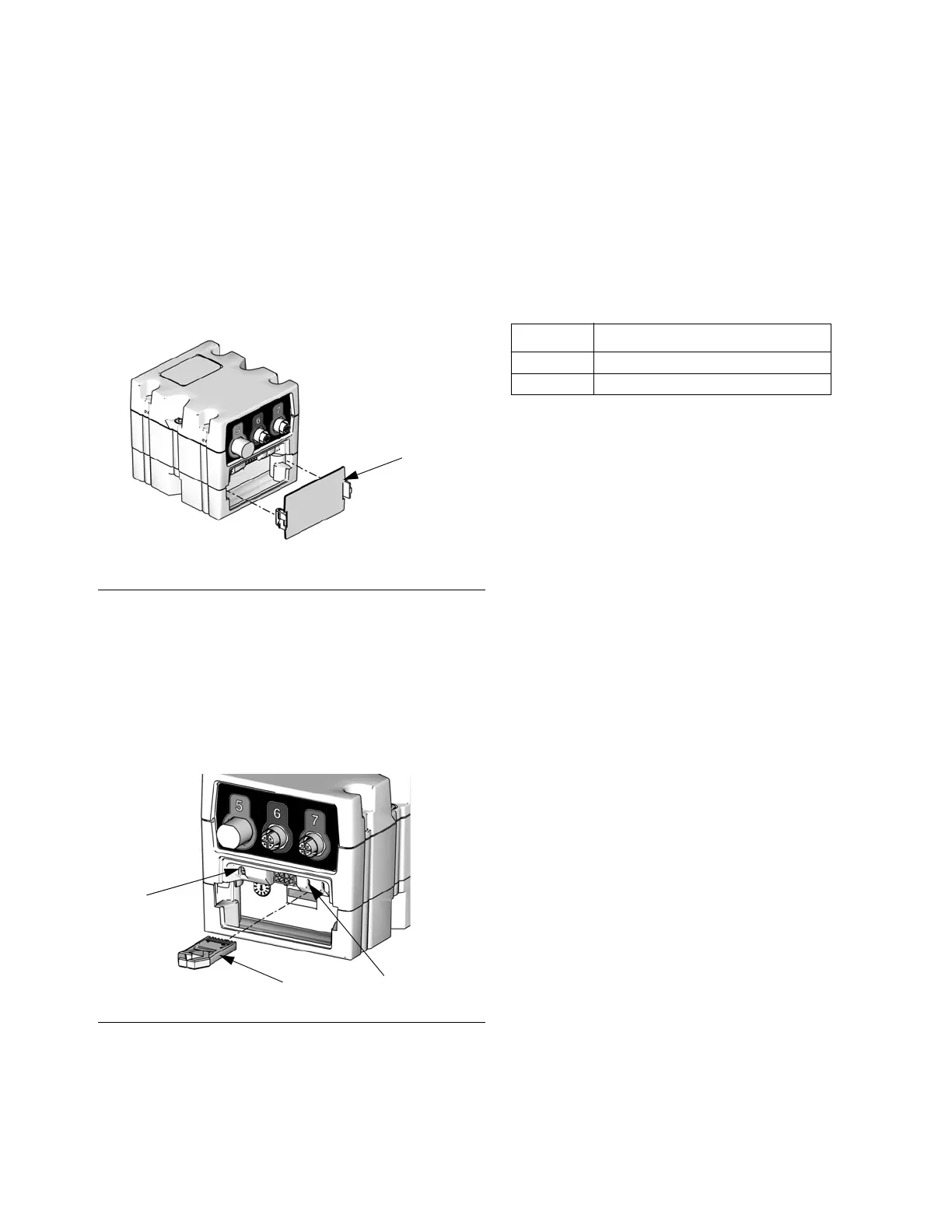
2. Remove access cover then remove key token (do
not discard token).
3. Insert and press software token firmly into slot.
NOTE: There is no preferred orientation of token.
4. Press and hold the button shown in F
IG. 51 for ~1
second, then release. The red indicator light (CK)
will flash until new software is completely loaded.
5. After the red indicator light shuts off, turn off power
to the system.
6. Remove software token.
7. Reinstall blue key token, and replace access cover.
Air Filter Maintenance
To prevent filter element damage, replace air filter every
two years or when pressure drop becomes 100 kPa
(1.0 bar, 14.5 psi) or greater; which ever occurs first.
Replacement Air Filters for Dual Filter
Assembly (234967)
Swirl Dispensers
See manual 309403 for maintenance schedule.
F
IG. 50: Remove Access Cover
F
IG. 51: Insert Token
CK
Token
TI12335A
Press Button
Part Description
123091 5 micron air filter
123092 0.3 micron air filter



 To Next Page