3. Press “Generate Ringfile” to finish the process. Ringtone with filename “ring1.bin” will be created at same location as
ringtone tool.
Step 2: Download Custom Ringtone(s) to DP752 Base Station
1. Make generated ringtone files available in your FTP, HTTP or HTTPS server.
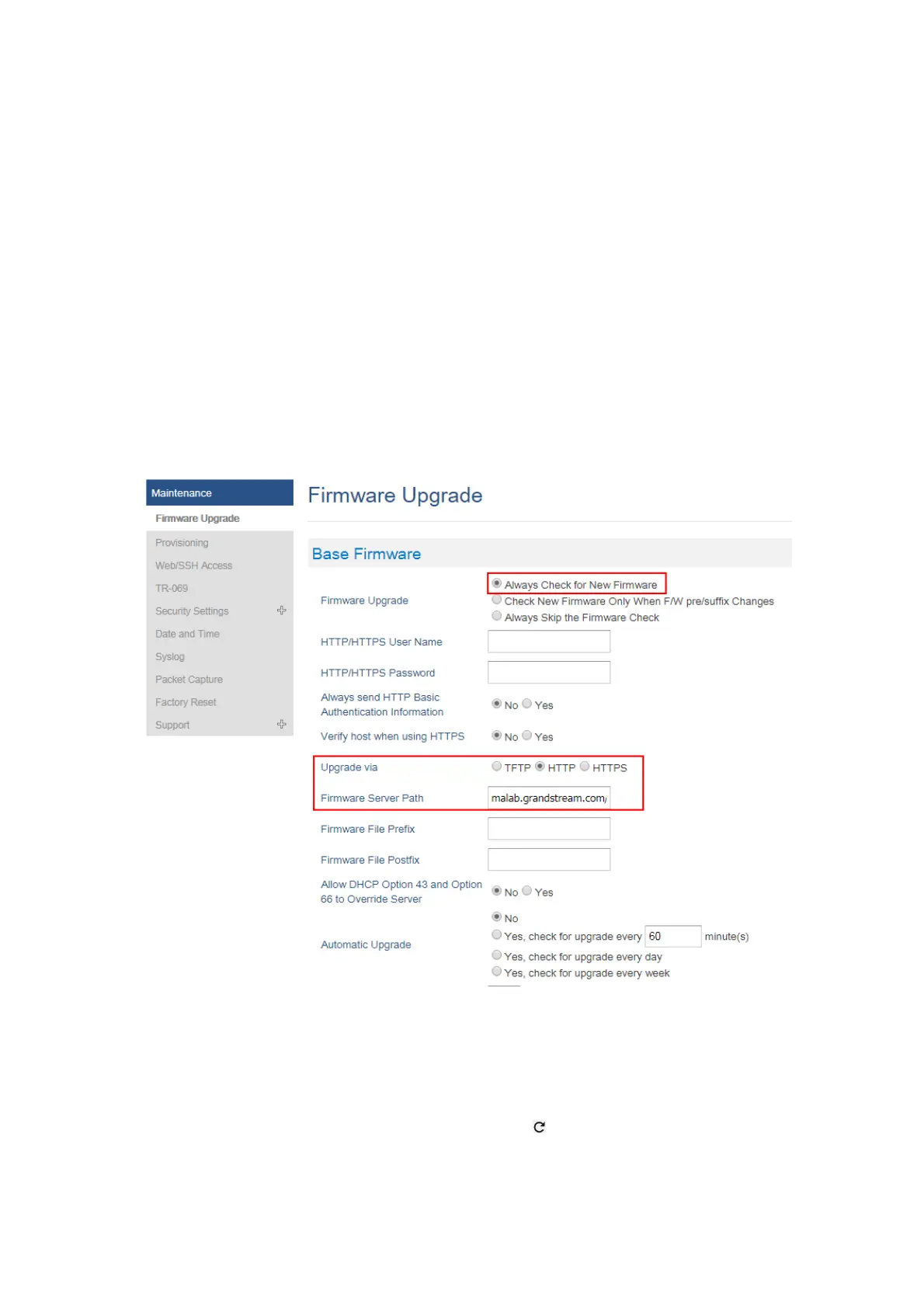
2. Access DP752 Web GUI and go Maintenance 🡪 Firmware Upgrade page.
3. Set “Upgrade Via” to HTTP/HTTPS or FTP/FTPS (depending on server type hosting ringtone files).
4. Set “Firmware Server Path” to IP address or the FQDN of the server.
5. Set “Firmware Upgrade and Provisioning” to “Always Check for New Firmware”.
6. Update the change by clicking the “Save and Apply” button. Then “Reboot” or power cycle the base station to download
the ringtone(s).
Figure 28: Downloading Custom Ringtones
Step 3: Assigning a Custom Ringtone for a DP722/DP730 Handsets
1. Access DP752 Web GUI and go DECT 🡪 HS Settings 🡪 HS# Settings page.
2. In Custom Ringtone, select a custom ringtone from the dropdown list.
Note: If the list is not showing downloaded custom ringtone(s), press and check again.
3. Press “Save and Apply”. DP722/DP730 handsets will download the ringtone locally before using it. (DP722/DP730 LCD
screen will display download progress at this stage).
4. On DP722/DP730 Handsets menu, access Settings 🡪 Audio 🡪 Ringtones. Select Custom Ringtone using up/down arrow
keys and press “Select” softkey.
Note
Currently only 16-bit linear PCM audio is supported for .wav files. The sampling rate should be automatically detected and the
audio will automatically be down sampled to 8kHz. Stereo channels are also detected and mixed to produce mono output.
.pcm files should be pre-formatted to 16-bit 8kHz mono format.






 To Next Page