L-SOLUTION 700 / 800 / 900 machines . 26
First contact
Connecting L-SOLUTION to your PC using the serial port (only with the old machines)
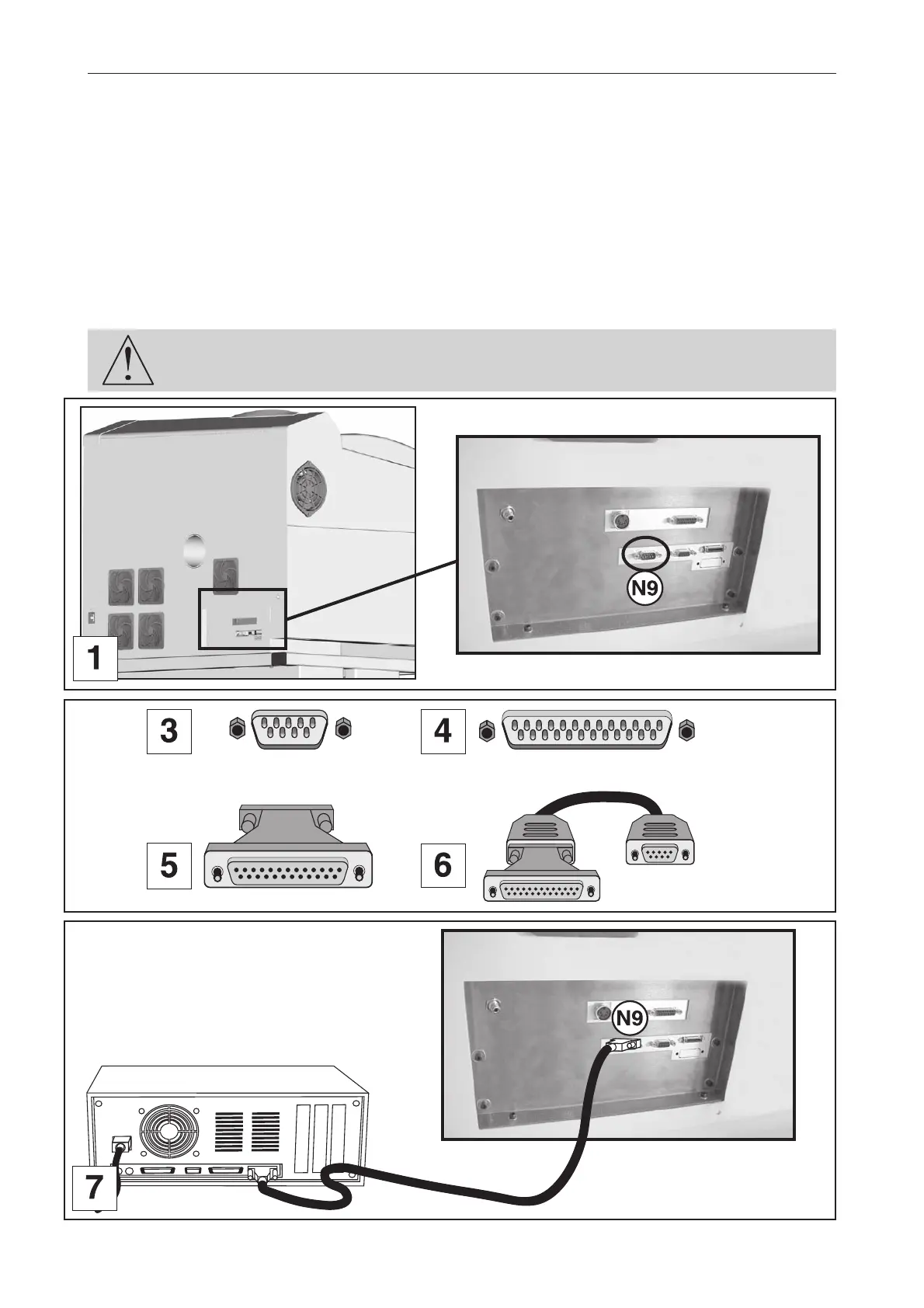
1. Plug the serial cable into the serial port (N9) of the L-SOLUTION 800 machine (diagram 1).
This is a 9-pin connector.
2. Plug the serial cable into the serial port of the PC.
Refer to the installation manual of the computer for the serial port.
PC computers can have two types of serial ports :
• 9-point serial port (diagram 3, transmission example diagram 7)
• 25-point serial port (diagram 4)
If you use a 25-point serial port, connect the 25-9 point adaptor (diagram 5) onto the serial cable
(diagram 6) before plugging it into the computer.
The connector screws must be very tight to avoid any accidental disconnection of the
cables while the machine is turned on, as this could damage the electronic boards
permanently.
1
25
1
9
1
25
1
9
1
9
1
25
L-SOLUTION 800
Old machines
Old machines
Installation











 To Next Page