L-SOLUTION 700 / 800 / 900 machines . 46
First contact
Printer driver
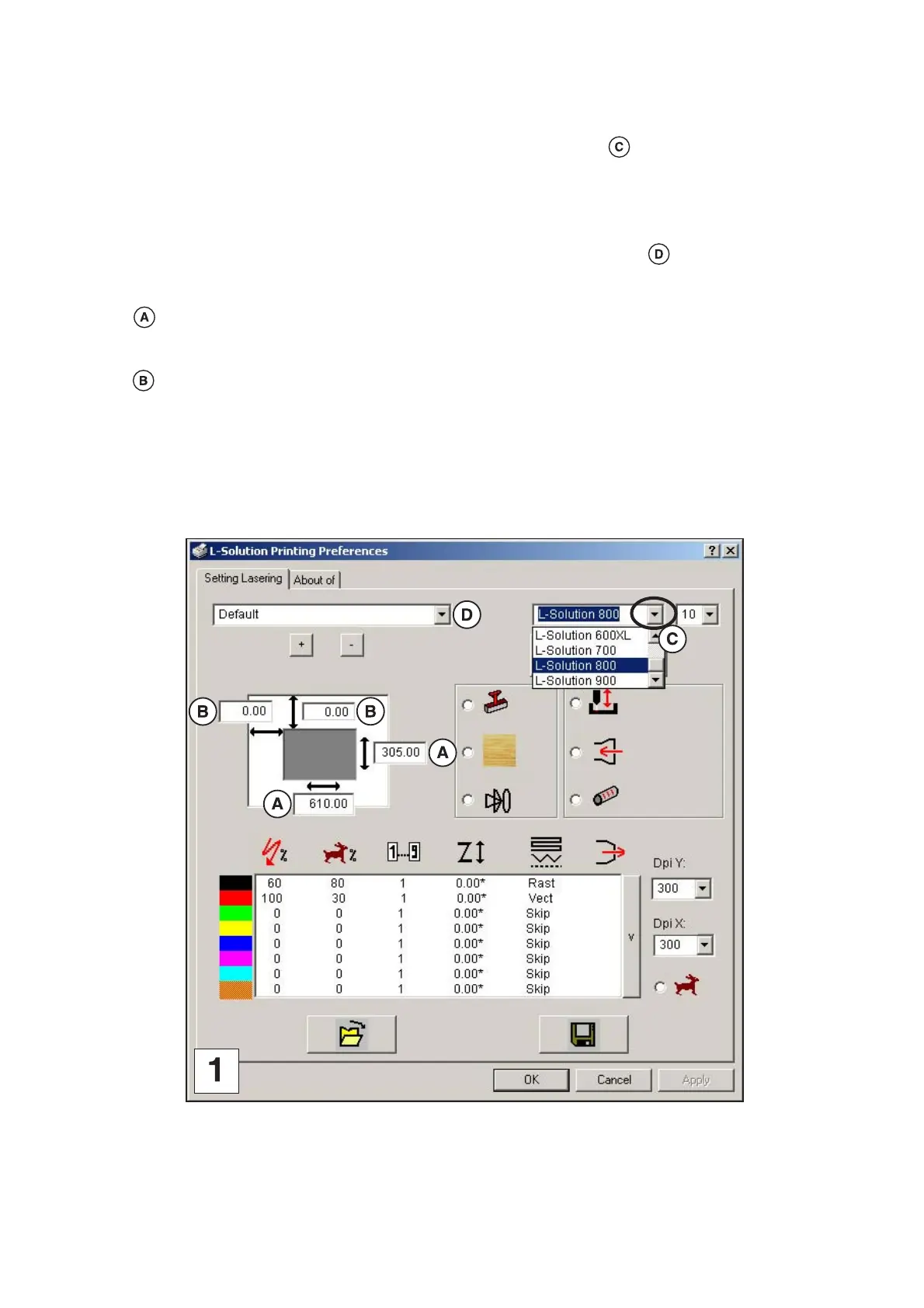
Definition of the machine used
(pict. 1)
A list of the machines available appears by clicking the “machine” drop down menu . Select the name of the machine
you want to use.
Definition of the plate
(pict. 1)
A list of 3 available pre-defined plates is displayed by clicking the “plate” drop down menu ("Default","Default rubber
stamp", "Untitled") . Select the name of the plate you want to use.
From these 3 pre-defined plates, you can define another plate by entering its dimensions:
Values correspond to the plate dimensions you have to enter for them to be EXACTLY the same as those defined in
your software; otherwise there might no output, a partial output or a poor alignment of the graphics. The operator has to
enter the suitable setting values (the maximum dimensions allowed are those of the machine maximum engraving area).
Values correspond to the original engraving which is the default value of the machine (point (0.0) in the top left corner
of the engraving table).
Once your new parameters defined, save them with a new name of plate. Change the name and click (+) in order to add
it in the list of your plates. Click (-) in order to delete the selected plate. The 3 pre-defined plates "Default","Default rubber
stamp" and "Untitled" can not be modified or deleted.











 To Next Page