Option Installation
Chapter 2
2-20
There are many other possible uses for a Database, as well. Up to 250 databases can be accessed.
Several different applications can be combined in one installation.
TRANSACTION RECORDER DATABASE
Using a Transaction Recorder database, every weighing operation that occurs on the scale can be stored to
memory with other pertinent data. This data can include time/date, employee ID, job number, part number,
number of boxes, customer number, and so on.
Normally this type of database only makes rows. The data is never recalled. A report can be sent to a
computer or printer at the end of the shift, day, or week, and then the data is deleted.
PART NUMBER LOOKUP DATABASE
When a part is weighed, the part number is keyed in. Information about the part - for example, description,
bin location, etc. - can be recalled from a Part Number Look-Up database. The information can be used to
print a label, which is placed on the part. This same concept can be used to recall a name and address
based on customer ID.
QUANTITY ON HAND DATABASE
A Quantity on hand database can be used to track the inventory levels of various products based on their
collective weight (or quantity by using the counting capabilities).
When an item number is keyed in, the current amount on hand (in weight or quantity) is recalled into the
Gross or Net total register. Then, depending on whether the stock is being increased or reduced, an add or
subtract accumulation operation is performed. The database row is then updated to show the revised
amount on hand.
Using a Variable (INT) that defines a safety stock level, a buy report can be issued when the amount of
stock on hand nears or drops below the defined safety stock amount. Another database can also be used to
track the stock amounts on order.
DATABASE SETUP
Database data is stored in either FRAM or in the optional Database. The setup parameter for setting FRAM
storage size is P698. If the optional database is installed, it will be automatically detected at P698. The
database board can be moved from one parts counter to another.
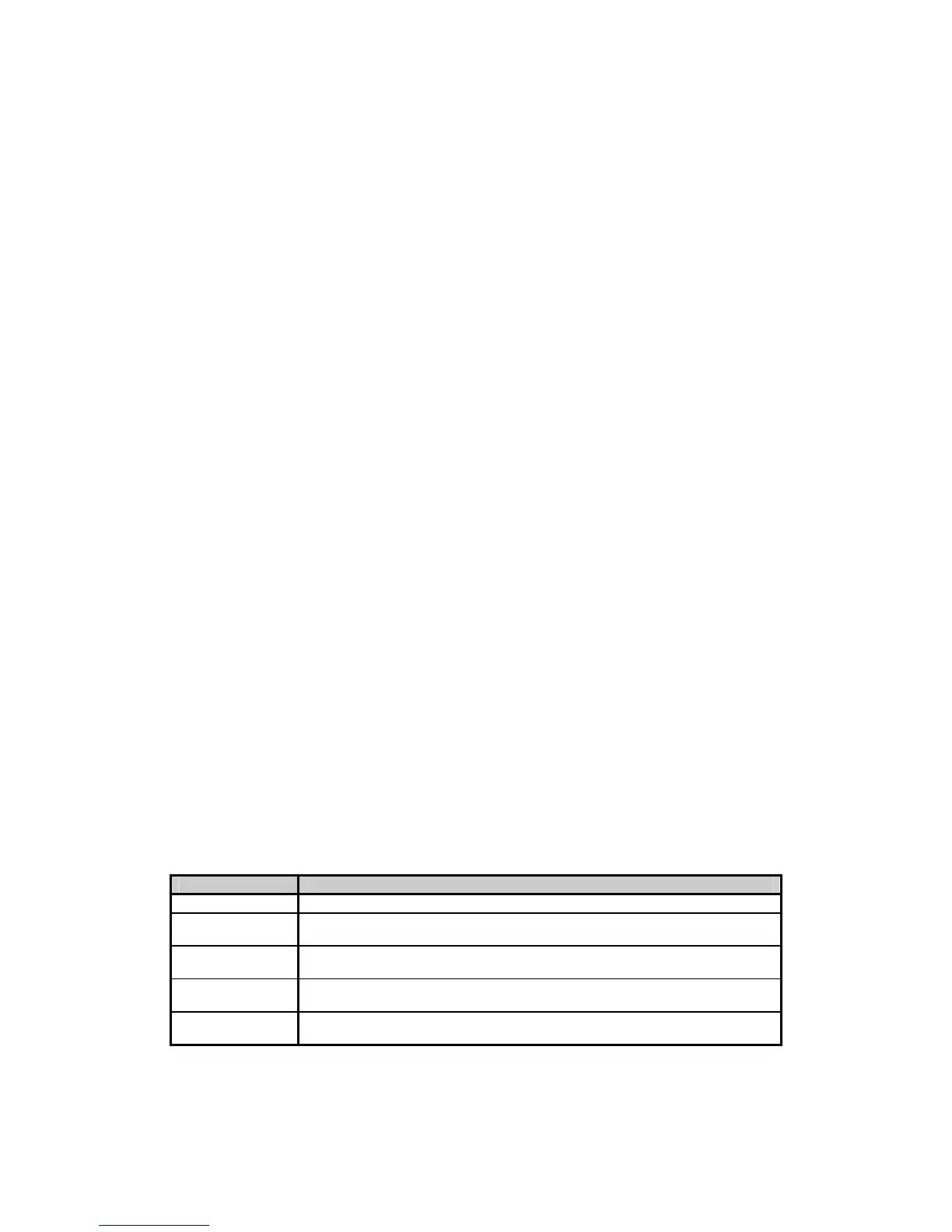
Each database has its own setup mode. Table 2-7 lists the database setup parameters.
Table 2-7: Database Setup Parameters
P
ARAMETER
D
ESCRIPTION
P699: DB #: Specifies the database number to be setup. Selections are 1 - 250.
P700: DBNam Allows for specifying the database name (customize to usage). Use arrow keys or
enable the [ALPHA] key to enter alpha characters.
P701: Col01 Specifies the parameter to be stored in column one of the database. Instances must
be chosen for most parameters.
P702: Col02 Specifies the parameter to be stored in column two of the database. Instances must
be chosen for most parameters.
P703: Col03 Specifies the parameter to be stored in column three of the database. Instances
must be chosen for most parameters.
All subsequent database parameters through P798 follow the pattern of those listed in the Database Setup
Parameters table. As many as 98 columns are allowed in each database.



 To Next Page