16
4.2 Keys and symbols
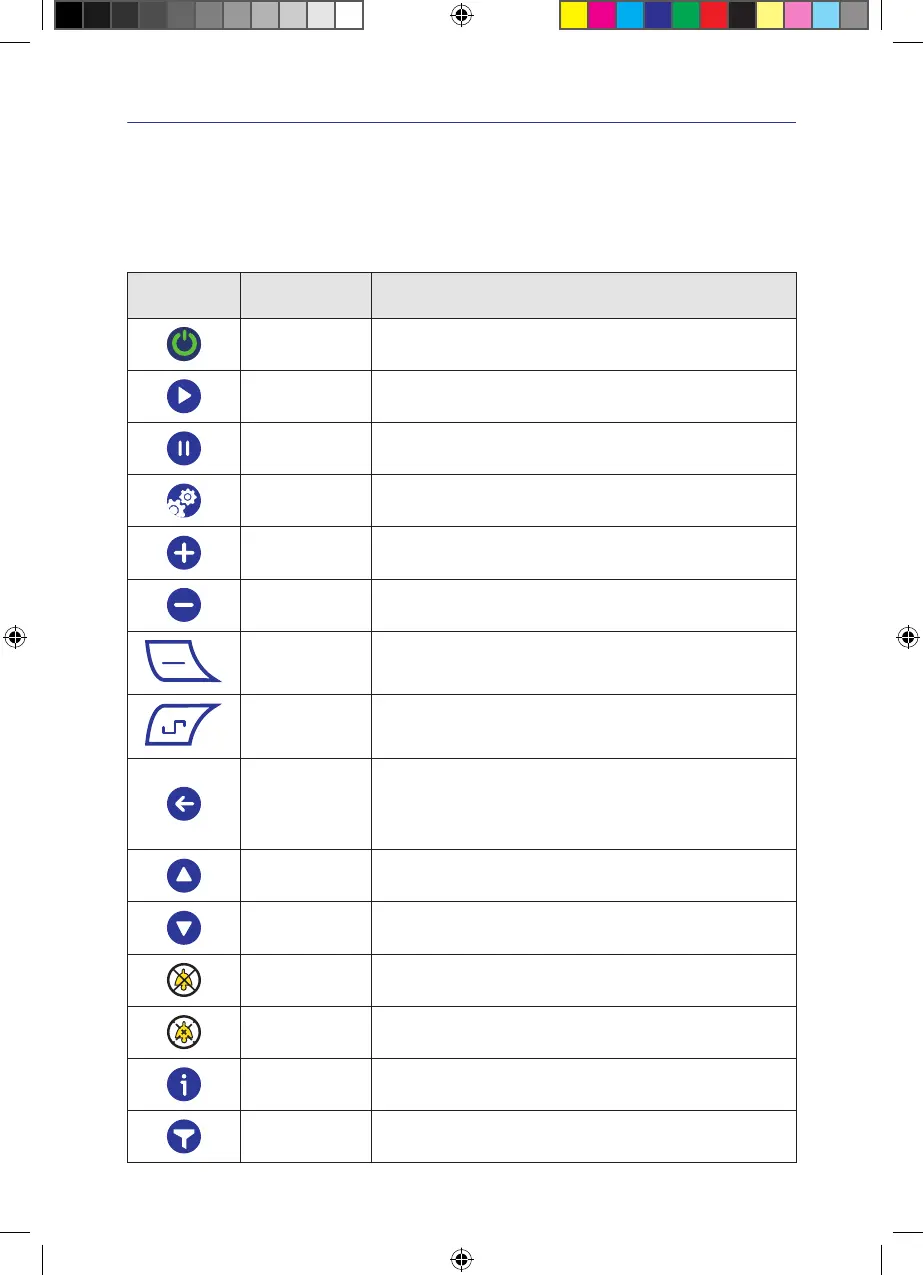
The VivanoTecPro negative pressure unit is equipped with a touchscreen� The device is operated by tapping and touching
the keys on the touchscreen�
Keys
Key Designation Function
On/Off switch
Press the switch for 2seconds� Switches the negative pressure unit on
or off�
Start key Starts the therapy�
Stop key Stops the therapy�
Menu key Calls up the settings menu�
Plus key Increases the current value�
Minus key Decreases the current value�
Cont key
Switches the continuous mode on�
After activation, the surrounding key border turns white�
Int key
Switches intermittent mode on�
After activation, the surrounding key border turns white�
Save/Return
Saves the new settings and returns to the main menu�
IMPORTANT! If the new settings are not to be saved, wait until the
system returns automatically to the previous menu�
This takes about 30seconds�
Up Moves up in the menu�
Down Moves down in the menu�
Close
Switches off the warning message and suppresses the warning message
till device is restarted again�
Close
Switches off the warning message and suppresses the warning message
for a limited duration�
Information
Calls up information about the negative pressure unit, such as serial
number, software version and operating data�
Filter Filters the event history messages�
IFU_4095080_0302884_190824_EN.indd 16IFU_4095080_0302884_190824_EN.indd 16 19.08.24 12:3119.08.24 12:31


 To Next Page