25
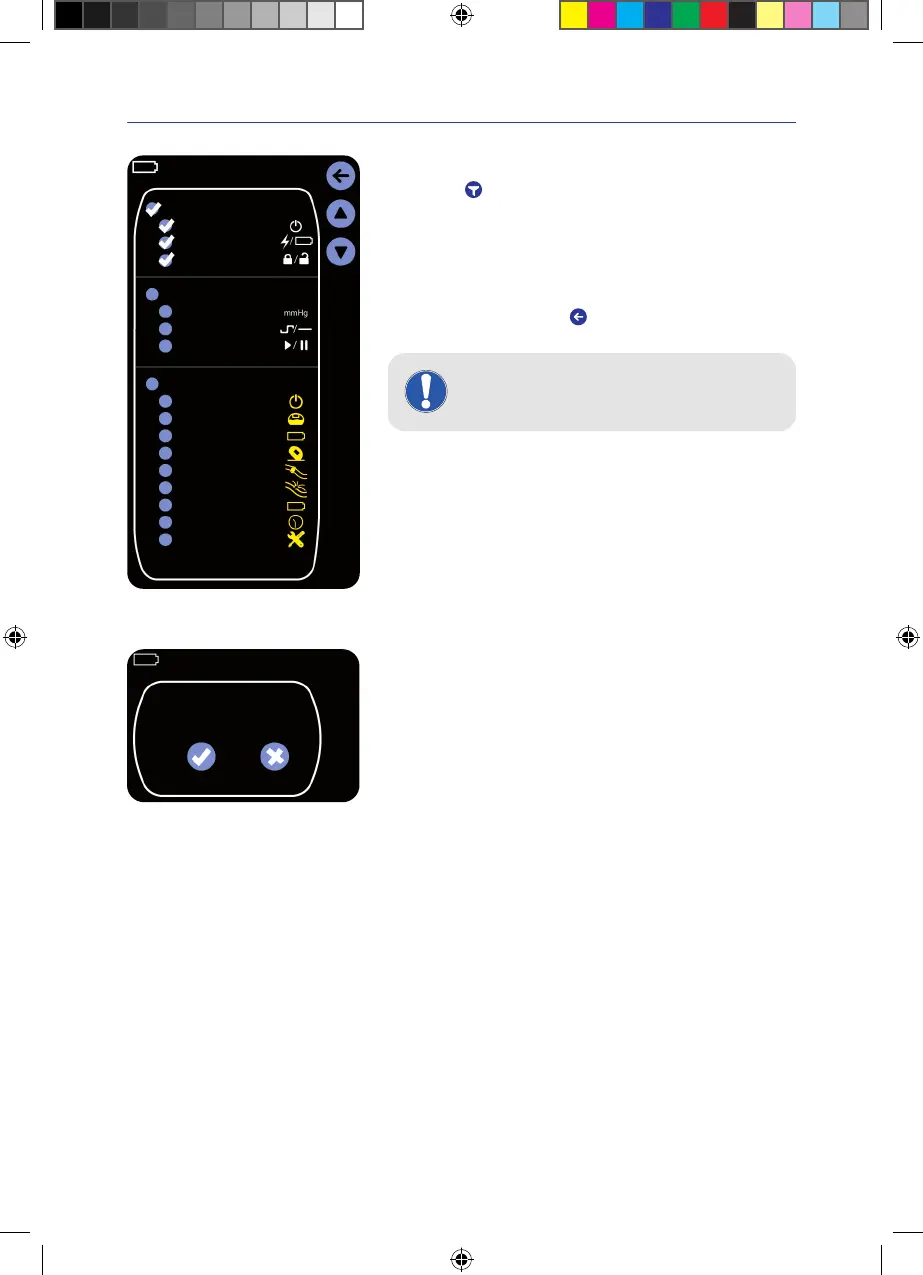
Device event history
Therapy settings
Warning messages
On/O
Mains/Battery
Key lock
Pressure (set)
Therapy Mode
Therapy start/pause
Automatic Switch O
Exudate canister full
Battery Discharged
Impact
Blocked tube
Battery service
Leakage
Inactivity
Technical defect
Filtering the event history
> Tap on the
key�
A selection of all recordable events appears.
In the factory settings, all events are displayed�
> Tap on the events that should no longer be displayed�
The checkmark next to the item is deleted. The event is no longer displayed
in the event history.
> Confirm the entry by pressing
�
The filtered event history is displayed.
INFORMATION
The events can also be shown and hidden in groups�
6.4 Factory settings
Do you wish to return to
the factory settings?
Yes No
> Tap on Factory Settings in the settings menu�
You will be asked again:
“Do you wish to return to the factory settings?”
> Tap on “Yes”
The factory settings are restored.
> Tap on “No”
The factory settings are not restored. The main menu is displayed again.
6.5 USB port
The USB port may be used only by the staff of PAULHARTMANNAG for data transfer� No other USB device may be
connected to the VivanoTecPro negative pressure unit�
The connection to IT networks could result in previously unidentified risks to patients, operators or third parties�
These risks should be identified, analysed, evaluated and controlled by the responsible organisation�
Changes in IT network could introduce new risks that require additional analyses�
IFU_4095080_0302884_190824_EN.indd 25IFU_4095080_0302884_190824_EN.indd 25 19.08.24 12:3119.08.24 12:31


 To Next Page