17
Symbols
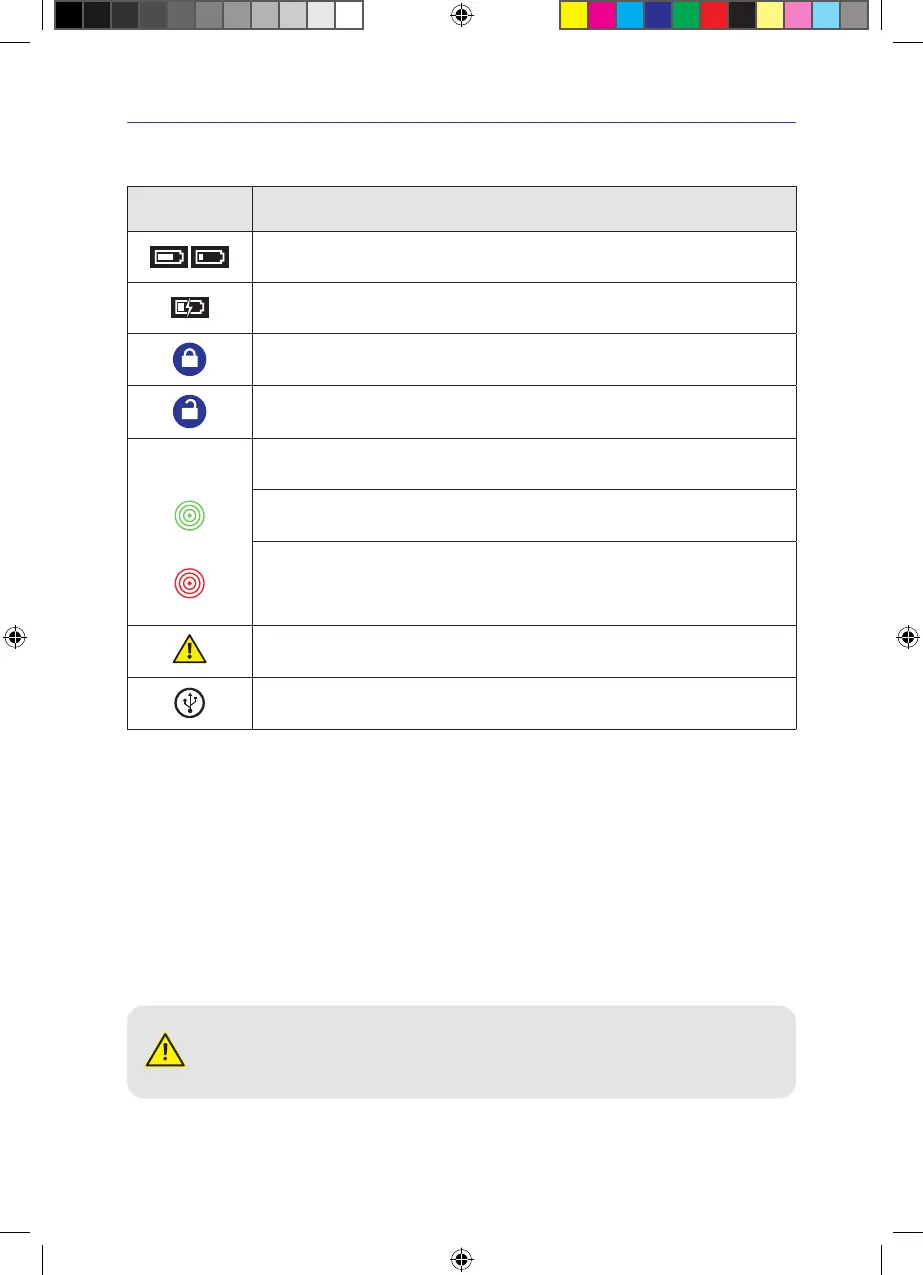
Symbol Definition
Displays the battery charge level�
Battery charging
Key lock enabled
Key lock disabled
Leakage indicator�
This symbol is only visible when the pump is running�
Slowly pulsating green symbol
Quickly pulsating green symbol
-> no leaks in system
-> a tolerable leak in the system
Pulsating red symbol
-> in the case of an intolerable leak in
the system
After two minutes in this condition, the leakage warning message is issued�
Indicates that a warning message has been suppressed�
The symbol extinguishes once the cause of the leakage warning has been rectified�
USB stick inserted
4.3 Display illumination
Day/night mode
The negative pressure unit reacts automatically to the ambient light conditions in the room and readjusts the display
brightness�
Display switch-off during battery operation
The display illumination switches off after 5 minutes of battery operation�
4.4 Preparing the negative pressure unit for use
CAUTION! Tripping hazard. Strangulation hazard.
Loosely laid power supply cables, straps and tubing can lead to a tripping or strangulation hazard�
> Always lay out the power supply cable, the straps and the tubing safely�
IFU_4095080_0302884_190824_EN.indd 17IFU_4095080_0302884_190824_EN.indd 17 19.08.24 12:3119.08.24 12:31


 To Next Page