32
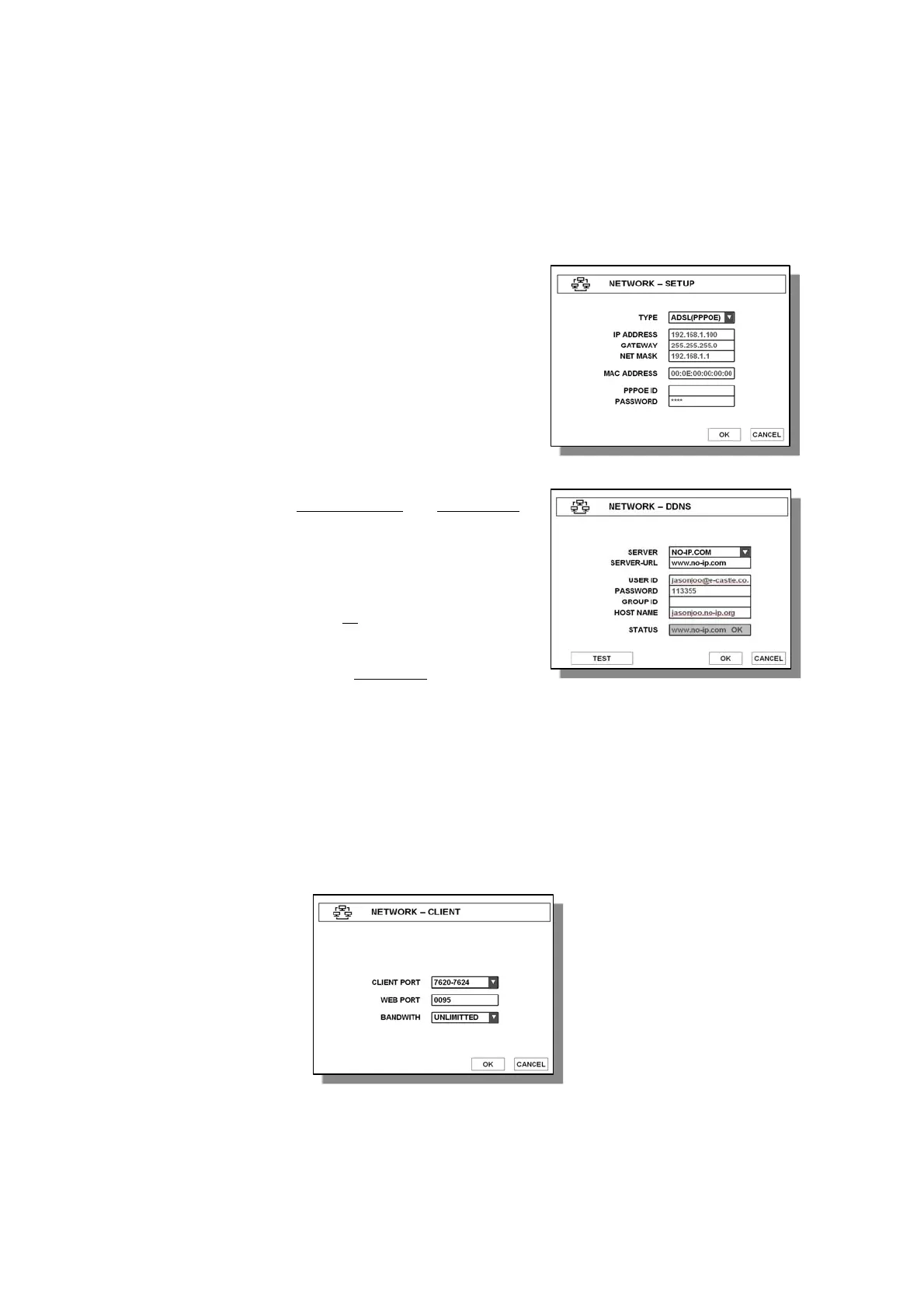
(2) ADSL(PPPOE)
If you use ADSL model, select ADSL and enter PPPOE ID and PASSWORD. If you don’t know
ID and Password, please contact your ADSL service provider.
3.6.2 DDNS
DVR supports basically DYNDNS.COM
and NO-IP.COM
for DDNS connection. Enter appropriate data as follows,
● SERVER - Choose DDNS server.
● USER ID - Enter your site ID
● PASWORD - Enter your site PASSWORD
● HOST NAME - Enter your host name
here.
3.6.3 CLIENT
Choose one of given CLIENT PORT list, and enter desired value at WEB PORT, whose default
value is 0080. Remember those values you have entered for the following setup. Total 16 values
of CLIENT PORT are already given for your convenience from 7620-7624 to 7770-7774.
Note : Before setting DDNS, you should register web-registration at dyndns.com or no-ip.com



 To Next Page