9
2. OPERATION
2.1 Turning on / Turning off the system
z Turn on the system.
Connect the power cord with product and AC110V/220V socket, system will turn
on automatically.
z Turn off the system.
Press MENU button and go to shutdown.
[MENU Æ SETUP Æ password Æ SYSTEM Æ SHUTDOWN]
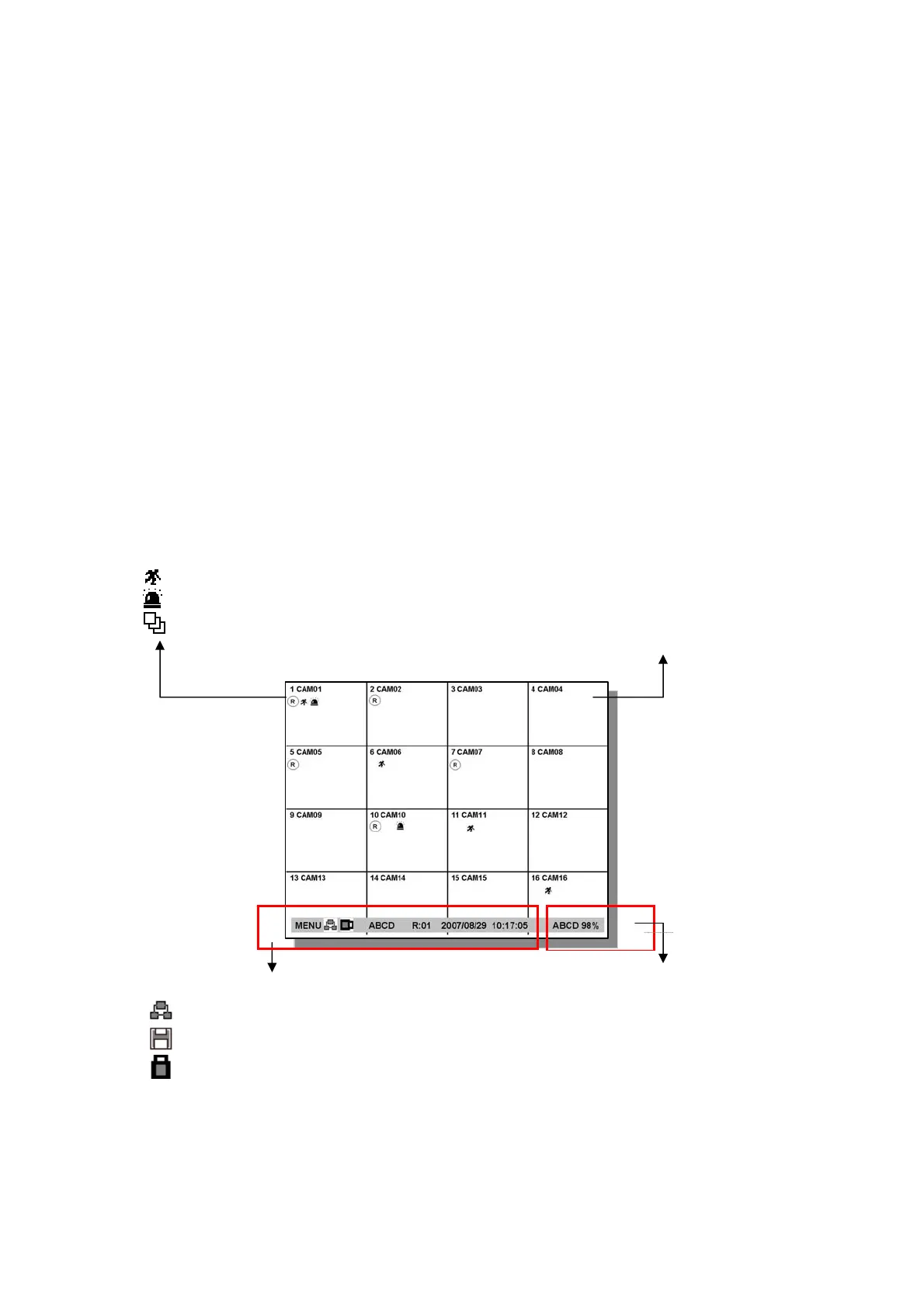
2.2 Screen layout
[ CHANNEL STATUS ]
Channel number
Camera name
R : Recording
: Motion detected
: Sensor alarm detected
: Channel sequencing
[STATUS BAR]
z MENU System Setup and function
z
Network-client connection status
z
Backup status
z
USB connection status
z External USB HDD indication ( A / B / C / D )
z Remote controller ID,
z System date/time
[PLAYBACK STATUS]
▶ : Normal forward Playback
∥ : Pause
▶▌: Fast forward
▌◀ : : Fast reward
[HDD STATUS]
z HDD indication ( A / B / C / D )
z Color
Blue : HDD is Full
White : Stand by
Yellow : Active (using for recording)
Red : Error
z When HDD usage is Full;
99% : if OVERWRITE_MODE=ON
100% : if OVERWRITE_MODE=OFF



 To Next Page