8
1.4 Remote Controller
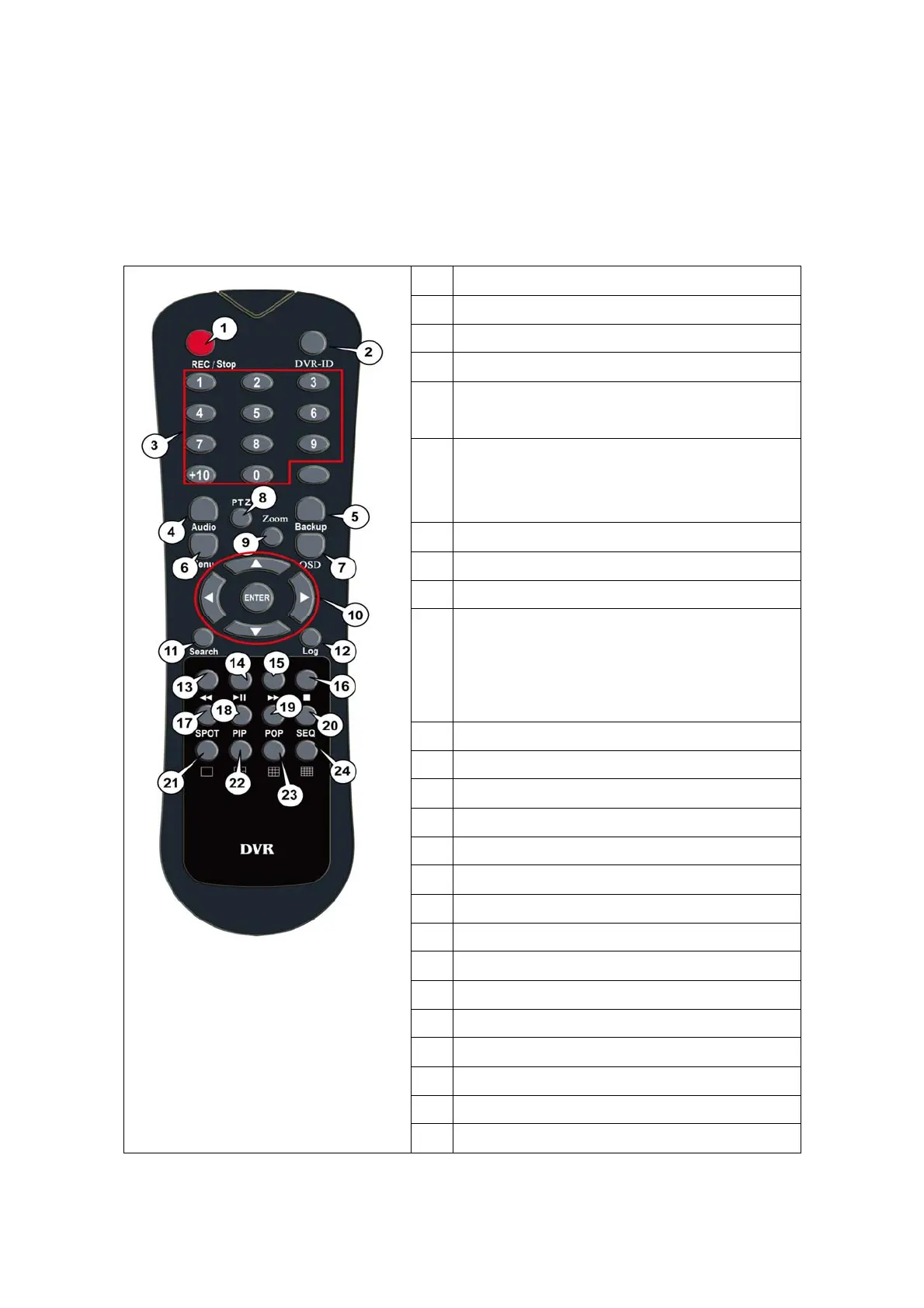
The function button of this IR remote controller as below
1
REC : Record button
2 DVR-ID
3 Number button
4
AUDIO : Audio ON / Mute
5
BACKUP :
Backup the recorded data to other device
6
MENU :
Go to ‘MENU’ mode to setup the system /
Close the dialog window
7
OSD : Show or Hide OSD
8
PTZ : Control Pan/Tilt/Zoom camera.
9 Digital Zoom
10
Direction
(▲,▼,◀,▶)
Move cursor or control PTZ camera
ENTER
Select sub item in system setup mode
11
SEARCH : Search recorded video
12
LOG : Show running statue of DVR system
13
◀◀ : Reverse play
14
▶I : Play or Pause during playback
15
▶▶ : Fast forward play
16
■ : Stop playback and go to Live mode
17
SPOT : Set SPOT output
18
PIP : Go to PIP mode
19
POP : Enlarge specific channel in Live mode
20
SEQ : Show each camera rotation
21 Full screen mode
22
Quad button : Show quad screen
23
9CH display mode
24
16CH display mode



 To Next Page