7
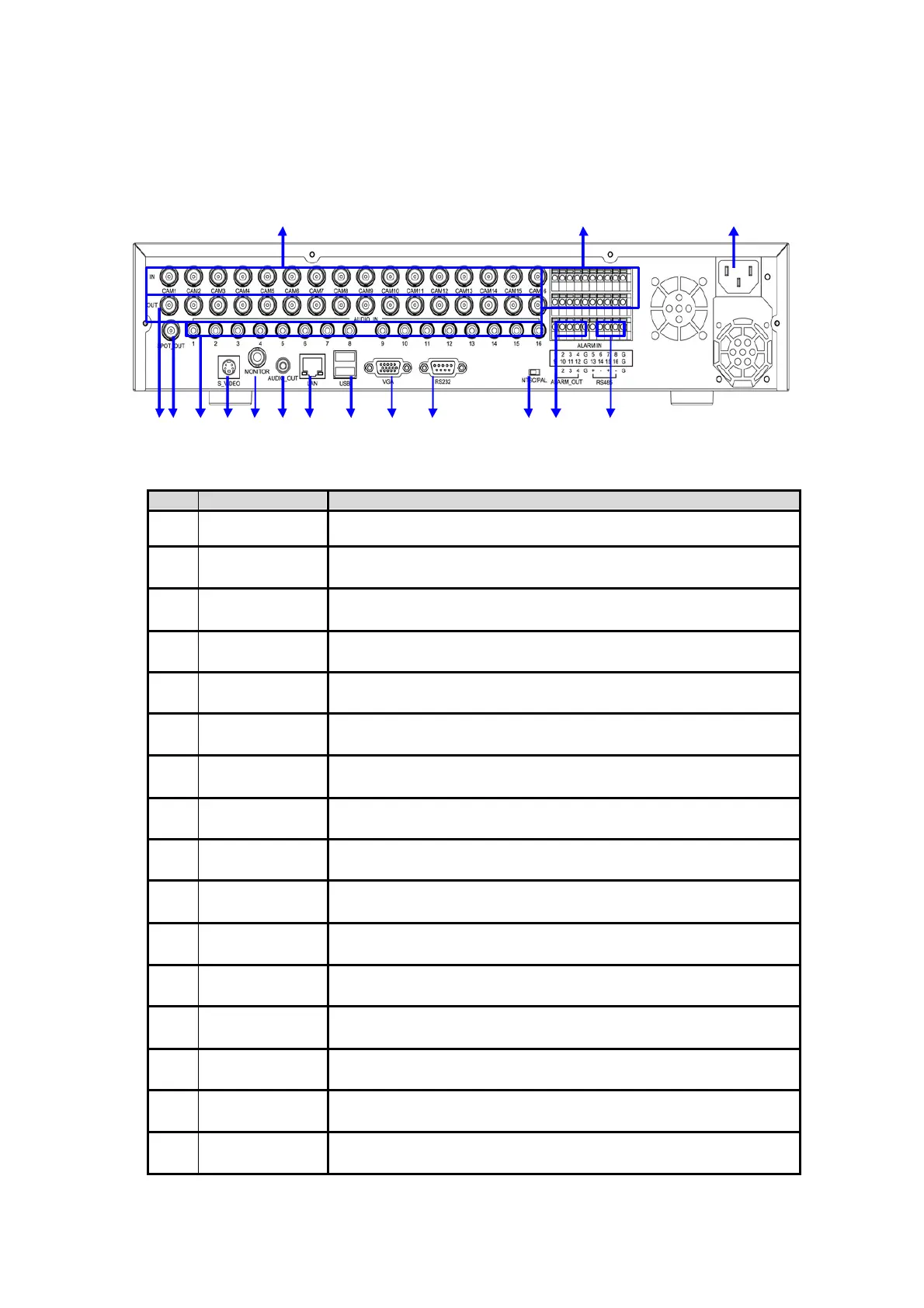
1.3 Rear Panel
1 13 16
2 3 4 5 6 7 8 9 10 11 12 14 15
No.
Name
Descri
tion
1 Video-In Video input (CH1 ~ CH16) BNC type
2 Video Loop-Out Loop-out of camera images (CH1 ~ CH16)
3 Spot-Out Connect the spot monitor
4 Audio-In Audio input device (x16)
5 S-Video Connect to S-Video terminal
6 Video-Out Connect the CCTV monitor
7 Audio-Out Connect the audio output device
8 LAN Port 10/100 Ethernet connection terminal
9 USB Port USB port (Ver 2.0) for mouse operation or Image backup (x2)
10 VGA-Out Connect the P/C(VGA) monitor
11 RS232 RS232 connect interface
12
NTSC/PAL
Selection
Select the video signal type (NTSC/PAL)
13 Sensor Input Connect the external sensor (x16)
14 Alarm Output Connect the external alarm device (x4)
15 RS-485 Port Connect the PTZ camera and/or external keyboard controller (x2)
16 Power Input Power cable connection



 To Next Page