x.Spot™ User Manual The x.Spot Menu System 4-9
4
Control
The Control parameter is controlled with DMX Channel 14.
To access all control settings (except for Pan & Tilt MSpeed Off), first select a control
channel value, then set the Shutter channel to “0.”
In the x.Spot fixture, the Control parameter functions have been expanded to allow
remote homing of individual functions as well as the entire fixture with a DMX
controller.
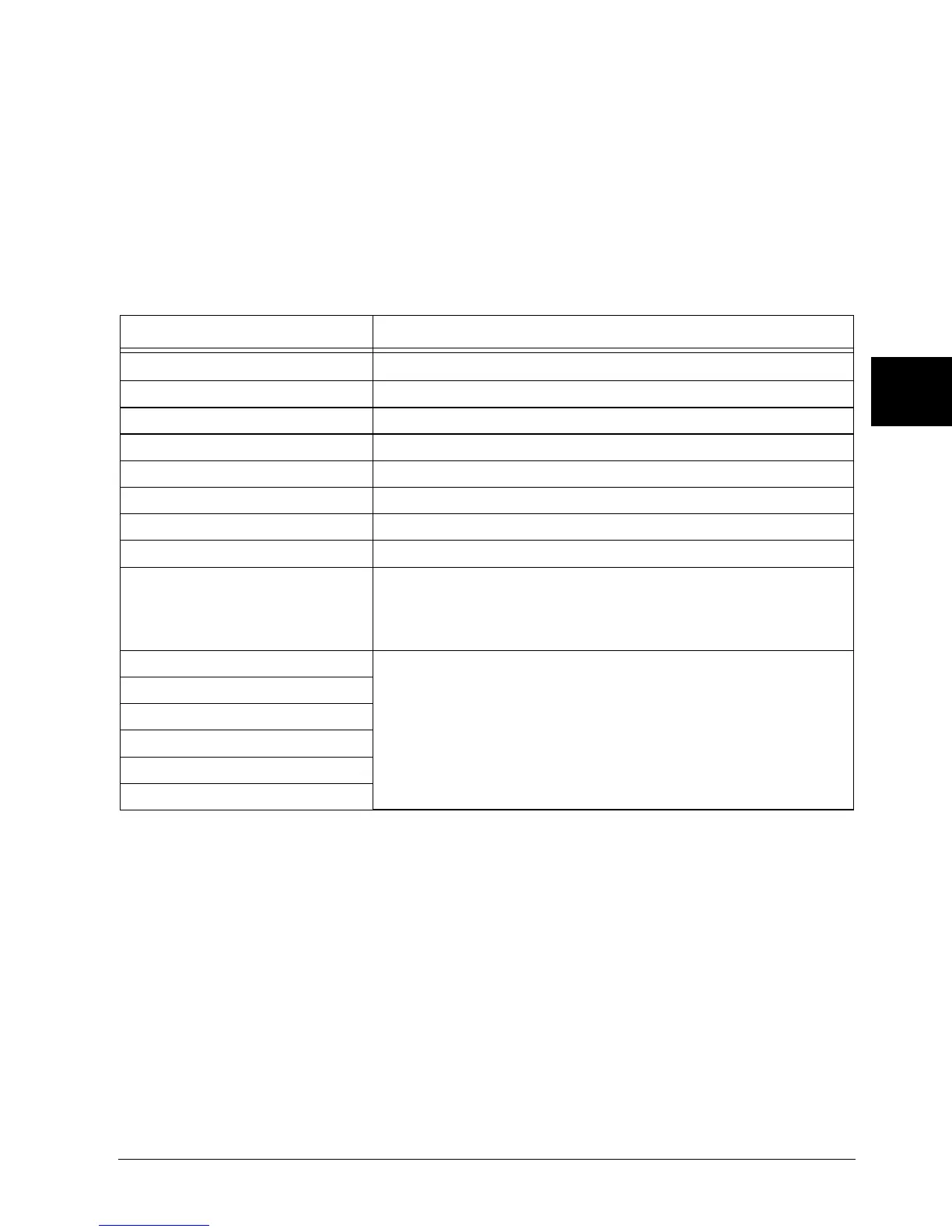
Table 4-4 Control Setting Descriptions
Control Setting Description
Safe Disables all Control settings for normal operation.
Pan & Tilt MSpeed Off Sets Pan & Tilt MSpeed off.
Display Off Sets display to off.
Display Dim Dims display characters.
Display Bright Brightens the display characters.
Home All Remotely homes the fixture.
Lamp On Remotely restrikes the fixture’s lamp.
Lamp Off Remotely extinguishes the fixture’s lamp.
Shutdown
Remotely shuts down the fixture. When a fixture is shut down,
the lamp is extinguished, power to the motors is disabled, and
the display reads [SHUTDOWN]. If a fixture is in shutdown mode,
the fixture must be homed to bring it back into operation.
Home Pan/Tilt
Remotely homes individual function groups without homing all
the fixture’s features.
Home Color System
Home Gobo System
Home Strobe/Dim
Home Focus/Zoom/Frost
Home Iris



 To Next Page