3-10
Cleaning Your Trackspot®
Trackspot User Manual
Cleaning the Internal Components
Remove the fixture’s access door by sliding the thumb latch toward the
rear of the fixture and lifting the door off. The access door is
connected to the fixture by a safety cable. You can leave the door
attached, or you can unclip the safety cable to completely remove the
door from the fixture.
Wipe the inner surfaces with a soft cloth or use a vacuum to remove the
dust and dirt. If you use a vacuum on the fan, stabilize the fan blades
with an object (not your finger!), such as a pen or a screwdriver, to
prevent the fan from spinning (see Figure 3-12). Allowing the fan to
spin with the force of the compressed air could damage the fan.
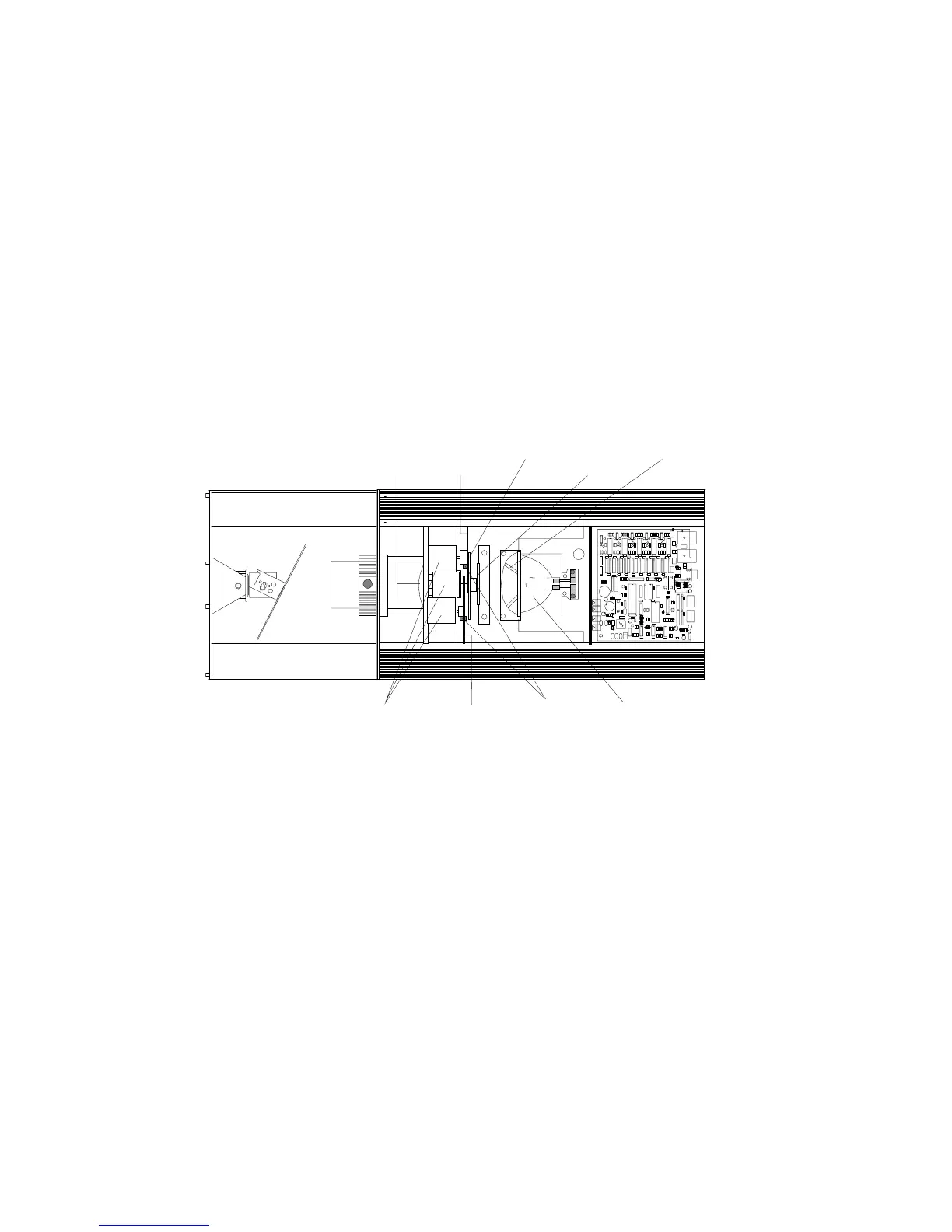
Locate the power lens, stepper motors, gobo wheel, color wheel,
sensors, shutter, hot mirror, and reflector (see Figure 3-12).
Clean the stepper motors, shutter, and reflector with a soft dusting
brush or low-pressure compressed air source to remove accumulated
dirt and dust.
Clean the hot mirror and power lens with a soft cloth and mild glass
cleaning solution.
To clean the color wheel, gobo wheel, and their sensors, you must
remove each wheel from the fixture. Follow the procedures below to
remove, clean, and reinstall each wheel.
Removing the Color Wheel or Gobo Wheel
For this procedure, you will need a 1/4-inch wrench.
Note: Be careful not to scratch the dichroic filter glass on the
wheels by scraping against other objects inside the fixture.
Figure 3-12. Trackspot internal components
power
lens
color
wheel
gobo wheel
hot
mirror
shutter
stepper motors
reflector
sensors
fan


 To Next Page