Trackspot User Manual
Cleaning Your Trackspot®
3-11
3
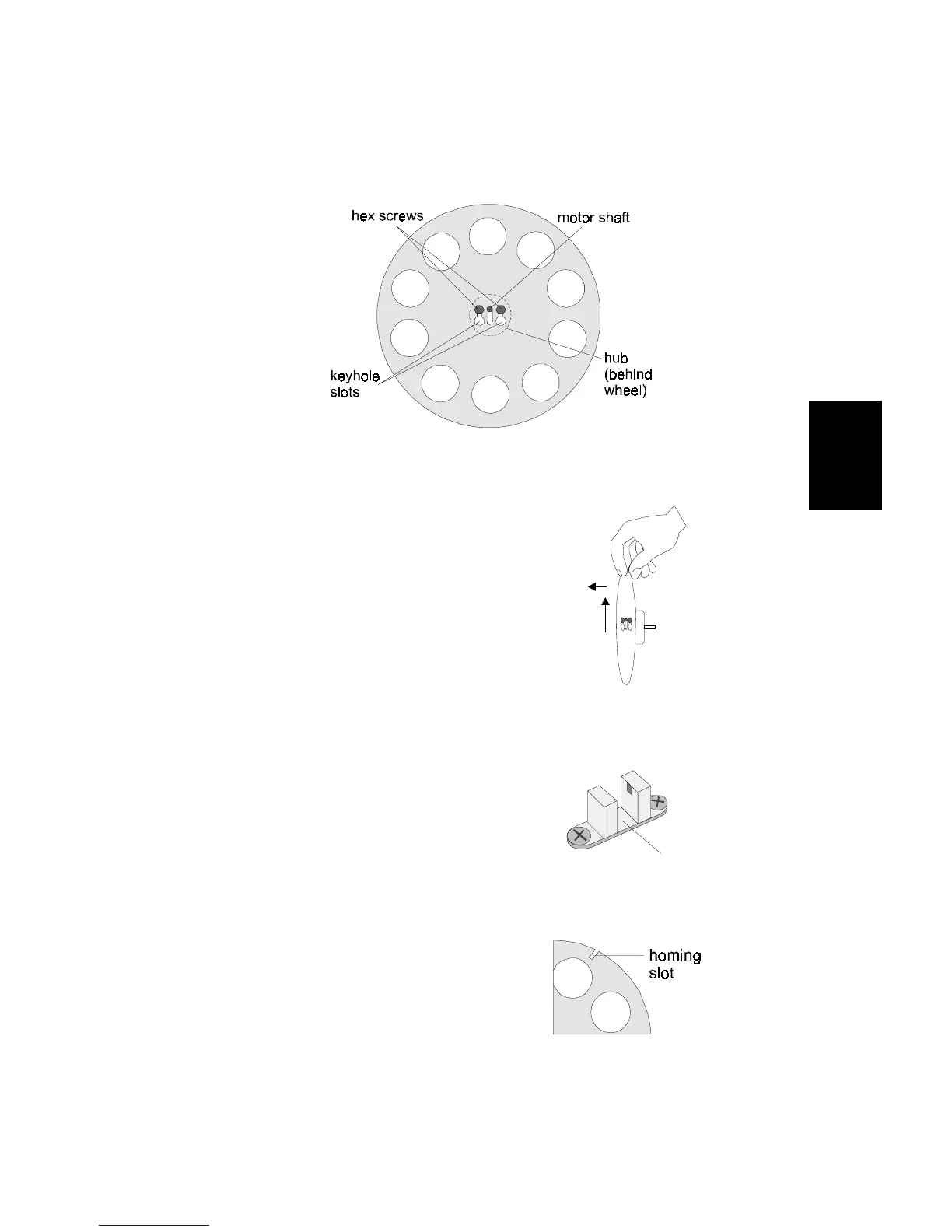
To remove either the color or gobo wheel:
1. Manually rotate the wheel until the two 1/4-inch hex screws are
pointed up and the large ends of the keyhole slots are pointed
down (see Figure 3-13).
2. Holding the wheel in
place, loosen, but do not
remove these two hex
screws using a 1/4-inch
wrench.
3. Pull up on the wheel to
slide the large ends of the
keyhole slot over the hex
screw heads, and pull out
to remove the wheel (see
Figure 3-14).
Locate the sensor below the
wheel (see Figure 3-15).
Gently clean the sensor’s
groove with either a cotton
swab dipped in mild glass
cleaner or with compressed
air.
Clean the dichroic filters or
gobos on the wheel with a mild
glass cleaner and a clean, soft
cloth. Make sure the wheel’s
homing slot is free of dust and
dirt (see Figure 3-16).
Figure 3-13. Components of the color and gobo wheels
Figure 3-14. Pull wheel up and out
to remove
Figure 3-15. Sensor below each wheel
Figure 3-16. Homing slot on wheel


 To Next Page