77
4. Start recording.
Tips:
•
The exposure setting will be memorized even if the DVD camera/recorder is turned off.
•
To return to automatic exposure from manual exposure not yet locked, press
the EXPOSURE button.
○○○○○○○○○○○○○○○○○○○○○○○○○○○○○○○○○○○○○○○○○○
White Balance (AUTO/HOLD)
With this DVD camera/recorder you can switch the white balance between AUTO and HOLD.
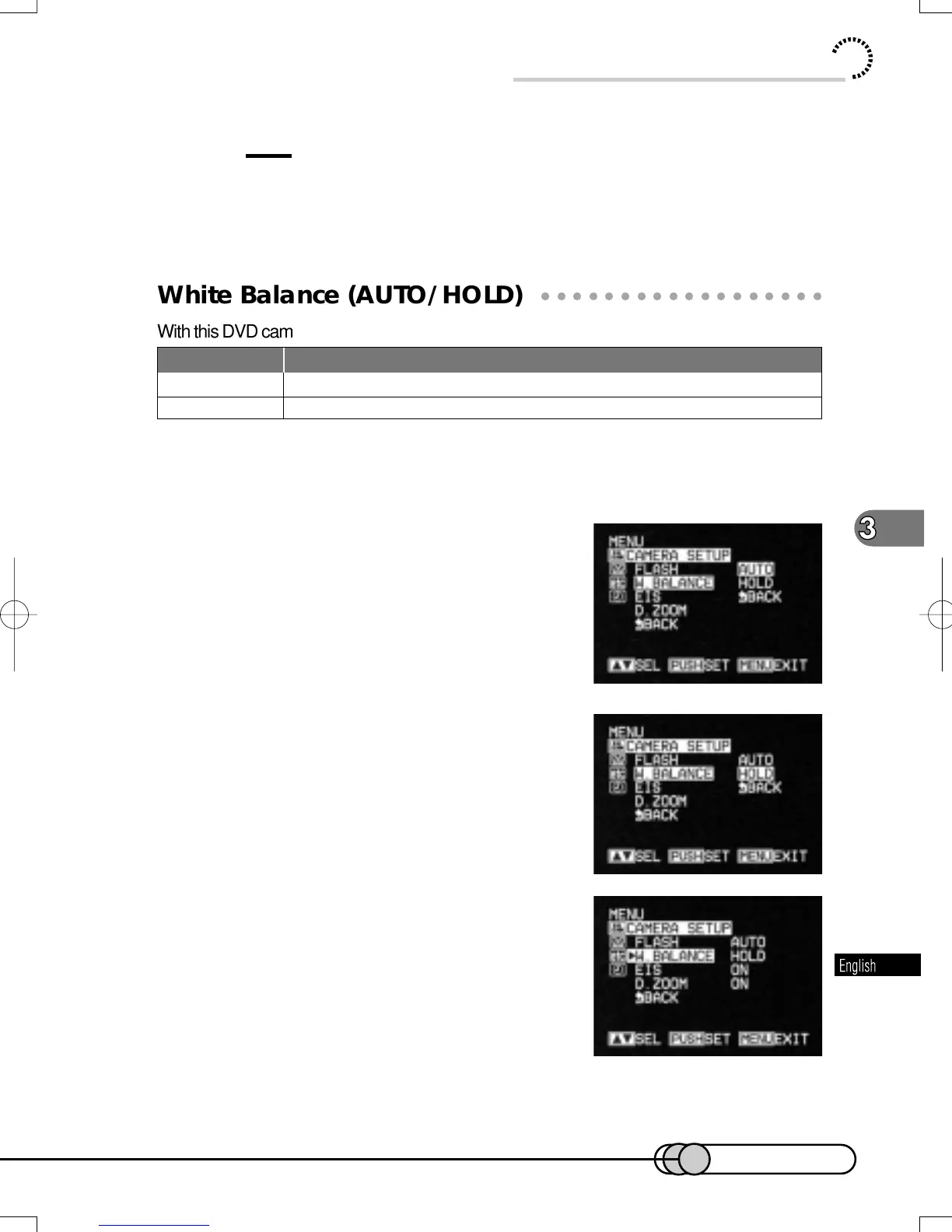
1. Press the MENU button in the recording pause status to display
the menu screen.
2. Use the Select dial to choose “CAM-
ERA SETUP” and then “W. BALANCE”.
Options will be next to W. BALANCE: “AUTO” is
being highlighted.
3. Turn the Select dial to highlight
“HOLD”, and then press the Select dial.
The menu screen for setting camera functions will
be restored, and “W. BALANCE HOLD” has been
specified.
4. Press the MENU button: The DVD camera/recorder will return to
the recording pause status.
Useful Functions during Recording of Movie
Status of camcorder
White balance is always adjusted automatically.
White balance at the time when HOLD is selected is held.
Mode
AUTO
HOLD
E-P54-88 01.1.29, 3:05 PMPage 77 AdobePageMaker6.5J/PPC















 To Next Page