79
○○○○○○○○○○○○○○○○○○○○○○○○○○○○○○○○○○○○○○○○○○
Reducing Wind Noise Picked Up by Microphone
When recording sound using the built-in microphone, you can reduce wind noise
by filtering it. Since the low-frequency components of sound input to the micro-
phone during recording are cut, the object sound will be easy to hear.
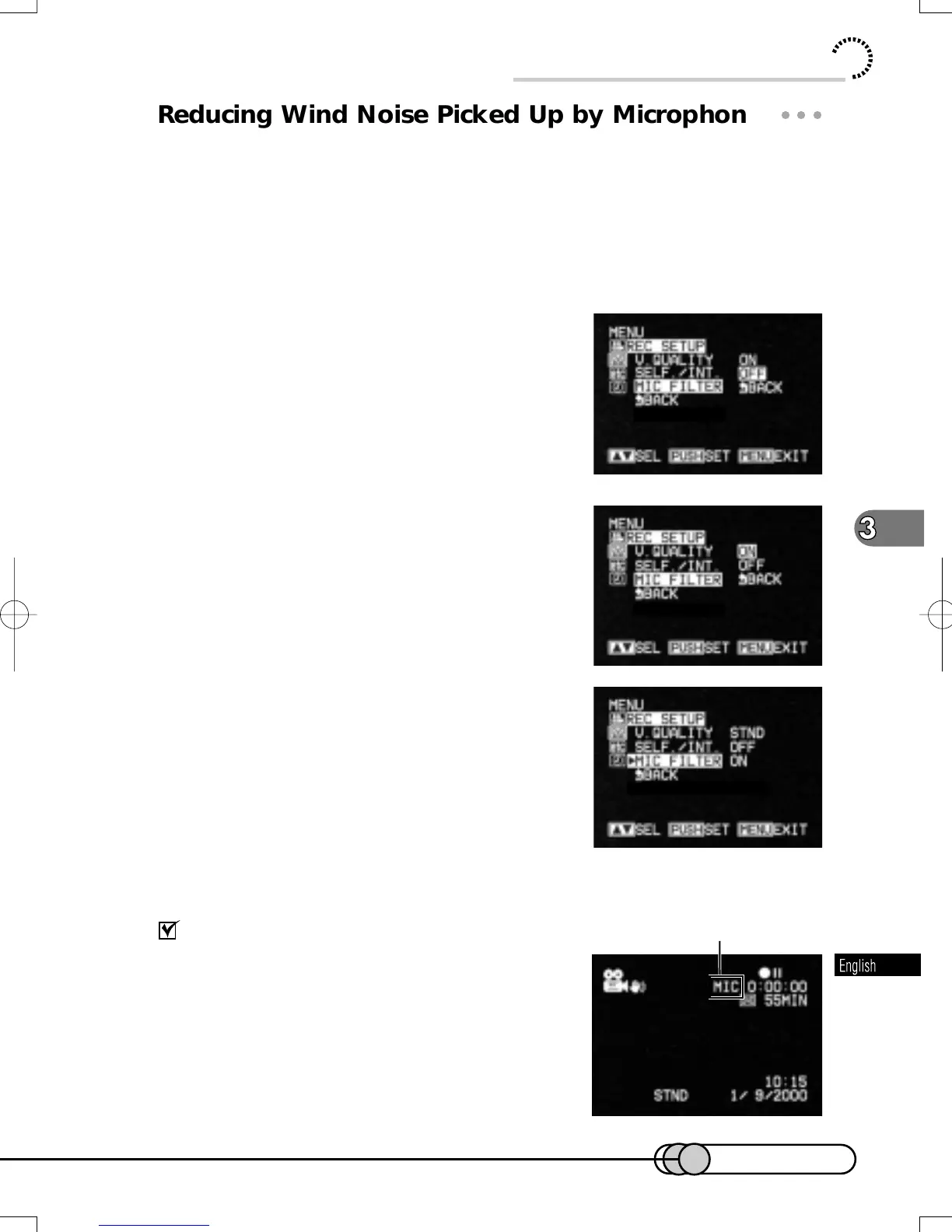
1. Press the MENU button in the recording pause status to display
the menu screen.
2. Choose "REC SETUP" and then "MIC
FILTER".
Options will be next to "MIC FILTER": "OFF" is
being highlighted.
3. Turn the Select dial to change the op-
tion to "ON", and then press the Select
dial.
The menu screen for setting record mode will be
restored, and "MIC FILTER ON" has been speci-
fied.
4. Press the MENU button to switch off the menu screen.
Checking microphone filter setting
You can check the on setting of microphone filter
by reviewing on-screen information: MIC will appear
for ON setting, and no indication will appear for OFF
setting.
The microphone filter setting will be held in memory
until it is changed even after the DVD camera/re-
corder is turned off.
Microphone filter indicator
Useful Functions during Recording of Movie
E-P54-88 01.1.29, 3:05 PMPage 79 AdobePageMaker6.5J/PPC















 To Next Page