83
Recording Stills
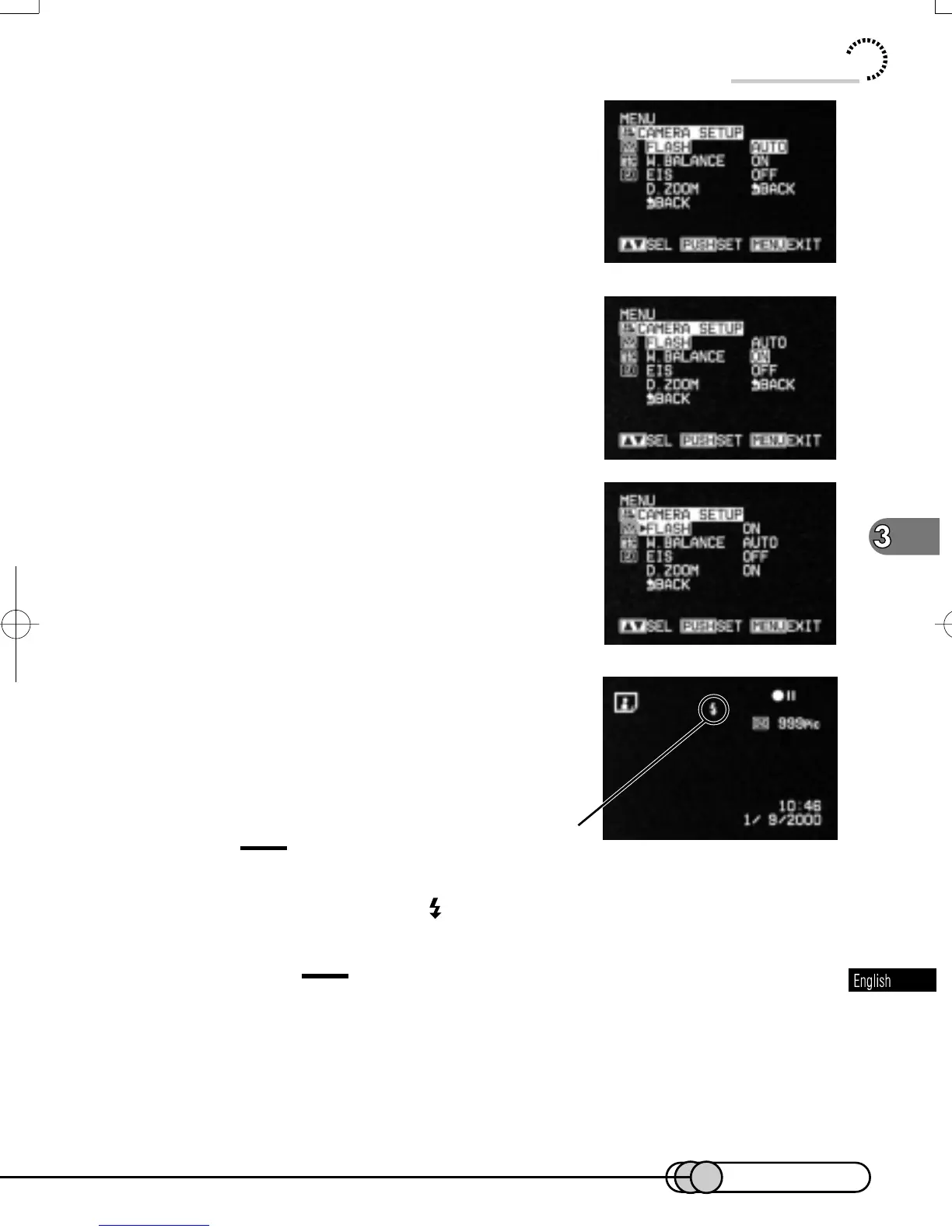
2. Use the Select dial to choose “CAM-
ERA SETUP” and then “FLASH”.
Options will be next to FLASH: “AUTO” is being
highlighted.
3. Turn the Select dial to switch the op-
tion to “ON” (always emitting light) or
“OFF” (never emitting light), and then
press the select dial.
The menu screen for setting camera functions
will be restored, and “FLASH” has been changed
to “ON” or “OFF”.
4. Press the MENU button to switch off the
menu screen.
You can check the condition of flash function by
reviewing the on-screen information. No indication
will appear when “FLASH AUTO” is specified.
Tip:
•
When the subject brightness is low with flash set to "AUTO" (automatically
emits light), a flash mark (
) will appear on the screen when the PHOTO
button is pressed half or all the way in.
Cautions:
• Flash automatically adjusts the amount of light to be emitted, but if the distance to
subject is too far or too near, the light amount adjustment may not be sufficient. The
distance to subject that allows optimum light amount adjustment varies depending
on the subject, but is approximately 0.5 - 2.5 m.
• Set flash to "OFF" for macro still recording. When the subject is too near,
white compression could occur.
Flash
E-P54-88 01.1.29, 3:17 PMPage 83 AdobePageMaker6.5J/PPC















 To Next Page