EasyManua.ls Logo

Hitachi F-4700 - Page 91

Hitachi F-4700
115 pages
Print Icon
To Next Page IconTo Next Page
To Previous Page IconTo Previous Page
Loading...
3 - 26
(contd)
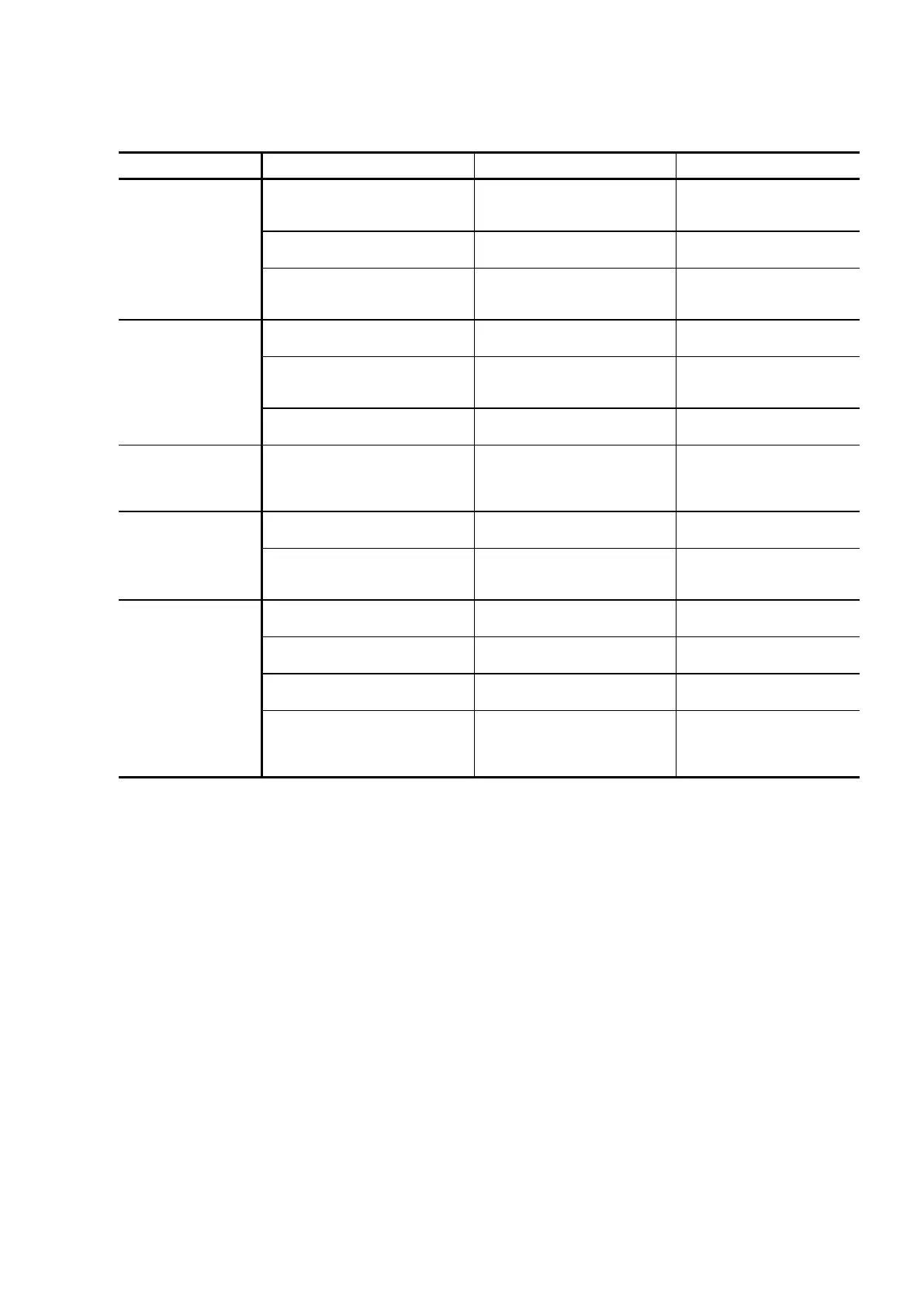
Symptom
Cause
Judgment Method
Remedy
Optical signal not
emitted
Error in parameter setting
Check opening/ closing of
shutter plus measurement
parameters.
Set the correct
parameters.
Xe lamp not positioned
correctly
Check with reference to
Fig. 3-4.
Readjust the lamp
position.
Xe lamp not lit
Check the lamp for
indicating Xe lamp
ignition.
Try turning ON the
POWER switch again.
Sensitivity is low
Xe lamp not positioned
correctly
Check with reference to
Fig. 3-4.
Readjust the lamp
position.
Sample compartment base
not attached securely
Ex beam does not
irradiate square hole of
cell holder correctly.
Attach base carefully
and securely onto
guide pins.
Xe lamp has reached
serviceable limit
Check the usage time of
lamp.
Replace with a new
lamp.
Large variation in
output signal
Deterioration of Xe lamp
electrodes
Place white paper at
sample position and
fluctuation of Ex beam
can be seen.
Replace with a new Xe
lamp.
Large noise level
Xe lamp has reached
serviceable limit
Check the usage time of
lamp.
Replace with a new
lamp.
Xe lamp mounted with
polarity reversed
Xe lamp is lit, but lamp
that indicates Xe lamp
ignition is not lit.
Replace with a new
lamp.
Error in
communication
with PC
Poor contact of USB cable
Try reconnecting the
cable.
Reinsert cable, or
replace it.
Dedicated USB cable was
not used.
Dedicated USB cable has
ferrite core.
Replace with dedicated
cable.
USB cable was connected
after turning on PC power.
Recheck the power-on
operation.
Connect USB cable,
then turn on PC power.
Software was started up
together with power-on of
main unit, or software was
started up first.
Recheck the software
startup operation.
Turn on POWER
switch of main unit,
then start up FL
Solutions program.

Table of Contents