EasyManua.ls Logo

Hitachi VM-C52E - Camera Recording

Hitachi VM-C52E
29 pages
Print Icon
To Next Page IconTo Next Page
To Previous Page IconTo Previous Page
Loading...
CAMERA
RECORDING
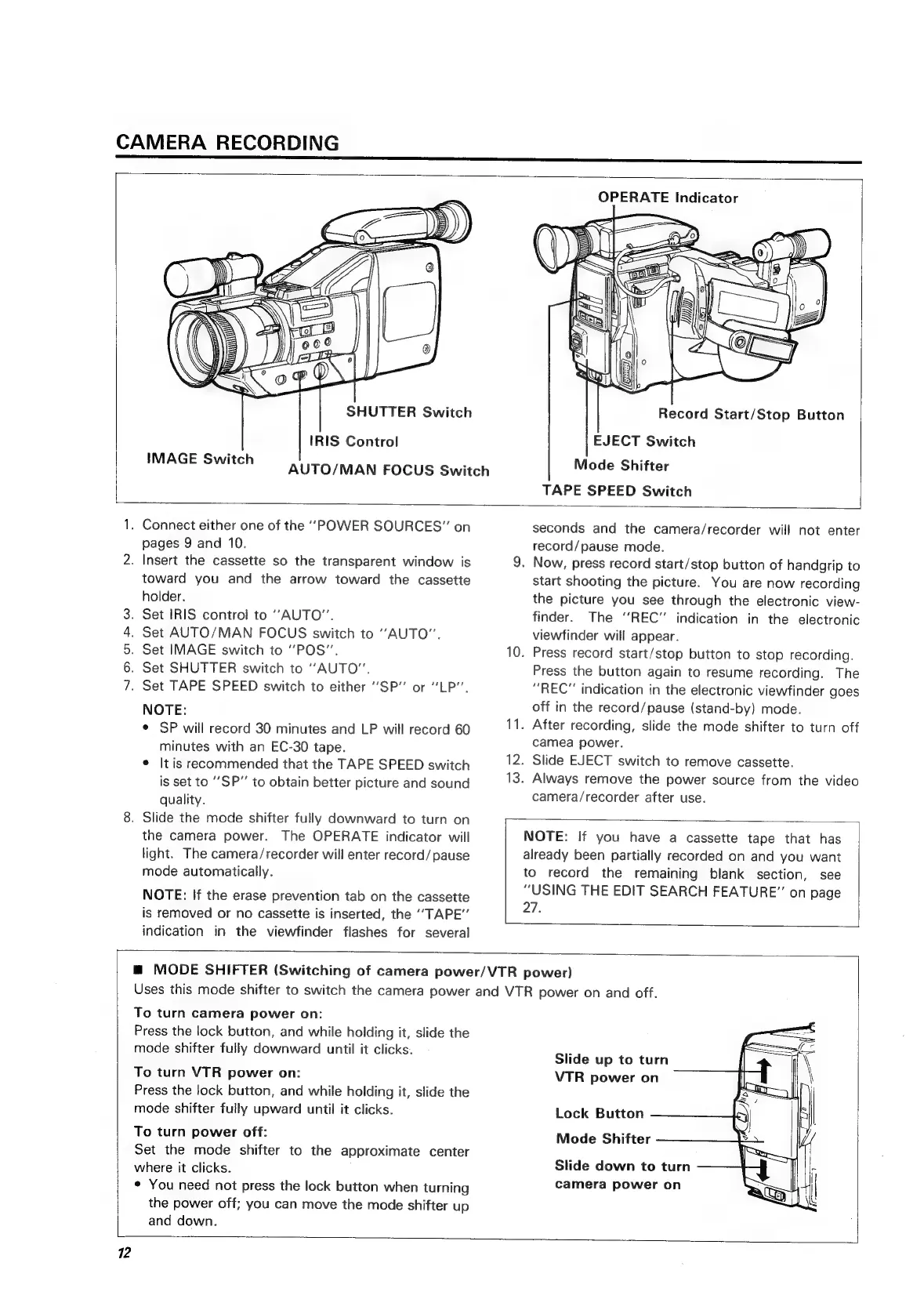
SHUTTER
Switch
IRIS
Control
IMAGE
Switch
A
UTO/MAN
FOCUS
Switch
OPERATE
Indicator
\
wD)
\
Record
Start/Stop
Button
EJECT
Switch
Mode
Shifter
TAPE
SPEED
Switch
SOD
OF
WL
.
Connect
either
one
of
the
‘‘POWER
SOURCES”
on
pages
9
and
10.
.
Insert
the
cassette
so
the
transparent
window
is
toward
you
and
the
arrow
toward
the
cassette
holder.
.
Set
IRIS
control
to
“AUTO”.
.
Set
AUTO/MAN
FOCUS
switch
to
‘‘AUTO”.
.
Set
IMAGE
switch
to
“POS”.
.
Set
SHUTTER
switch
to
“AUTO”.
.
Set
TAPE
SPEED
switch
to
either
“SP”
or
“LP”.
NOTE:
¢
SP
will
record
30
minutes
and
LP
will
record
60
minutes
with
an
EC-30
tape.
¢
It
is
recommended
that
the
TAPE
SPEED
switch
is
set
to
‘‘SP”
to
obtain
better
picture
and
sound
quality.
.
Slide
the
mode
shifter
fully
downward
to
turn
on
the
camera
power.
The
OPERATE
indicator
will
light.
The
camera/recorder
will
enter
record/
pause
mode
automatically.
NOTE:
If
the
erase
prevention
tab
on
the
cassette
is
removed
or
no
cassette
is
inserted,
the
‘‘TAPE”
indication
in
the
viewfinder
flashes
for
several
seconds
and
the
camera/recorder
will
not
enter
record/pause
mode.
9.
Now,
press
record
start/stop
button
of
handgrip
to
Start
shooting
the
picture.
You
are
now
recording
the
picture
you
see
through
the
electronic
view-
finder.
The
“REC”
indication
in
the
electronic
viewfinder
will
appear.
10.
Press
record
start/stop
button
to
stop
recording.
Press
the
button
again
to
resume
recording.
The
“REC”
indication
in
the
electronic
viewfinder
goes
off
in
the
record/pause
(stand-by)
mode.
11.
After
recording,
slide
the
mode
shifter
to
turn
off
camea
power.
12.
Slide
EJECT
switch
to
remove
cassette.
13.
Always
remove
the
power
source
from
the
video
camera/recorder
after
use.
NOTE:
If
you
have
a
cassette
tape
that
has
already
been
partially
recorded
on
and
you
want
to
record
the
remaining
blank
section,
see
“USING
THE
EDIT
SEARCH
FEATURE”
on
page
27.
m
MODE
SHIFTER
(Switching
of
camera
power/VTR
power)
Uses
this
mode
shifter
to
switch
the
camera
power
and
VTR
power
on
and
off.
To
turn
camera
power
on:
Press
the
lock
button,
and
while
holding
it,
slide
the
mode
shifter
fully
downward
until
it
clicks.
To
turn
VTR
power
on:
Press
the
lock
button,
and
while
holding
it,
slide
the
mode
shifter
fully
upward
until
it
clicks.
To
turn
power
off:
Set
the
mode
shifter
to
the
approximate
center
where
it
clicks.
*
You
need
not
press
the
lock
button
when
turning
the
power
off;
you
can
move
the
mode
shifter
up
and
down.
Slide
up
to
turn
VTR
power
on
Lock
Button
Mode
Shifter
Slide
down
to
turn
camera
power
on
12

Related product manuals