EasyManua.ls Logo

Hitachi VM-C52E - Controls and Functions

Hitachi VM-C52E
29 pages
Print Icon
To Next Page IconTo Next Page
To Previous Page IconTo Previous Page
Loading...
CONTROLS
AND
FUNCTIONS
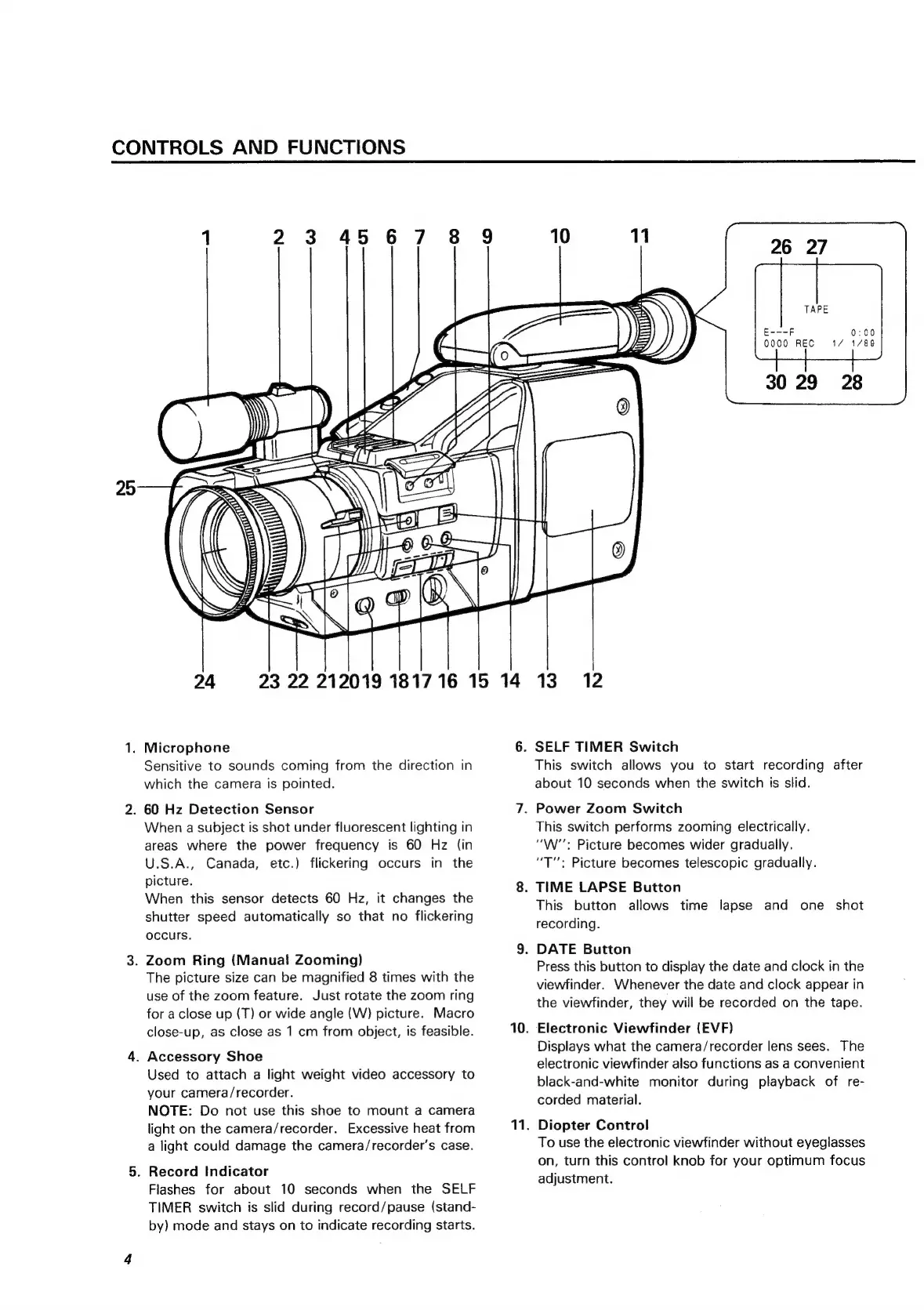
1
23
4567
8
9
10
11
E---F
0000
REC
0:00
1/
1/89
24
23
22
212019
181716
15
14
13
30
29
28
12
1.
Microphone
6.
SELF
TIMER
Switch
Sensitive
to
sounds
coming
from
the
direction
in
This
switch
allows
you
to
start
recording
after
which
the
camera
is
pointed.
about
10
seconds
when
the
switch
Is
slid.
2.
60
Hz
Detection
Sensor
7.
Power
Zoom
Switch
When
a
subject
is
shot
under
fluorescent
lighting
in
This
switch
performs
zooming
electrically.
areas
where
the
power
frequency
is
60
Hz
(in
“W'':
Picture
becomes
wider
gradually.
U.S.A.,
Canada,
etc.)
flickering
occurs
in
the
“T":
Picture
becomes
telescopic
gradually.
pietare:
8.
TIME
LAPSE
Button
When
this
sensor
detects
60
Hz,
it
changes
the
:
;
:
:
:
.
This
button
allows
time
lapse
and
one
shot
shutter
speed
automatically
so
that
no
flickering
.
recording.
occurs.
. .
9.
DATE
Button
3.
Zoom
Ring
(Manual
Zooming)
:
.
Press
this
button
to
display
the
date
and
clock
in
the
The
picture
size
can
be
magnified
8
times
with
the
er
.
.
viewfinder.
Whenever
the
date
and
clock
appear
in
use
of
the
zoom
feature.
Just
rotate
the
zoom
ring
Bh
ee
.
:
the
viewfinder,
they
will
be
recorded
on
the
tape.
for
a
close
up
(T)
or
wide
angle
(W)
picture.
Macro
close-up,
as
close
as
1
cm
from
object,
is
feasible.
10.
Electronic
Viewfinder
(EVF)
Displays
what
the
camera/recorder
lens
sees.
The
4.
Accessory
Shoe
ie
can
.
:
. .
?
electronic
viewfinder
also
functions
as
a
convenient
Used
to
attach
a
light
weight
video
accessory
to
bl
, z
ack-and-white
monitor
during
playback
of
re-
your
camera/recorder.
Kopdsd
canter
NOTE:
Do
not
use
this
shoe
to
mount
a
camera
:
light
on
the
camera/recorder.
Excessive
heat
from
11.
Diopter
Control
a
light
could
damage
the
camera/recorder’s
case.
.
Record
Indicator
Flashes
for
about
10
seconds
when
the
SELF
TIMER
switch
is
slid
during
record/pause
(stand-
by)
mode
and
stays
on
to
indicate
recording
starts.
To
use
the
electronic
viewfinder
without
eyeglasses
on,
turn
this
control
knob
for
your
optimum
focus
adjustment.

Related product manuals