EasyManua.ls Logo

Hitachi VM-C52E - Poweyf SOUICES

Hitachi VM-C52E
29 pages
Print Icon
To Next Page IconTo Next Page
To Previous Page IconTo Previous Page
Loading...
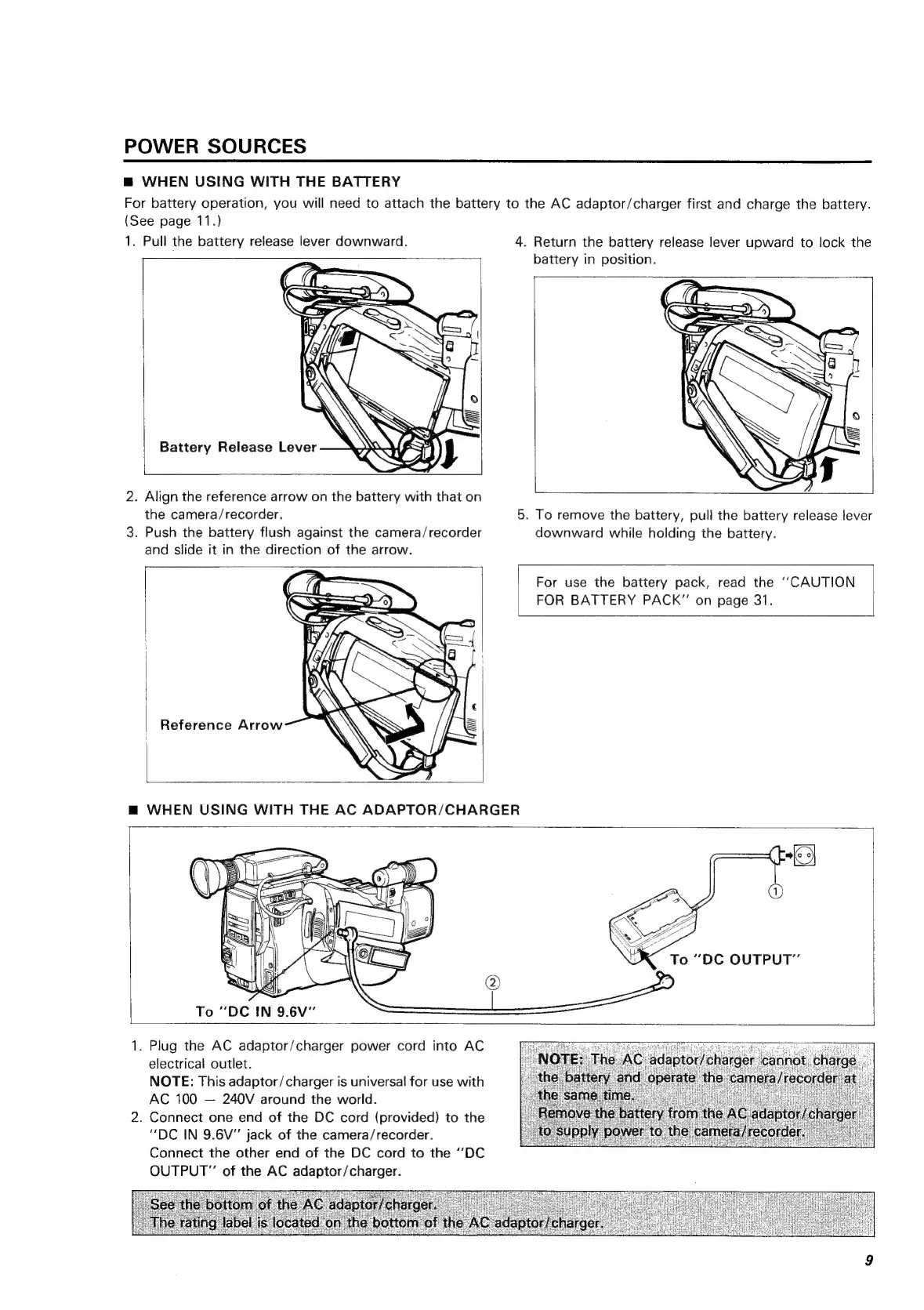
POWER
SOURCES
@
WHEN
USING
WITH
THE
BATTERY
For
battery
operation,
you
will
need
to
attach
the
battery
to
the
AC
adaptor/charger
first
and
charge
the
battery.
(See
page
11.)
1.
Puli
the
battery
release
lever
downward.
4.
Return
the
battery
release
lever
upward
to
lock
the
battery
in
position.
Battery
Release
Lever
2.
Align
the
reference
arrow
on
the
battery
with
that
on
the
camera/recorder.
5.
To
remove
the
battery,
pull
the
battery
release
lever
3.
Push
the
battery
flush
against
the
camera/recorder
downward
while
holding
the
battery.
and
slide
it
in
the
direction
of
the
arrow.
For
use
the
battery
pack,
read
the
‘‘CAUTION
|
FOR
BATTERY
PACK”
on
page
31.
Reference
Arrow
To
“DC
IN
9.6V"’
1.
Plug
the
AC
adaptor/charger
power
cord
into
AC
electrical
outlet.
NOTE:
This
adaptor/charger
is
universal
for
use
with
AC
100
240V
around
the
world.
2.
Connect
one
end
of
the
DC
cord
(provided)
to
the
“DC
IN
9.6V”
jack
of
the
camera/recorder.
Connect
the
other
end
of
the
DC
cord
to
the
‘DC
OUTPUT”
of
the
AC
adaptor/charger.

Related product manuals