EasyManua.ls Logo

Hitachi VM-C52E - Viewing the Picture Played Back on Your TV

Hitachi VM-C52E
29 pages
Print Icon
To Next Page IconTo Next Page
To Previous Page IconTo Previous Page
Loading...
VIEWING
THE
PICTURE
PLAYED
BACK
ON
YOUR
TV
To
play
back
a
tape
recorded
on
your
Camera/Recorder
and
view
it
on
your
TV
receiver,
you
must
connect
the
Camera/Recorder
to
the
TV
receiver
using
either
Audio/Video
Output
Cable
or
RF
Converter
Unit.
You
also
may
play
back
the
tape
recorded
by
your
Camera/Recorder
on
a
VHS
table-top
VTR*.
The
Camera/Recorder
records
and
plays
back
at
the
VHS
standard
speed
(SP)
or
long
play
(LP).
*
Some
table-top
VTR
cannot
play
tapes
recorded
in
LP.
SP
recorded
tapes
can
be
played
back
by
any
other
VHS
table-top
VTRs.
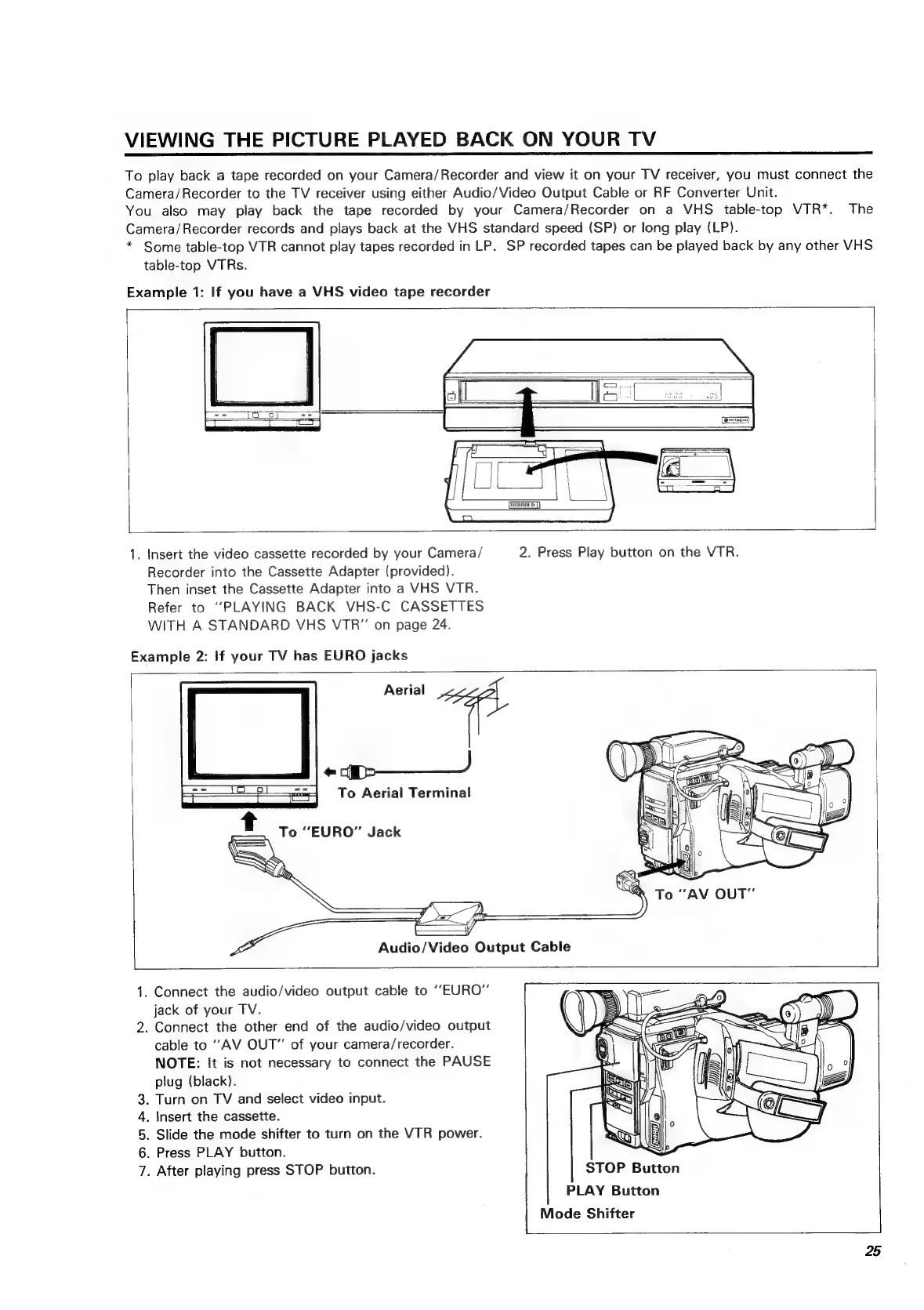
Example
1:
If
you
have
a
VHS
video
tape
recorder
1.
Insert
the
video
cassette
recorded
by
your
Camera/
2.
Press
Play
button
on the
VTR.
Recorder
into
the
Cassette
Adapter
(provided).
Then
inset
the
Cassette
Adapter
into
a
VHS
VTR.
Refer
to
“PLAYING
BACK
VHS-C
CASSETTES
WITH
A
STANDARD
VHS
VTR"
on
page
24.
Example
2:
If
your
TV
has
EURO
jacks
Aerial
1.
Connect
the
audio/video
output
cable
to
“EURO”
jack
of
your
TV.
2.
Connect
the
other
end
of
the
audio/video
output
cable
to
‘‘AV
OUT”
of
your
camera/recorder.
NOTE:
It
is
not
necessary
to
connect
the
PAUSE
plug
(black).
.
Turn
on
TV
and
select
video
input.
.
Insert
the
cassette.
.
Slide
the
mode
shifter
to
turn
on
the
VTR
power.
.
Press
PLAY
button.
.
After
playing
press
STOP
button.
STOP
Button
PLAY
Button
Mode
Shifter
SO
of
W
25

Related product manuals