EasyManua.ls Logo

Hitachi VM-C52E - Using the Auto Focus Feature

Hitachi VM-C52E
29 pages
Print Icon
To Next Page IconTo Next Page
To Previous Page IconTo Previous Page
Loading...
USING
THE
AUTO
FOCUS
FEATURE
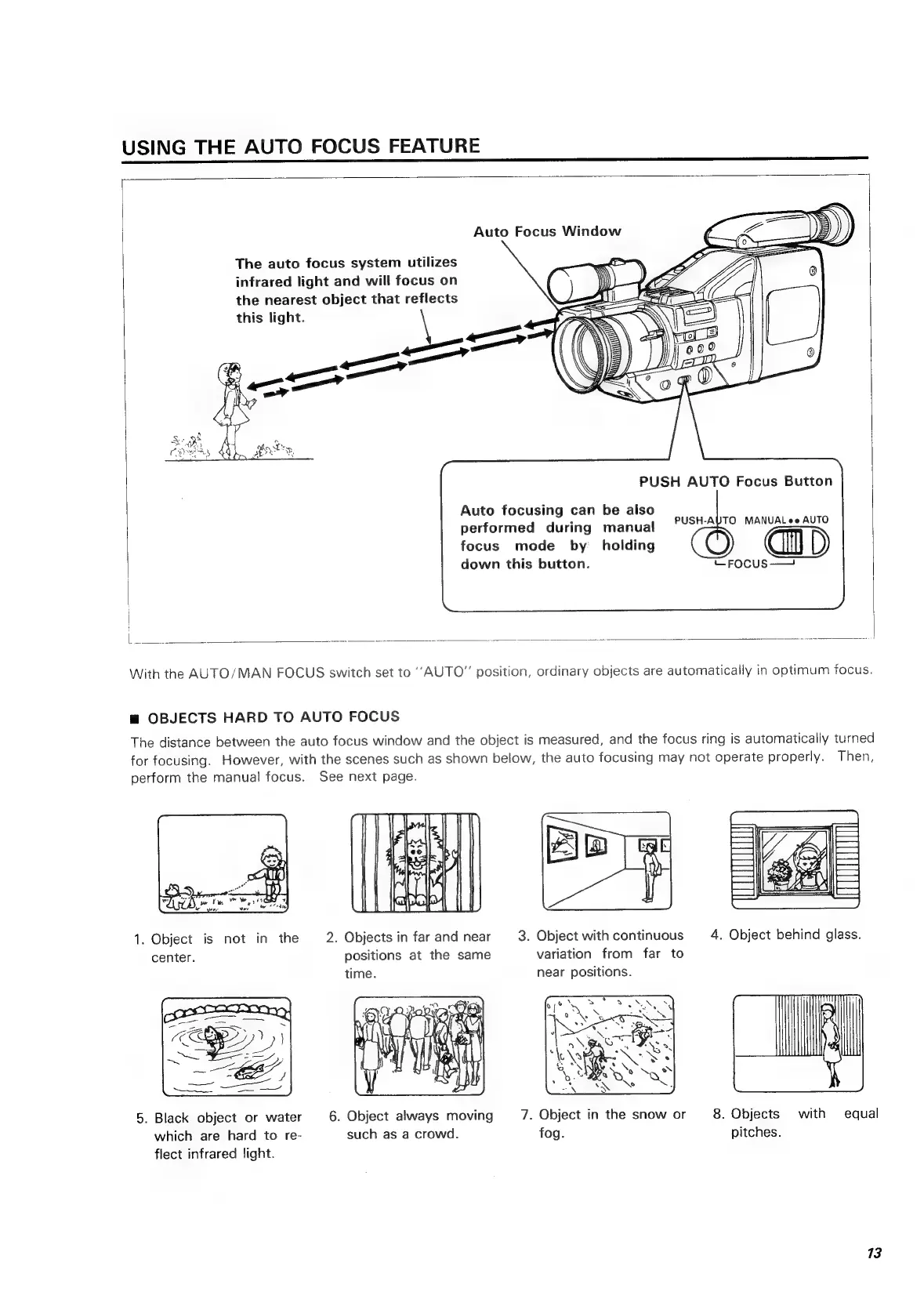
Auto
Focus
Window
The
auto
focus
system
utilizes
infrared
light
and
will
focus
on
the
nearest
object
that
reflects
this
light.
PUSH
AUTO
Focus
Button
Auto
focusing
can
be
also
;
PUSH-
A
performed
during
manual
PUSHARO
MANUeusa
eu?
focus
mode
by
_
holding
down
this
button.
—Focus——
With
the
AUTO/MAN
FOCUS
switch
set
to
“AUTO”
position,
ordinary
objects
are
automatically
in
optimum
focus.
m
OBJECTS
HARD
TO
AUTO
FOCUS
The
distance
between
the
auto
focus
window
and
the
object
is
measured,
and
the
focus
ring
is
automatically
turned
for
focusing.
However,
with
the
scenes
such
as
shown
below,
the
auto
focusing
may
not
operate
properly.
Then,
perform
the
manual
focus.
See
next
page.
1.
Object
is
not
in
the
2.
Objects
in
far
and
near
3.
Object
with
continuous
4.
center.
positions
at
the
same
variation
from
far
to
time.
near
positions.
5.
Black
object
or
water
6.
Object
always
moving
7.
Object
in
the
snow
or
8.
Objects
with
equal
which
are
hard
to
re-
such
as
a
crowd.
fog.
pitches.
flect
infrared
light.
13

Related product manuals