EasyManua.ls Logo

Hitachi VM-C52E - Electronic Viewfinder Position Adjustment; Loading a Battery for Date;Clock

Hitachi VM-C52E
29 pages
Print Icon
To Next Page IconTo Next Page
To Previous Page IconTo Previous Page
Loading...
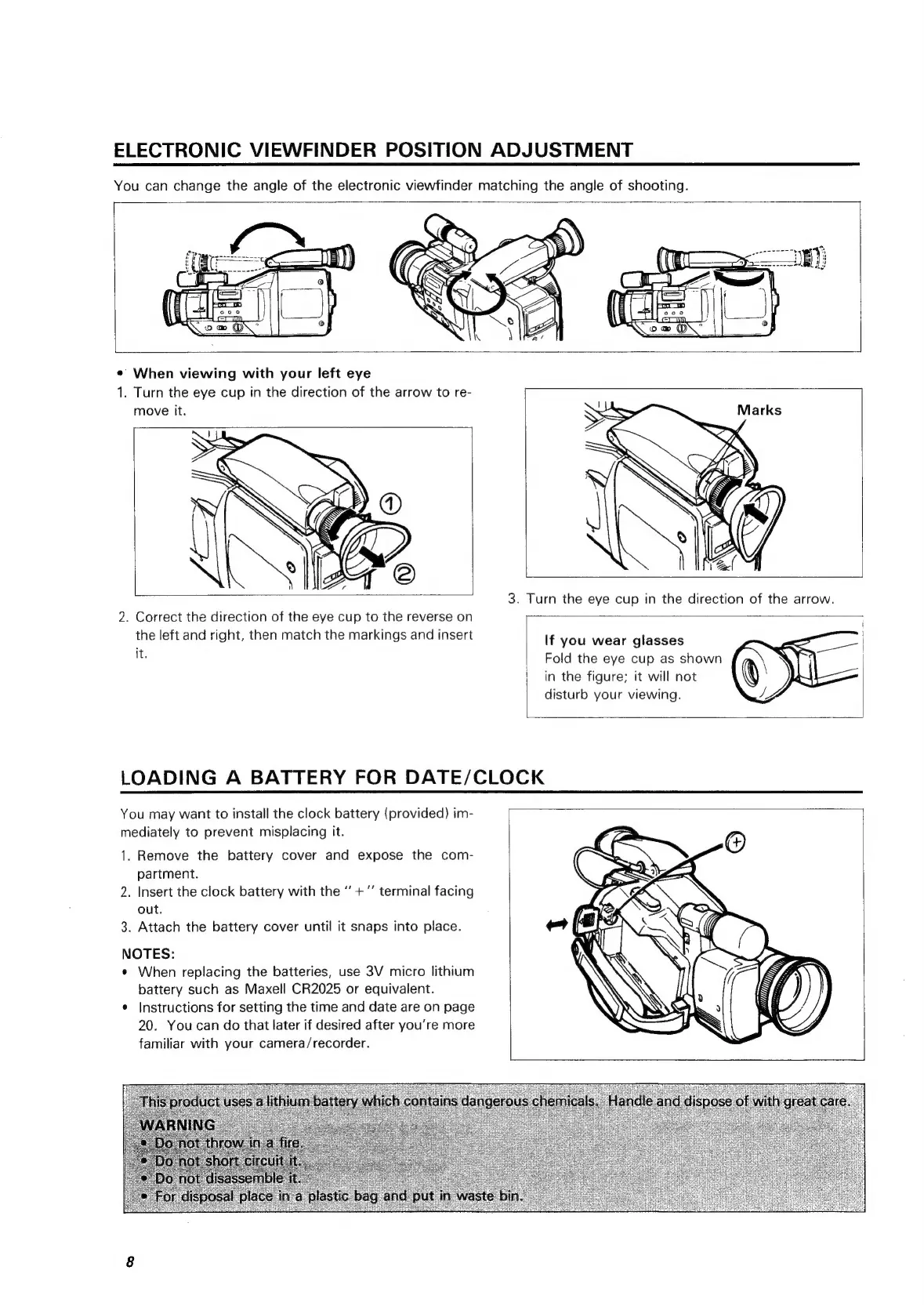
ELECTRONIC
VIEWFINDER
POSITION
ADJUSTMENT
You
can
change
the
angle
of
the
electronic
viewfinder
matching
the
angle
of
shooting.
*
When
viewing
with
your
left
eye
1.
Turn
the
eye
cup
in
the
direction
of
the
arrow
to
re-
move
it.
2.
Correct
the
direction
of
the
eye
cup
to
the
reverse
on
the
left
and
right,
then
match
the
markings
and
insert
it.
If
you
wear
glasses
Fold
the
eye
cup
as
shown
in
the
figure;
it
will
not
disturb
your
viewing.
LOADING
A
BATTERY
FOR
DATE/CLOCK
You
may
want
to
install
the
clock
battery
(provided)
im-
mediately
to
prevent
misplacing
it.
1.
Remove
the
battery
cover
and
expose
the
com-
partment.
2.
Insert
the
clock
battery
with
the
“+
“’
terminal
facing
out.
3.
Attach
the
battery
cover
until
it
snaps
into
place.
NOTES:
¢
When
replacing
the
batteries,
use
3V
micro
lithium
battery
such
as
Maxell
CR2025
or
equivalent.
¢
Instructions
for
setting
the
time
and
date
are
on
page
20.
You
can
do
that
later
if
desired
after
you’re
more
familiar
with
your
camera/recorder.

Related product manuals