EasyManua.ls Logo

Hitachi VM-C52E - Using the Display Button; Using the Memory; Using the Time Remaining Feature

Hitachi VM-C52E
29 pages
Print Icon
To Next Page IconTo Next Page
To Previous Page IconTo Previous Page
Loading...
USING
THE
DISPLAY
BUTTON
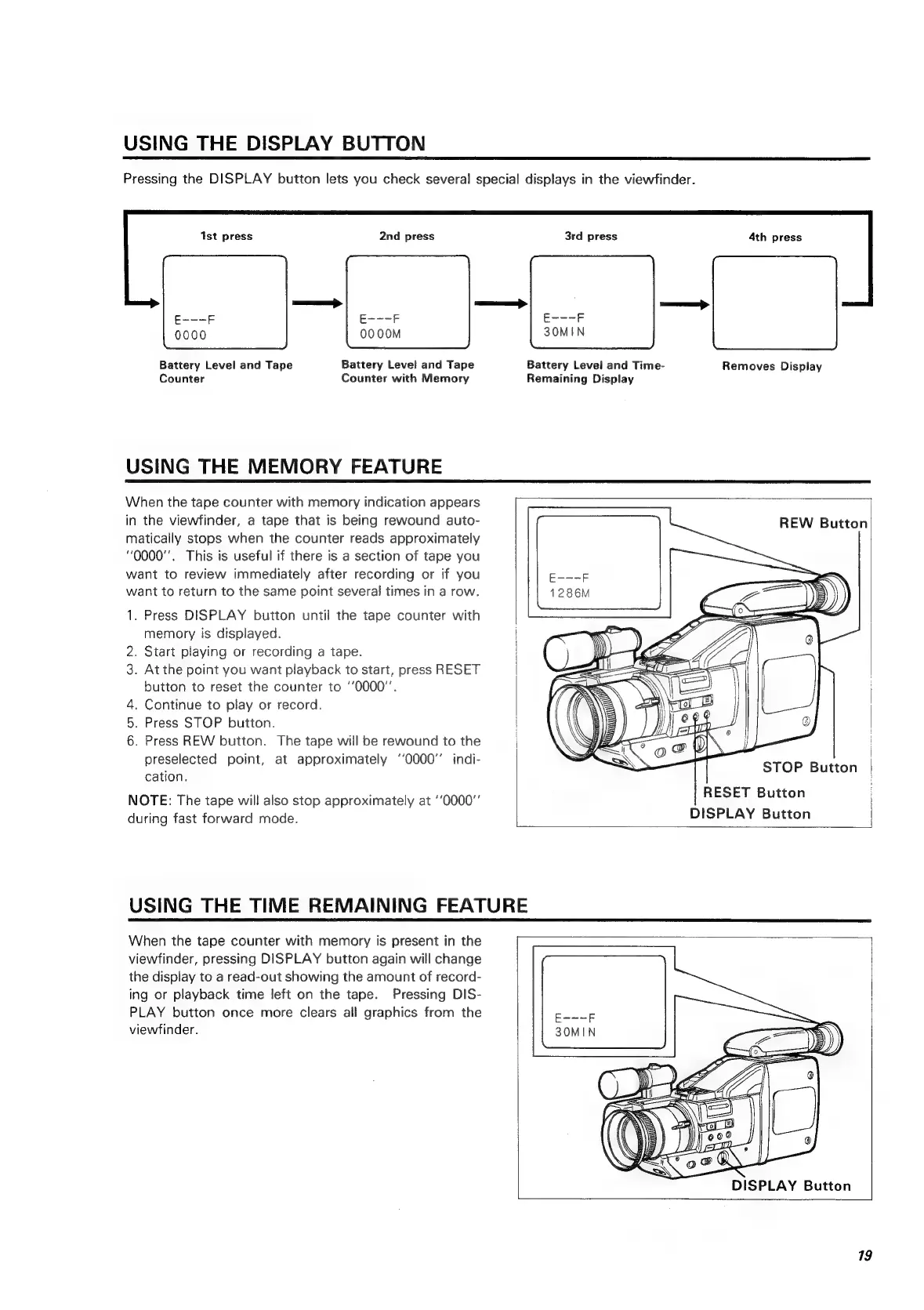
Pressing
the
DISPLAY
button
lets
you
check
several
special
displays
in
the
viewfinder.
Ist
press
2nd
press
3rd
press
4th
press
E---F
E---F
0000M 3OMIN
Battery
Level
and
Tape
Battery
Level
and
Tape
Battery
Level
and
Time-
Removes
Display
Counter
Counter
with
Memory
Remaining
Display
USING
THE
MEMORY
FEATURE
When
the
tape
counter
with
memory
indication
appears
in
the
viewfinder,
a
tape
that
is
being
rewound
auto-
matically
stops
when
the
counter
reads
approximately
0000".
This
is
useful
if
there
is
a
section
of
tape
you
want
to
review
immediately
after
recording
or
if
you
want
to
return
to
the
same
point
several
times
in
a
row.
REW
Button
1.
Press
DISPLAY
button
until
the
tape
counter
with
memory
is
displayed.
2.
Start
playing
or
recording
a
tape.
3.
At
the
point
you
want
playback
to
start,
press
RESET
|
button
to
reset
the
counter
to
‘0000’.
4.
Continue
to
play
or
record.
.
Press
STOP
button.
|
6.
Press
REW
button.
The
tape
will
be
rewound
to
the
i
preselected
point,
at
approximately
‘‘0000’’
indi-
cation.
on
STOP
Button
NOTE:
The
tape
will
also
stop
approximately
at
‘‘0000"
RESET
Button
during
fast
forward
mode.
DISPLAY
Button
|
USING
THE
TIME
REMAINING
FEATURE
When
the
tape
counter
with
memory
is
present
in
the
viewfinder,
pressing
DISPLAY
button
again
will
change
the
display
to
a
read-out
showing
the
amount
of
record-
ing
or
playback
time
left
on
the
tape.
Pressing
DIS-
PLAY
button
once
more
clears
all
graphics
from
the
viewfinder.
DISPLAY
Button
19

Related product manuals