EasyManua.ls Logo

Hitachi VM-C52E - Using the Video Dubbing Feature

Hitachi VM-C52E
29 pages
Print Icon
To Next Page IconTo Next Page
To Previous Page IconTo Previous Page
Loading...
USING
THE
VIDEO
DUBBING
FEATURE
The
video
dubbing
feature
lets
you
record
new
pictures
on
a
previous
recorded
tape
without
erasing
the
original
audio
(sound).
When
you
video
dub
a
tape,
the
previous
video
is
erased
and
replaced
with
the
new
pictures.
In
video
dubbing,
the
source
of
the
video
dub
is
whatever
you
are
seeing
in
the
viewfinder.
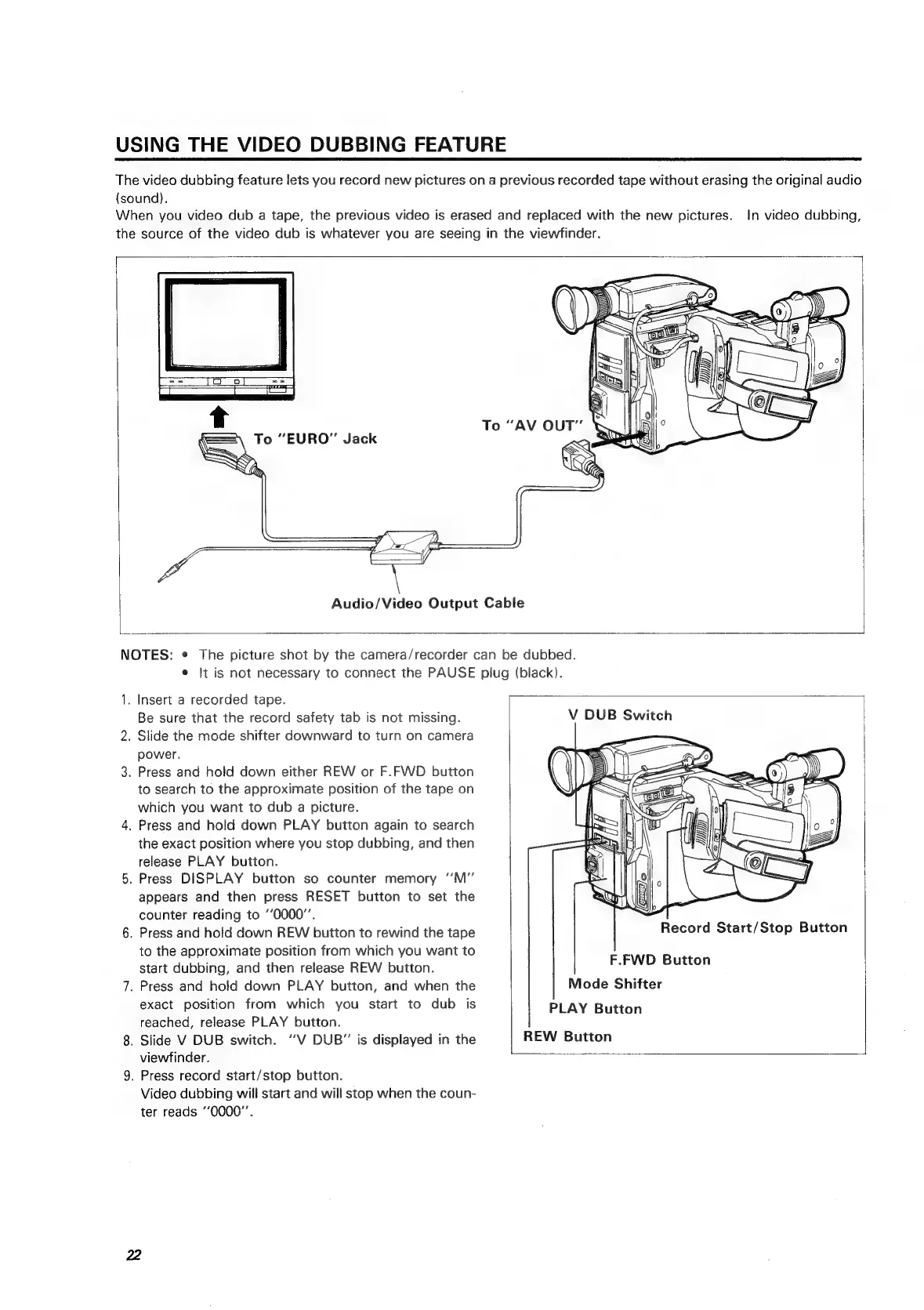
Audio/Video
Output
Cable
NOTES:
¢
The
picture
shot
by
the
camera/recorder
can
be
dubbed.
e
It
is
not
necessary
to
connect
the
PAUSE
plug
(black).
1.
Insert
a
recorded
tape.
Be
sure
that
the
record
safety
tab
is
not
missing.
V
DUB
Switch
2.
Slide
the
mode
shifter
downward
to
turn
on
camera
power.
3.
Press
and
hold
down
either
REW
or
F.FWD
button
to
search
to
the
approximate
position
of
the
tape
on
which
you
want
to
dub
a
picture.
4,
Press
and
hold
down
PLAY
button
again
to
search
the
exact
position
where
you
stop
dubbing,
and
then
release
PLAY
button.
5.
Press
DISPLAY
button
so
counter
memory
‘’M”
appears
and
then
press
RESET
button
to
set
the
counter
reading
to
“0000”.
6.
Press
and
hold
down
REW
button
to
rewind
the
tape
to
the
approximate
position
from
which
you
want
to
start
dubbing,
and
then
release
REW
button.
7.
Press
and
hold
down
PLAY
button,
and
when
the
exact
position
from
which
you
start
to
dub
is
|
Record
Start/Stop
Button
F.FWD
Button
Mode
Shifter
PLAY
Button
REW
Button
reached,
release
PLAY
button.
8.
Slide
V
DUB
switch.
‘‘V
DUB”
is
displayed
in
the
viewfinder.
9.
Press
record
start/stop
button.
Video
dubbing
will
start
and
will
stop
when
the
coun-
ter
reads
‘’0000"’.

Related product manuals