EasyManua.ls Logo

Hitachi VM-C52E - Camera;Recorder to VTR Dubbing

Hitachi VM-C52E
29 pages
Print Icon
To Next Page IconTo Next Page
To Previous Page IconTo Previous Page
Loading...
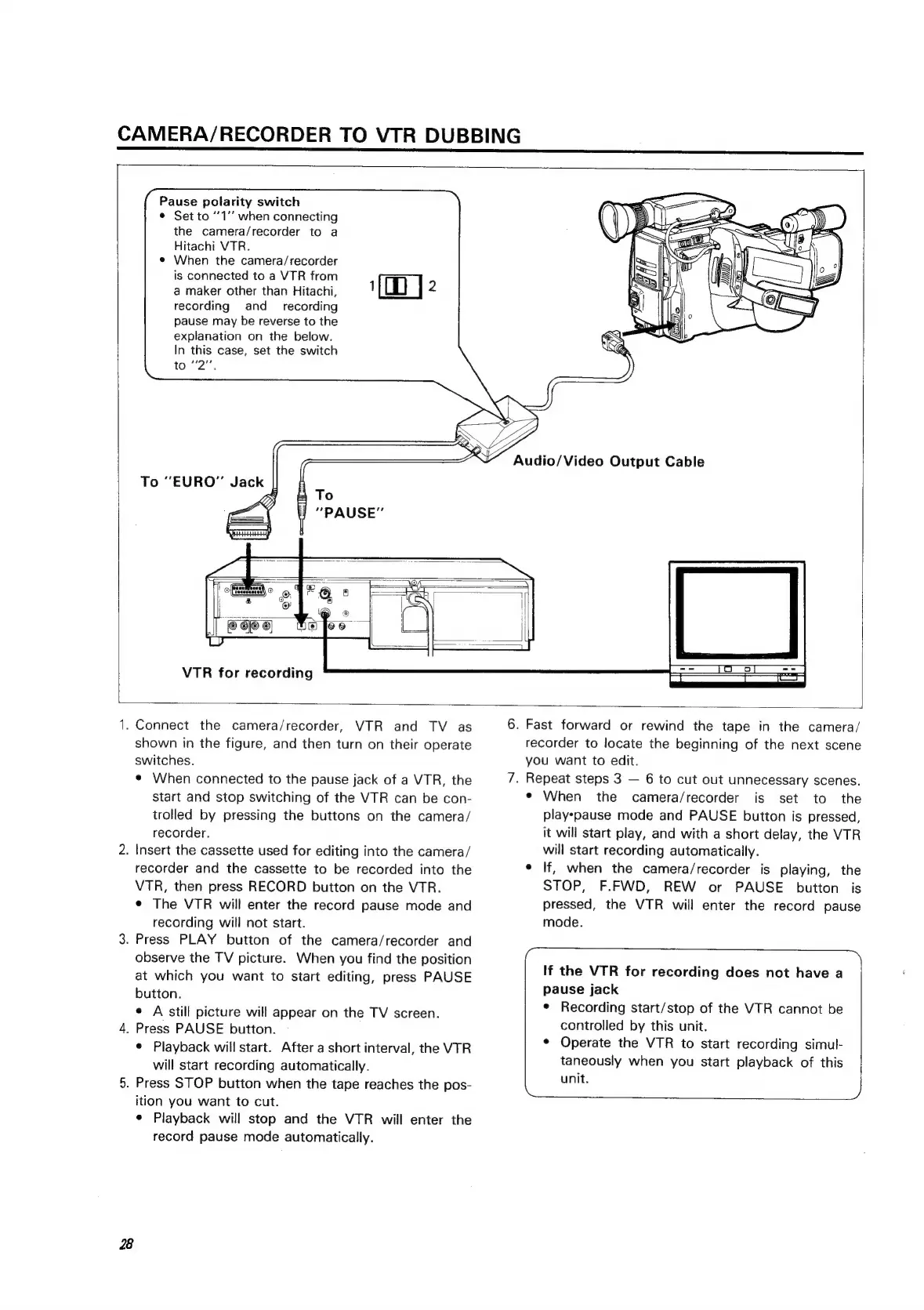
CAMERA/RECORDER
TO
VTR
DUBBING
Pause
polarity
switch
©
Set
to
“1’’
when
connecting
the
camera/recorder
to
a
Hitachi
VTR.
¢
When
the
camera/recorder
is
connected
to
a
VTR
from
a
maker
other
than
Hitachi,
recording
and_
recording
pause
may
be
reverse
to
the
explanation
on
the
below.
In
this
case,
set
the
switch
to
"2",
{OD
|
2
To
“EURO”
Jack
||
VTR
for
recording
1B
2.
3.
4.
5.
2
Connect
the
camera/recorder,
VTR
and
TV
as
shown
in
the
figure,
and
then
turn
on
their
operate
switches.
¢
When
connected
to
the
pause
jack
of
a
VTR,
the
start
and
stop
switching
of
the
VTR
can
be
con-
trolled
by
pressing
the
buttons
on
the
camera/
recorder.
Insert
the
cassette
used
for
editing
into
the
camera/
recorder
and
the
cassette
to
be
recorded
into
the
VTR,
then
press
RECORD
button
on
the
VTR.
¢
The
VTR
will
enter
the
record
pause
mode
and
recording
will
not
start.
Press
PLAY
button
of
the
camera/recorder
and
observe
the
TV
picture.
When
you
find
the
position
at
which
you
want
to
start
editing,
press
PAUSE
button.
e
A
still
picture
will
appear
on
the
TV
screen.
Press
PAUSE
button.
e
Playback
will
start.
After
a
short
interval,
the
VTR
will
start
recording
automatically.
Press
STOP
button
when
the
tape
reaches
the
pos-
ition
you
want
to
cut.
¢
Playback
will
stop
and
the
VTR
will
enter
the
record
pause
mode
automatically.
6.
Fast
forward
or
rewind
the
tape
in
the
camera/
recorder
to
locate
the
beginning
of
the
next
scene
you
want
to
edit.
7.
Repeat
steps
3
6
to
cut
out
unnecessary
scenes.
¢
When
the
camera/recorder
is
set
to
the
play-pause
mode
and
PAUSE
button
is
pressed,
it
will
start
play,
and
with
a
short
delay,
the
VTR
will
start
recording
automatically.
e
If,
when
the
camera/recorder
is
playing,
the
STOP,
F.FWD,
REW
or
PAUSE
button
is
pressed,
the
VTR
will
enter
the
record
pause
mode.
If
the
VTR
for
recording
does
not
have
a.
pause
jack
e
Recording
start/stop
of
the
VTR
cannot
be
controlled
by
this
unit.
¢
Operate
the
VTR
to
start
recording
simul-
taneously
when
you
start
playback
of
this
unit.
,

Related product manuals