EasyManua.ls Logo

Hitachi VM-C52E - Page 6

Hitachi VM-C52E
29 pages
Print Icon
To Next Page IconTo Next Page
To Previous Page IconTo Previous Page
Loading...
CONTROLS
AND
FUNCTIONS
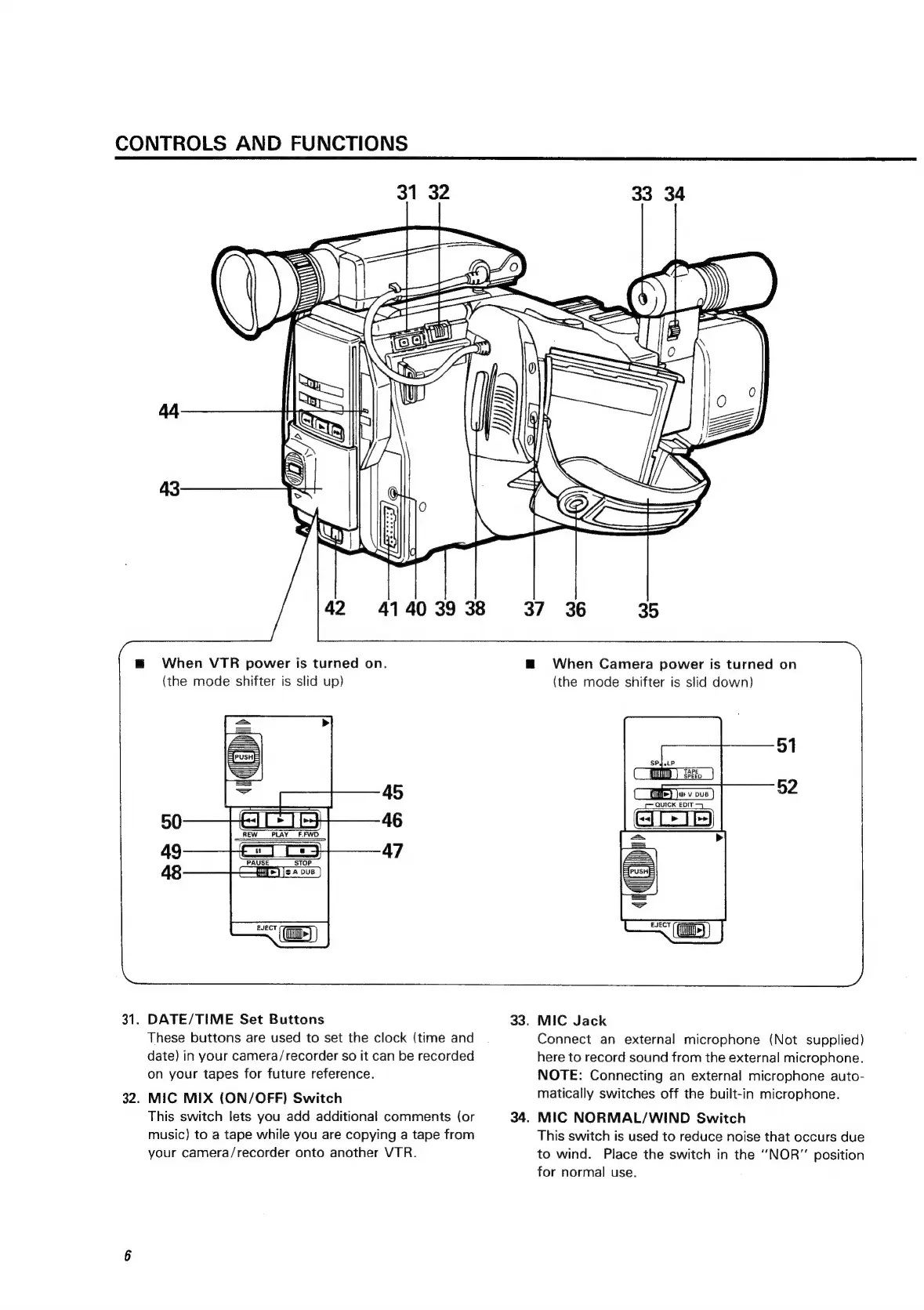
31.
32.
\
\
44
ANN
Za
=
YW
i
/
(
v
5
44
<r
ay
43
42
41
40
39 38
m@
When
VTR
power
is
turned
on.
(the
mode
shifter
is
slid
up)
HEIST
EH
REW
PLAY
F.FWD
DATE/TIME
Set
Buttons
These
buttons
are
used
to
set
the
clock
(time
and
date)
in
your
camera/recorder
so
it
can
be
recorded
on
your
tapes
for
future
reference.
MIC
MIX
(ON/OFF)
Switch
This
switch
lets
you
add
additional
comments
(or
music)
to
a
tape
while
you
are
copying
a
tape
from
your
camera/recorder
onto
another
VTR.
37 36
m@
When
Camera
power
is
turned
on
33.
34.
33
34
35
(the
mode
shifter
is
slid
down)
SPqelP
CMD)
i.)
CU)
Jo
v
ove
)
QUICK
EDIT
EJECT
i
MIC
Jack
Connect
an
external
microphone
(Not
supplied)
here
to
record
sound
from
the
external
microphone.
NOTE:
Connecting
an
external
microphone
auto-
matically
switches
off
the
built-in
microphone.
MIC
NORMAL/WIND
Switch
This
switch
is
used
to
reduce
noise
that
occurs
due
to
wind.
Place
the
switch
in
the
‘‘NOR”
position
for
normal
use.

Related product manuals