EXCEL 50 MMI - USER GUIDE
EN2B-0222GE51 R0216 34
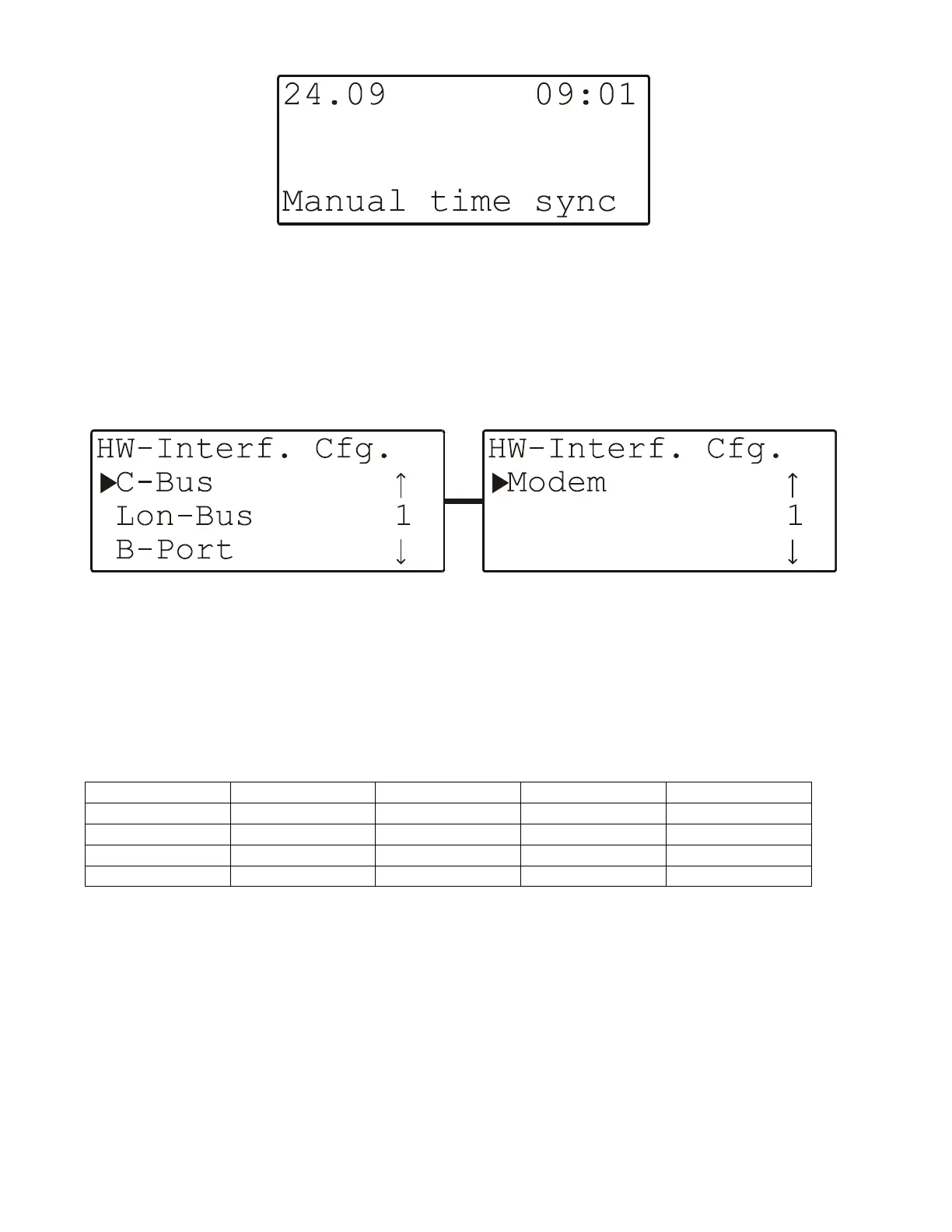
Fig. 47. Screen upon completing entry of daylight savings start and end
dates or of the date or time
Hardware Interface Configuration
Selecting "HW-Interf. Cfg." will cause a listbox with a corresponding heading
to appear (see Fig. 48).
Fig. 48. Hardware-interface configuration screens
The contents of this listbox will depend upon the specific hardware interfaces
which your controller features. It may be necessary to scroll downwards in order
to display all of the items.
Table 5. Contents of listbox dependent upon hardware interfaces
XD50C-F XD50C-FC XD50C-FL XD50C-FCL
C-Bus / YES / YES
Lon-Bus / / YES YES
B-Port YES YES YES YES
Modem YES YES YES YES
C-Bus Configuration
Selecting "C-Bus" will cause a screen with a corresponding heading to appear
(see Fig. 49), and in which you can edit the baud rate and controller number, as
appropriate.


 To Next Page
 Loading...