EXCEL 50 MMI - USER GUIDE
EN2B-0222GE51 R0216 58
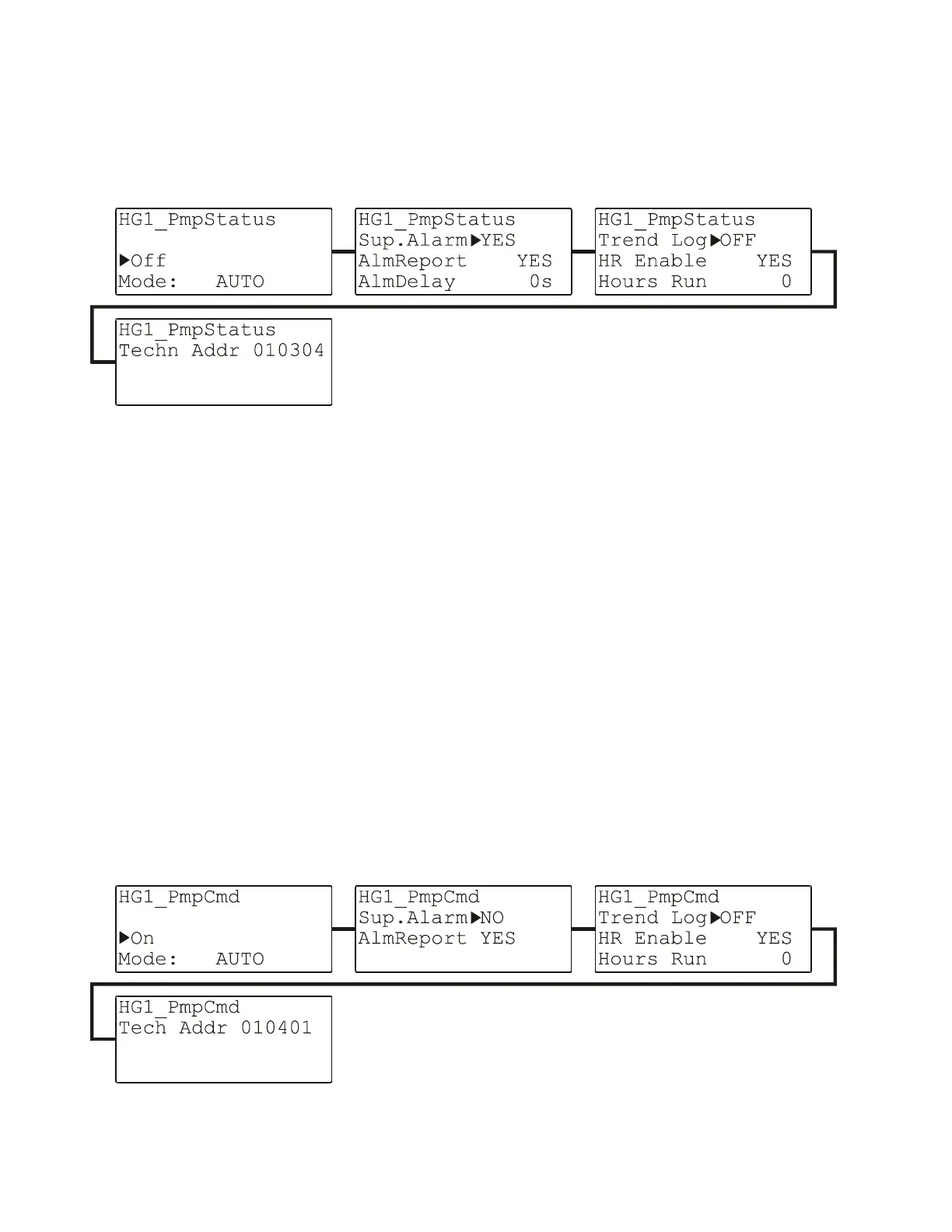
Digital Input Data-Point Attributes
See also section "Types of Physical Data-Points" on page 25 for a description of
digital input data-points. Their editable and non-editable attributes are displayed in
the following series of screens:
Fig. 80. Digital input data-point attributes (as exemplified by HG1_PmpState)
The "AlmReport" (alarm reporting) attribute: Setting this attribute to "YES" will
cause the state of the digital input data-point to be checked for a change; in the
event of a change, an alarm is generated.
The "AlmDelay" (alarm delay) attribute: Using this attribute, the delay (in
seconds) until an alarm is generated can be set.
"hours run" enable/disables measuring of the runtime of the connected actuator
(e.g. a pump).
hours run (not editable)
See also the previous sections for information on previously-described attributes.
Digital Output Data-Point Attributes
See also section "Types of Physical Data-Points" on page 25 for a description of
digital output data-points. Their editable and non-editable attributes are displayed
in the following series of screens:


 To Next Page
 Loading...