To install the audio board, reverse the removal procedure.
Serial port
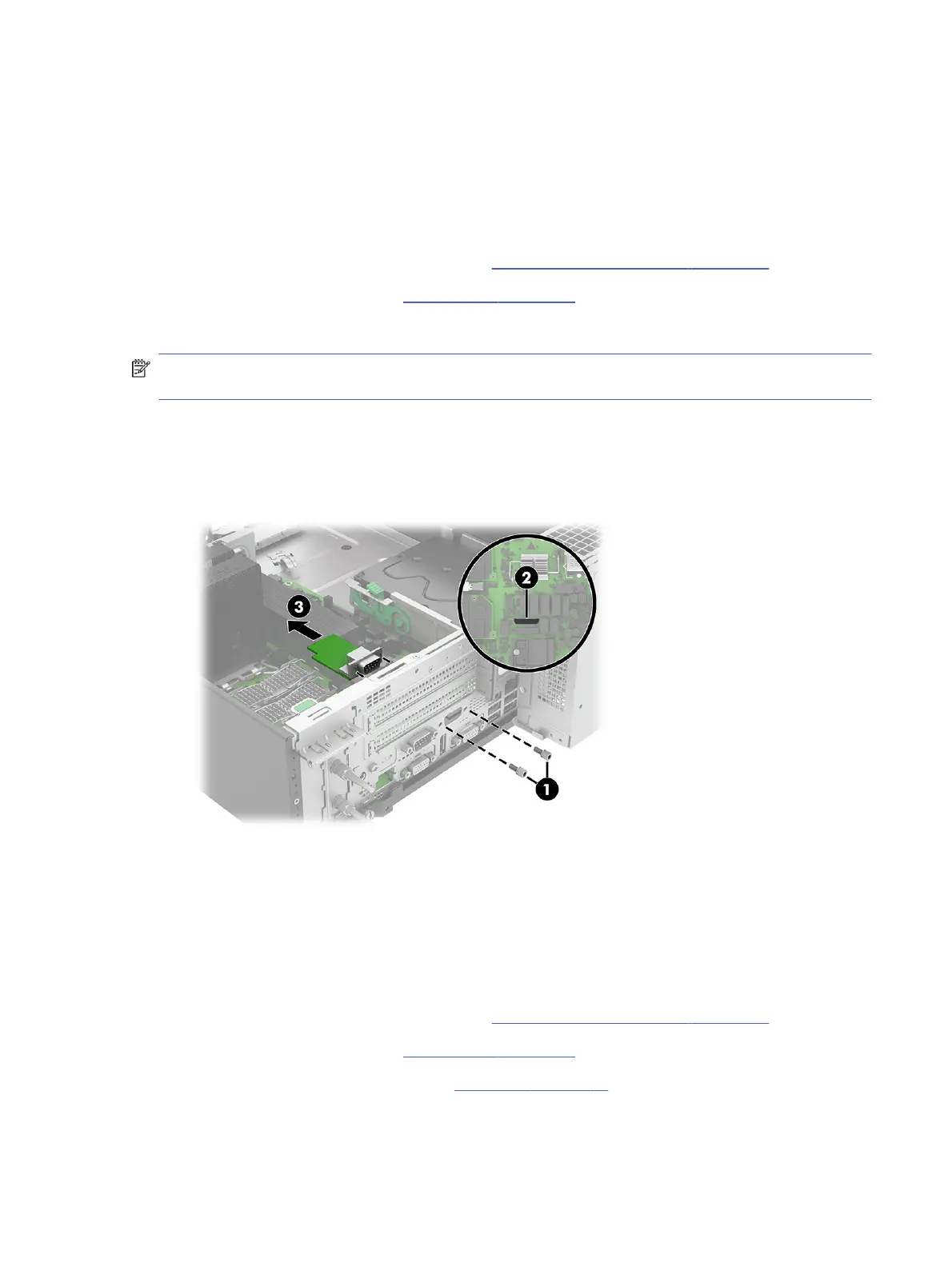
To remove the serial port, use this procedure and illustration.
Before removing the serial port, follow these steps:
1. Prepare the computer for disassembly (see Preparation for disassembly on page 20).
2. Remove the access panel (see Access panel on page 21).
Remove the serial port:
NOTE: You can install different rear expansion ports into this location. While the installation process is
similar, the system board connector might differ.
1. Remove the two Torx screws (1) that secure the serial port to the rear of the computer.
2. Disconnect the serial port cable from the system board connector labeled COMA (2).
3. Remove the serial port and cable (3) from the computer.
To install the serial port, reverse the removal procedure.
Rear expansion port
To remove the rear expansion port, use this procedure and illustration.
Before removing the rear expansion port, follow these steps:
1. Prepare the computer for disassembly (see Preparation for disassembly on page 20).
2. Remove the access panel (see Access panel on page 21).
3. If installed, remove the serial port (see Serial port on page 53).
Remove the rear expansion port:
Serial port
53



 To Next Page