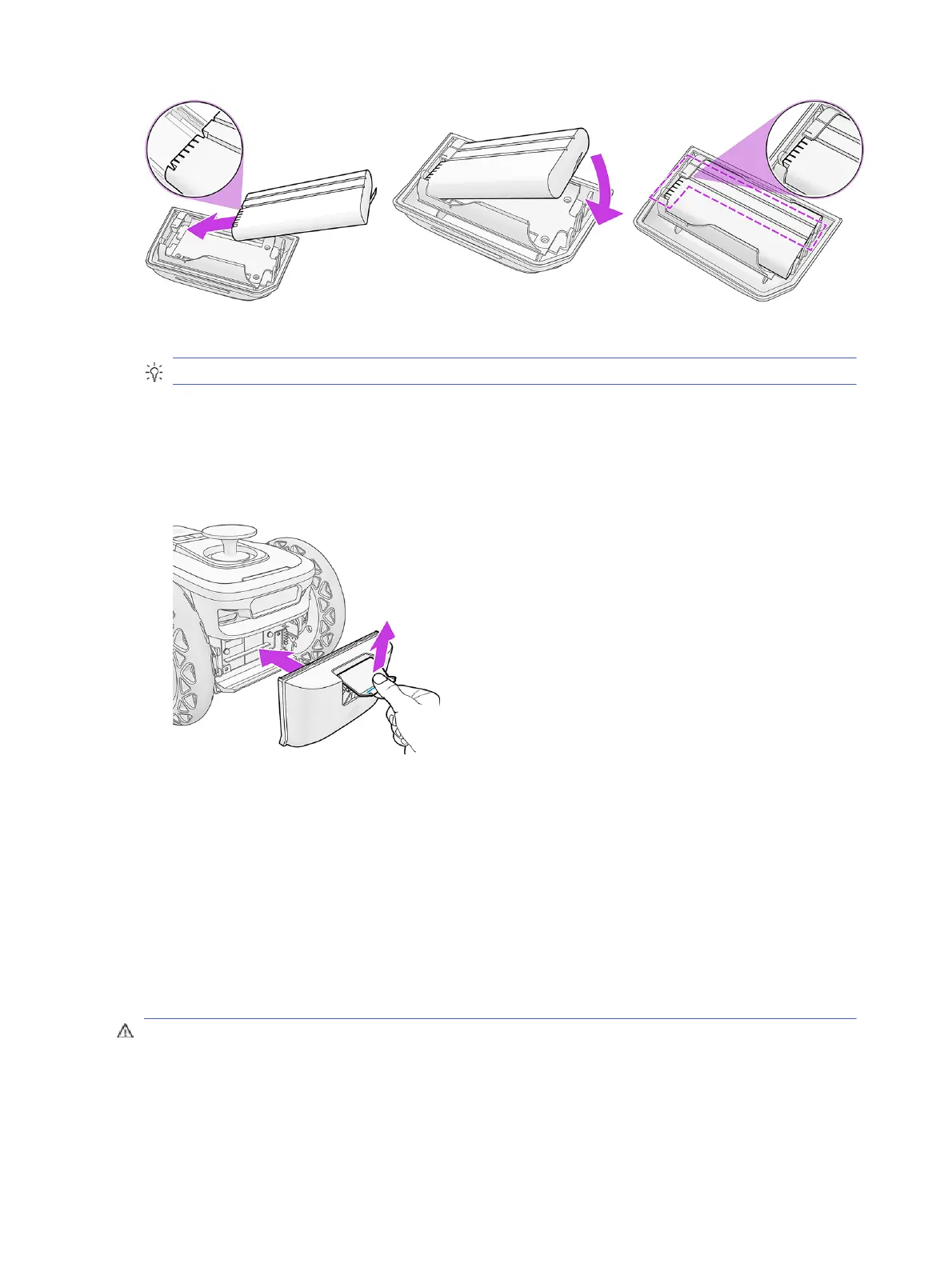
● Take the battery holder and a charged battery.
TIP: Make sure that the battery is charged.
● Locate the pins in the battery, and place them into the corresponding holes in the battery holder.
● Two parallel grooves should remain visible during the process.
● Place the battery holder and battery into the robot, keeping the latch pressed with your thumb. Hold
the robot by the rear handle or by the wheel while locking the battery holder into place.
Recommendations
● Battery will last about 4 hours, consider recharging it before projects.
● Replace the battery at 20% of charge for optimal accuracy and control.
● Battery cover may be difficult to close, the latches can deform slightly, handle with care if it is
difficult to open or close.
Insert the ink cartridge
To insert the ink cartridge, the robot should be horizontal, or rotated by up to 45°.
CAUTION: Do not rotate the robot by more than 45°, which could damage the sensors.
38
Chapter 3 Prepare to print



 To Next Page