Robot maintenance5
How to maintain your robot.
Clean the printhead
Clean the printhead at the end of each day in which the robot is used.
This maintenance process will remove dust, ink, or other substances that can block the nozzles and
create print-quality issues. Printhead wiping should be done with a lint-free cloth.
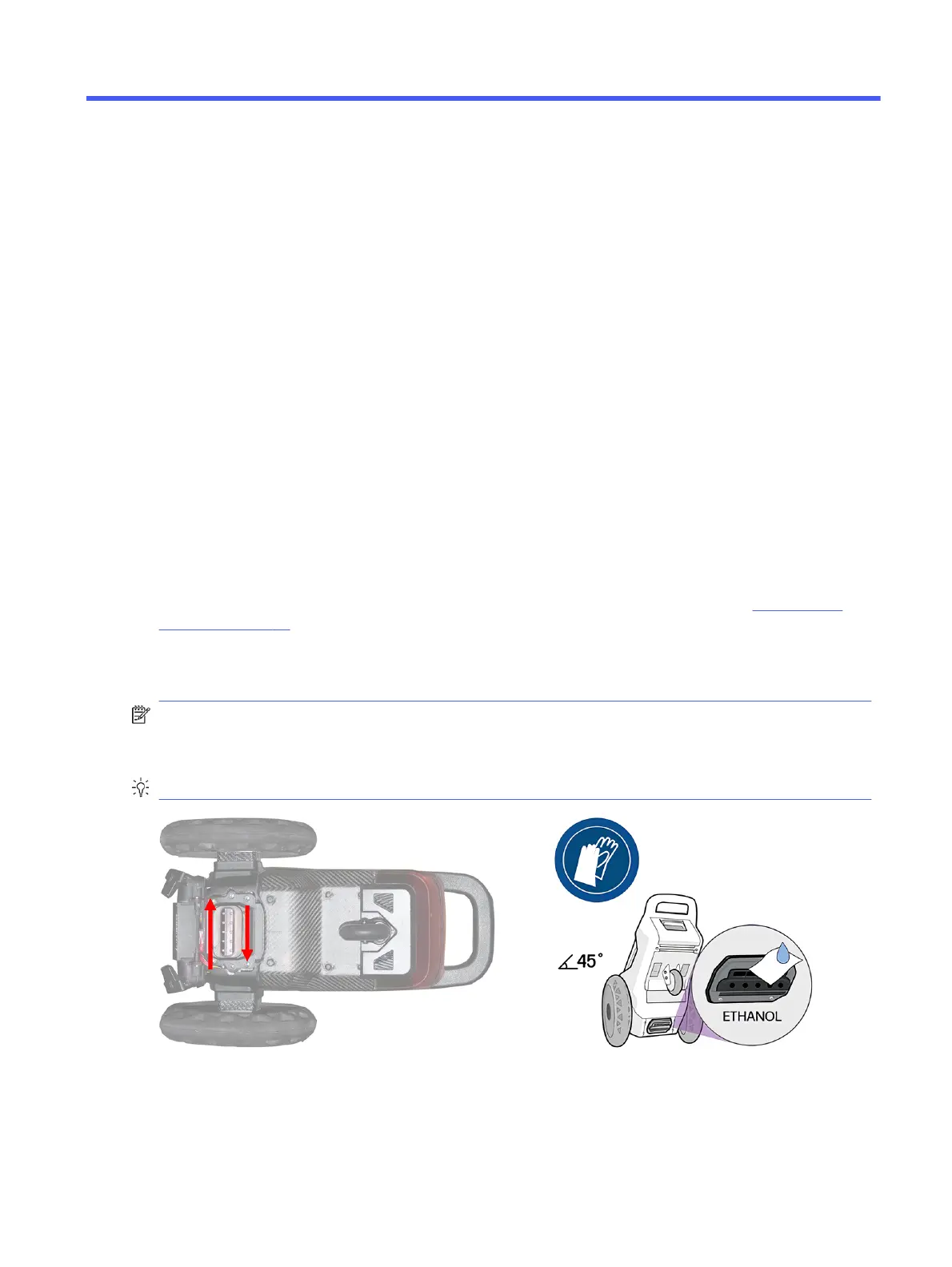
When applying the cleaning fluid, use a the lint-free cloth to absorb the excess of liquid to prevent the
fluid from reaching the battery. Ethanol can damage the battery-cover sealing foam.
If you are going to store the robot, HP strongly suggests removing the battery before cleaning the
printhead. If the robot will not be used for more than a week, purge the ink system: see Purge the ink
system on page 59.
Clean the nozzles and the metallic plate in the direction of the arrows, and repeat four or five times until
you are sure that they are clean.
NOTE: Preferably use the same cleaning fluid after using the water-based or solvent-based inks.
Distilled water is also allowed, but only if you are sure to have used water-based inks. Do not use
distilled water after using solvent-based inks, as it could damage the printhead nozzles.
TIP: HP strongly recommends wearing gloves throughout these cleaning operations.
Check nozzle health
When you suspect that some nozzles are failing, HP strongly recommends printing a nozzle health plot.
Robot maintenance
57



 To Next Page