22 Chapter 1
Product Information
Rear Panel Components
Rear Panel Components
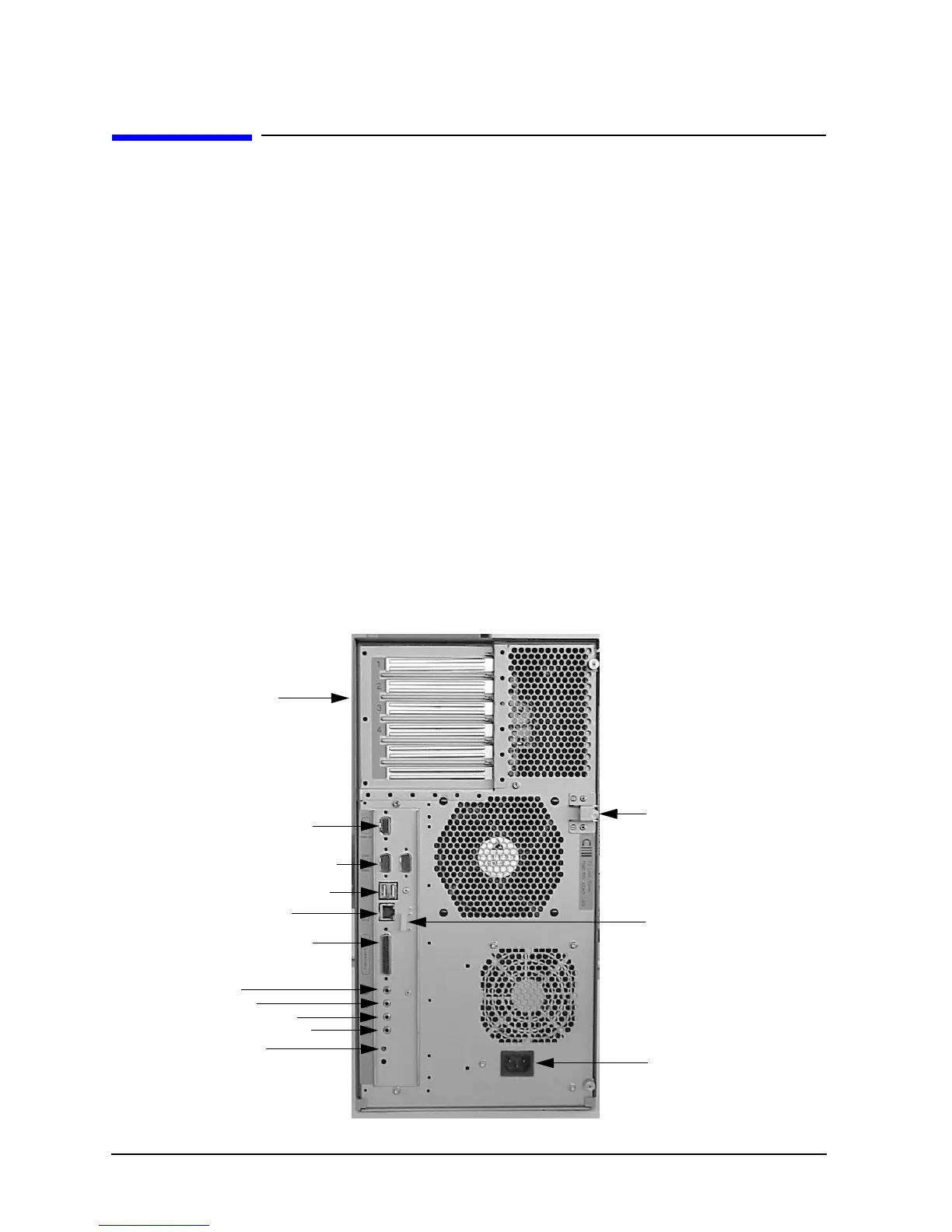
This section describes the following components that are located on the rear panel of the
B2000 workstation:
• I/O slots
• Monitor connector
• Serial (RS-232) connectors
• USB (Universal Serial Bus) connectors
• LAN (Ethernet IEEE 802.3, RJ45 Twisted Pair 10/100 BaseT) connector
• Parallel (IEEE 1284) connector
• Audio connectors (Line In, Line Out, Microphone In, and Headphones Out)
• TOC (Transfer Of Control) button
• Security loop
• Power cord connector
Figure 1-5 shows the locations of the components on the rear panel of the B2000
workstation. The following subsections describe each of these components.
Figure 1-5. Rear Panel Components
Four I/O Slots
Monitor Connector
Two Serial Connectors
Two USB Connectors
LAN Connector
Parallel Connector
Four Audio Connectors:
Line In
Line Out
Microphone In
Headphones Out
TOC Button
Security Loop
USB Cable Clip
Power Cord
Connector


 To Next Page