18 Chapter 1
Product Information
Front Panel Components
Front Panel Components
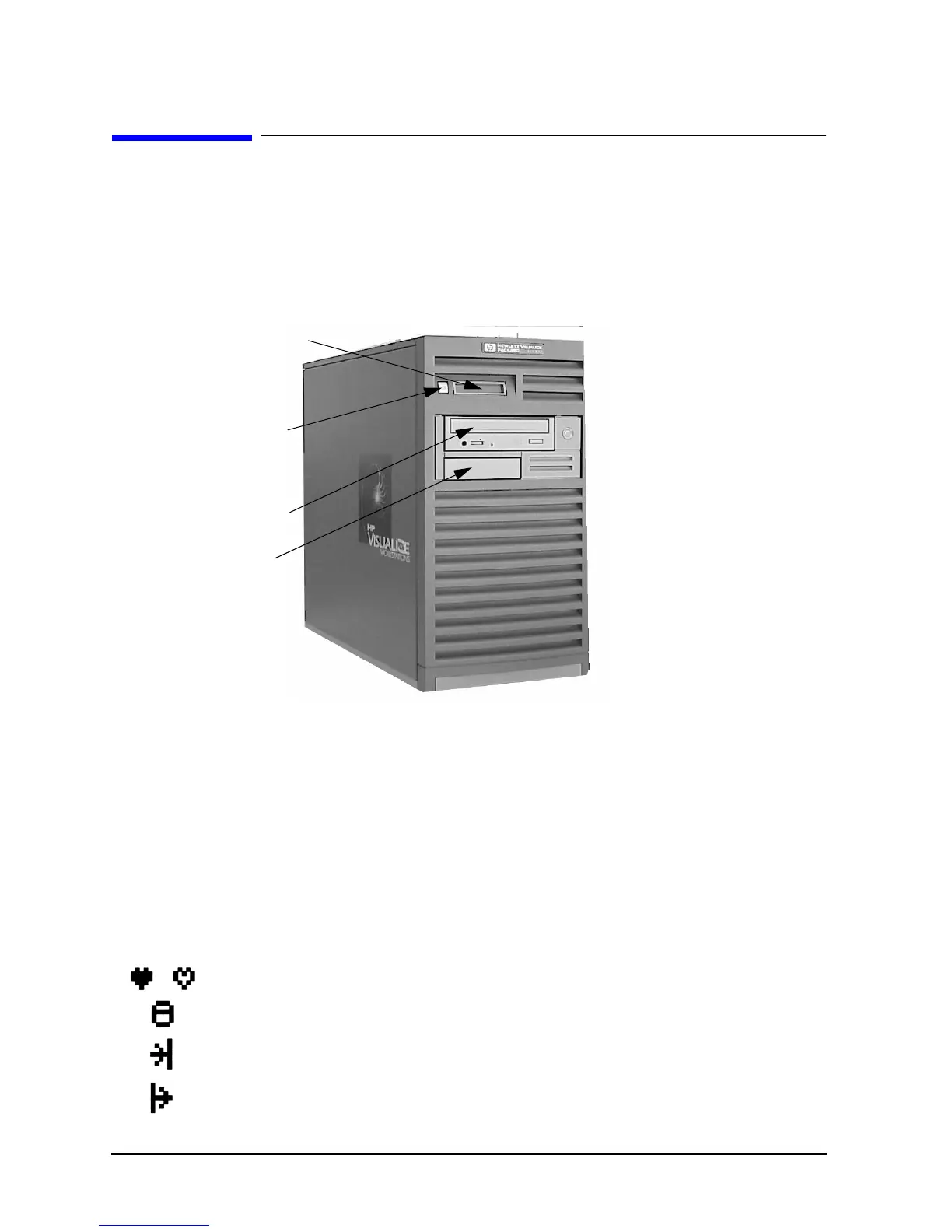
Figure 1-1 shows the components that are located on the front panel of the B2000
workstation. The following subsections describe the system LCD, power switch, and the
internal storage devices (including the standard CD drive and optional floppy disk drive)
that are located on the front panel.
Figure 1-1. Front Panel Components
System LCD
The Liquid Crystal Display (LCD) is located on the left side of the front panel as part of the
power switch/LCD assembly. The LCD lights when the workstation power is on. The LCD
has a 2-line display, with up to 16-characters per line. It displays messages about the state
of the system, which are called chassis codes. See the section titled “Selftest Failures” on
page 53 in Chapter 3 for a complete listing of the possible chassis codes which can be
displayed on the LCD.
The following symbols appear on the LCD, representing different system activities.
Figure 1-2. LCD Symbols
System LCD
Power
Switch
CD Drive
Bay for
Optional
Floppy
Disk Drive
Operating system running
Disk Access in progress
Network Receive in progress
Network Transmit in progress



 To Next Page