88 Chapter 4
Field Replaceable Units
FRU Removal and Replacement
Left Side Panel
This section explains how to open and close the left side panel. You will need to open this
side panel whenever you need to access the internal components of the workstation.
Opening the Left Side Panel
Perform the following steps to open the left side panel:
1. Power off the workstation and unplug the power cord from the electrical outlet.
WARNING
Always unplug the workstation’s power cord from the electrical
outlet before opening the workstation.
2. Attach the static-grounding wrist strap by following the instructions on the package.
Attach the sticky end of the wrist strap to bare metal on the workstation’s rear panel.
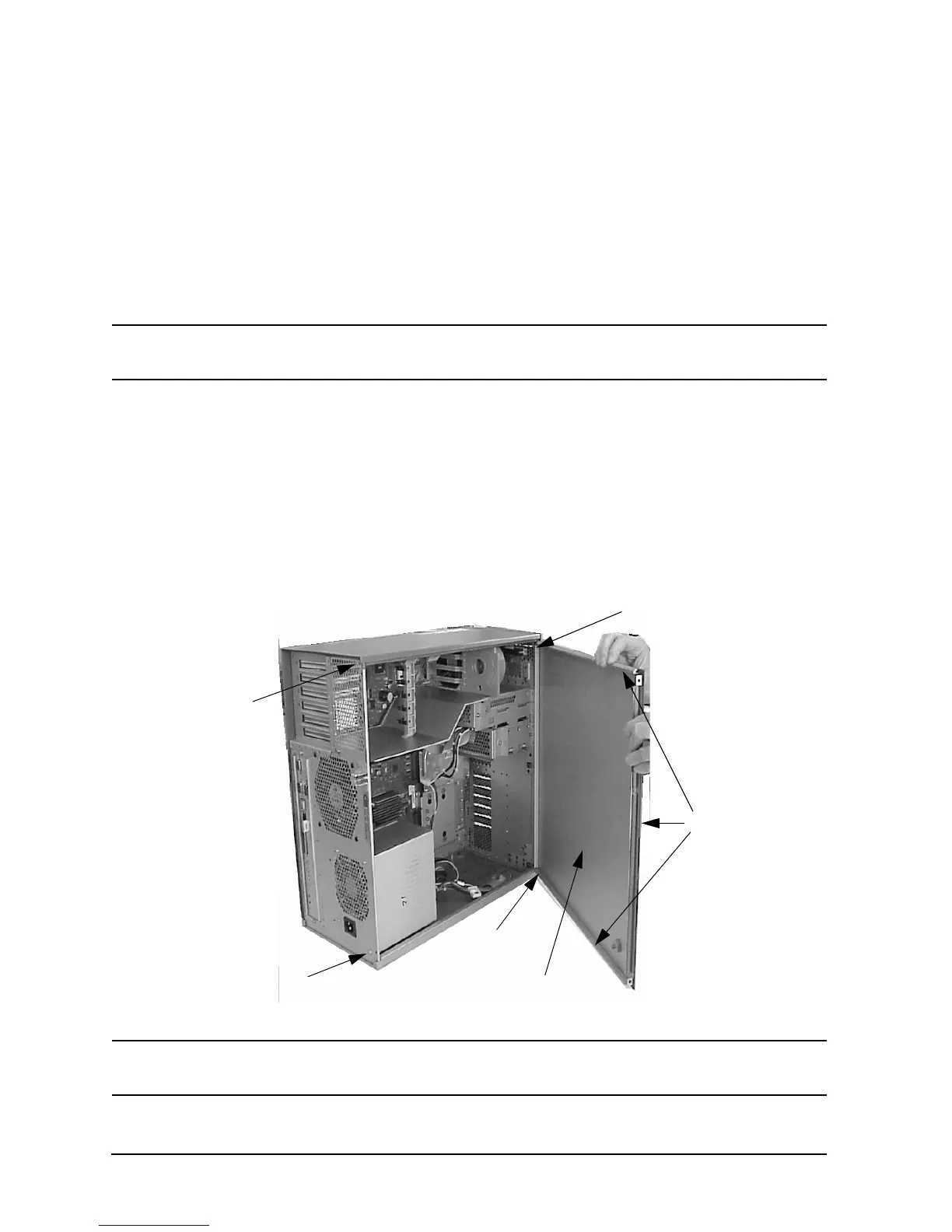
3. Remove the two T-15 Torx thumbscrews located on the top and bottom, right edge of the
workstation’s rear panel, as shown in Figure 4-3.
4. Grasp the rear edge of the left side panel and rotate it outward approximately 30
degrees to the workstation. Next, pull the panel toward you as shown in Figure 4-3.
This releases the panel’s top and bottom hinge hooks from their hinge slots.
Figure 4-3. Opening the Left Side Panel
NOTE
The EMI gasket, as shown in Figure 4-3, must not be removed from the left
side panel.
Left Side Panel
EMI Gasket
Hinge Hook
Hinge Hook
T-15 Torx
Thumbscrew
T-15 Torx
Thumbscrew



 To Next Page