92 Chapter 4
Field Replaceable Units
FRU Removal and Replacement
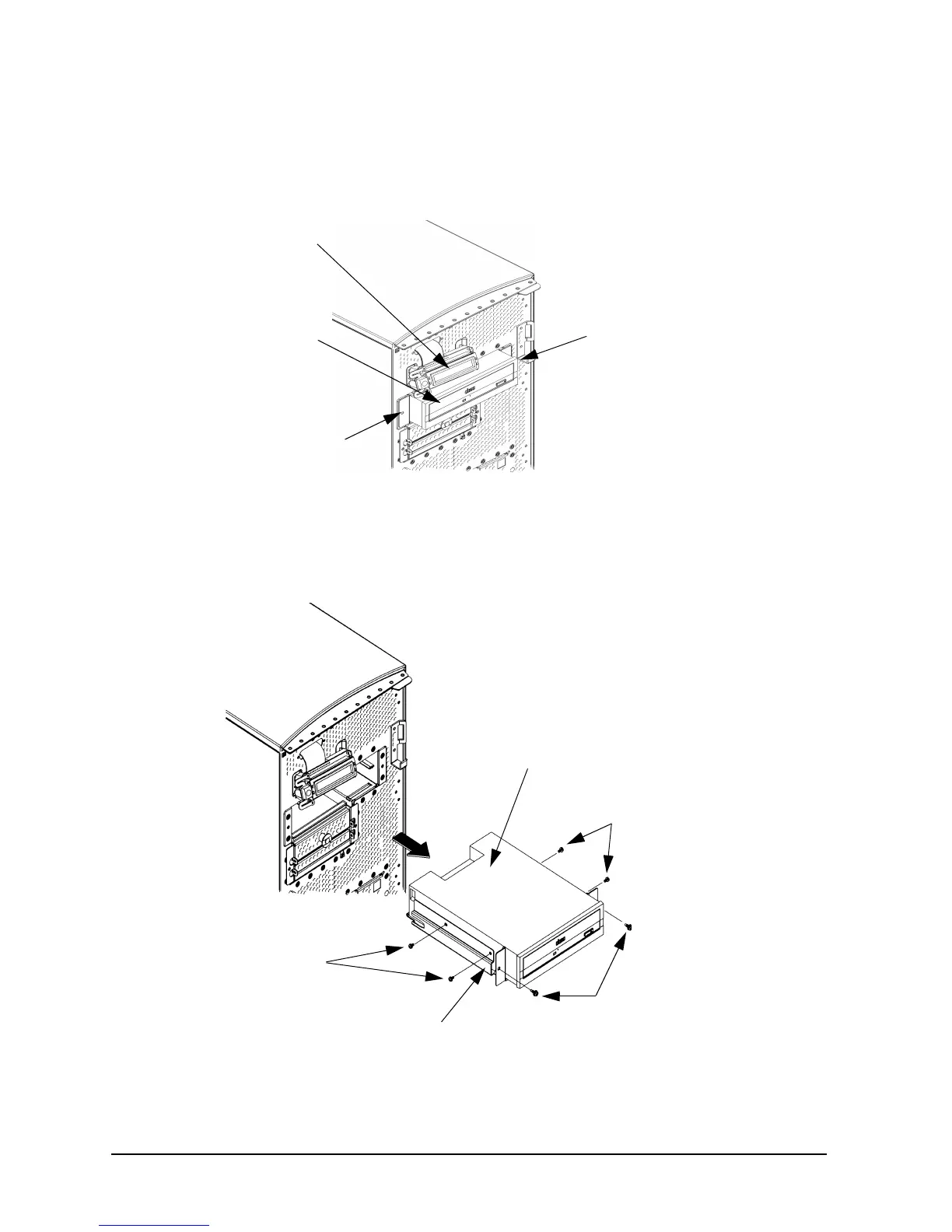
4. Rotate the workstation around until you see the front of the workstation as shown in
Figure 4-6.
Figure 4-6. Front of the Workstation with the Front Panel Removed
5. Remove both CD drive bracket screws (T-15 Torx/slotted screws) and pull the CD drive
out of the workstation chassis as shown in Figure 4-7.
Figure 4-7. Removing the CD Drive
6. Remove the four CD drive mounting screws (T-15 Torx/slotted screws) from the sides of
the CD drive bracket as shown in Figure 4-7 and remove the CD drive from the bracket.
Bracket Screw
LCD
(hidden)
Bracket Screw
CD Drive
CD Drive Mounting
Screws (T-15 Torx)
Bracket Screws
CD Drive
(T-15 Torx)
CD Drive Bracket
CD Drive Mounting
Screws (T-15 Torx)



 To Next Page