Shenzhen Hpmont Technology Co., Ltd. Chapter 4 Electrical Installation
HD09-S Series User Manual V1.1 - 17 -
4.4 External Keypad or Upper Computer
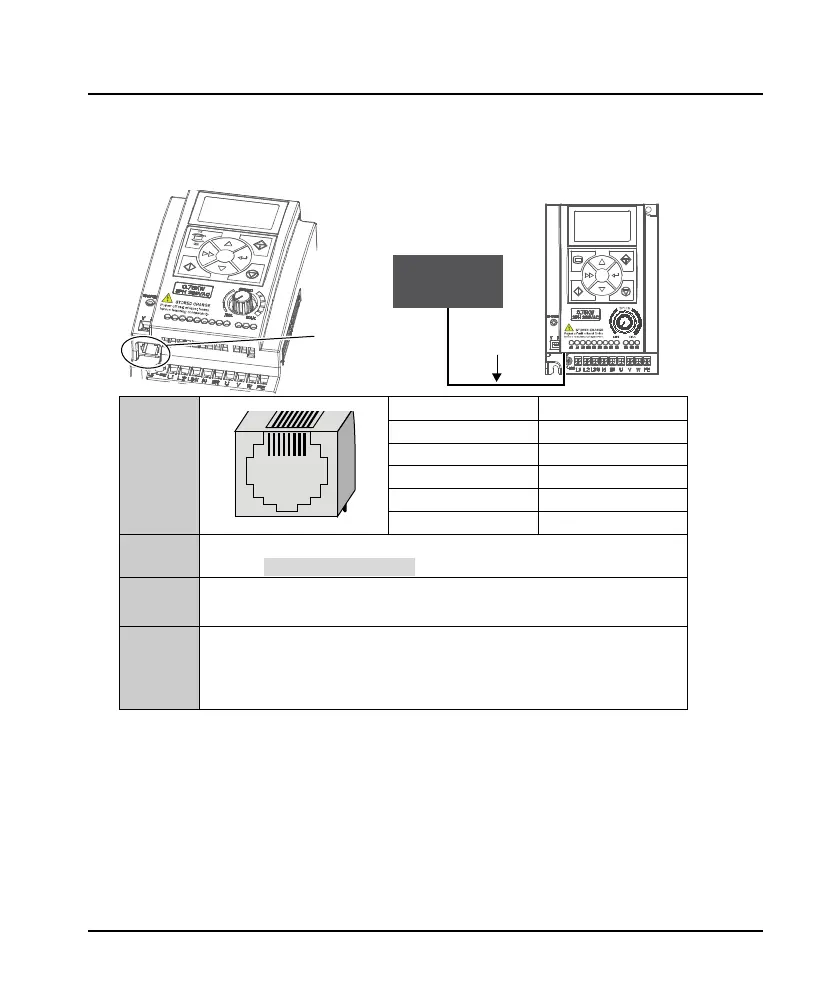
The RJ45 terminal can connect the optional keypad or upper computer, as shown in the following
figure.
RJ45
Pin Definition
1, 3 +5V
2 485+
4, 5, 6 GND
7 485-
8 Reserved
Keypad
Can connect the optional keypad to realize keypad control
Refer to section 6.1 Keypad, page 23
Upper
Computer
Can connect the upper computer to realize communication control
• The upper computer includes PLC, touch screen, PC, etc.
Connection
Cable
• 1m conncection cable [HD-CAB-1M]
• 2m conncection cable [HD-CAB-2M]
• 3m conncection cable [HD-CAB-3M]
6m conncection cable [HD-CAB-6M]
RJ45
Connection
cable
Keypad or
upper computer

 To Next Page
 Loading...