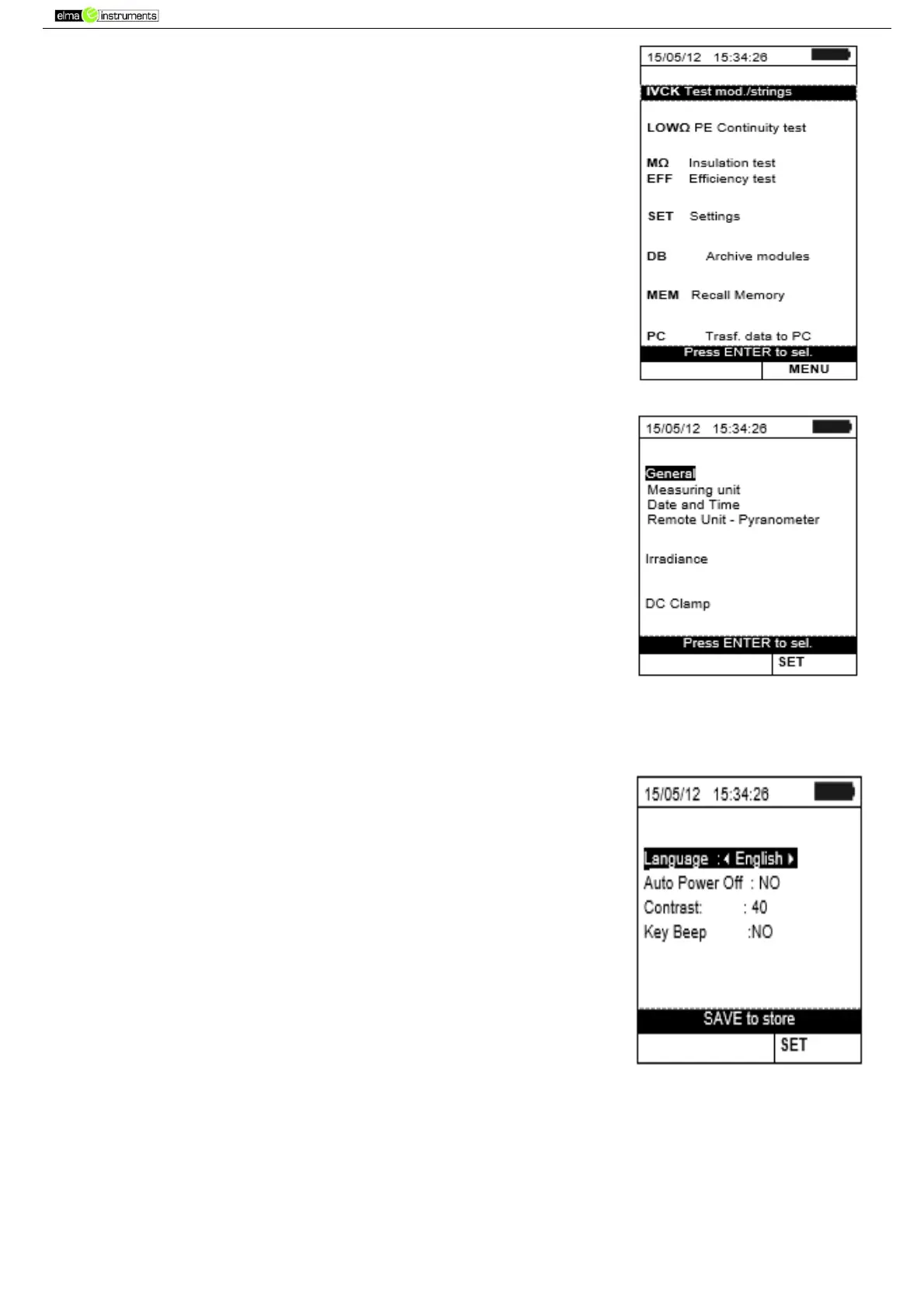
5. GENERAL MENU
Pressing the ESC/MENU key in any condition of the instrument
displays the general menu screen, in which the instrument may be
set, the saved measures can be displayed and the desired measuring
function may be selected. Use the cursor to select one of the options
and confirm with ENTER to access the desired function.
5.1. SET – INSTRUMENT SETTINGS
Position the cursor onto SET by using the arrow keys (,) and
confirm with ENTER. The display shows the screen which lists the
different settings of the instrument.
Settings will be maintained also after switching off the instrument.
5.1.1. General
1. Position the cursor onto General by using the arrow keys
(,) and confirm with ENTER.
2. The display shows the screen which allows: Setting the
instrument language
Enabling/disabling the auto power off function
Adjusting display contrast
Enabling the acoustic signal when pressing a key.
3. Use the arrow keys (,) for option setting, and select the
desired option by means of the arrow keys ( , ).
4. Press the SAVE key to save the settings made; the message
“Data saved” will be displayed for a few seconds. Press the
ESC/MENU key to exit without saving and go back to the previous
screen.



 To Next Page