7. STORING DATA
The instrument allows saving max 999 measured values. The saved data can be recalled at display
and deleted at any moment, and can be associated to reference numerical markers relevant to the
installation name, the PV string and the PV module (max 250 markers).
7.1. SAVING EFFICIENCY MEASURES
1. Press the SAVE key with a measured result shown on the display.
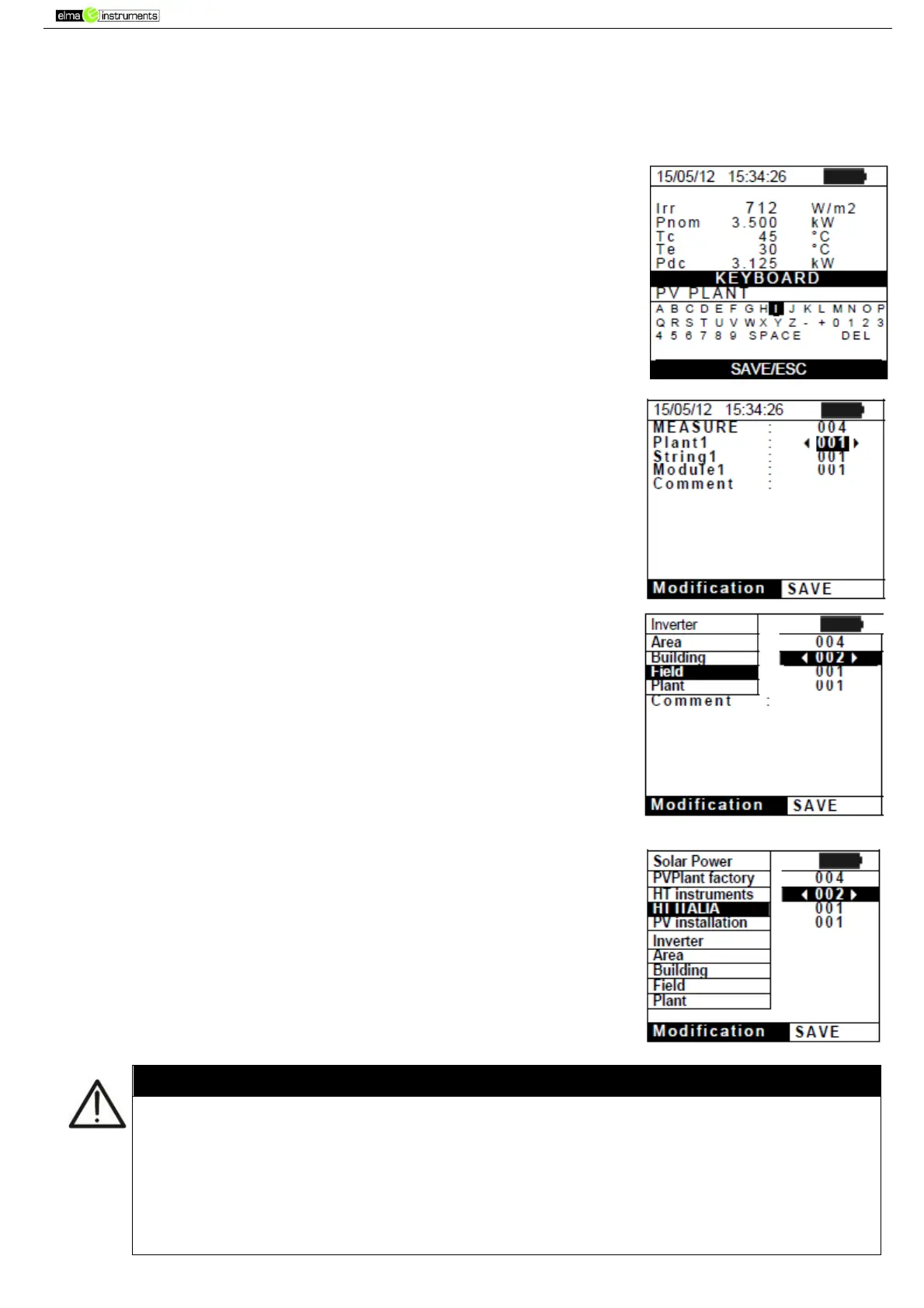
The instrument shows the screen to the side, containing a virtual
keyboard.
2. Use the arrow keys (,) and ( , ) to add a short description
(max 13 chars) relevant to the test performed.
3. Press the SAVE key again to confirm data saving or ESC/MENU to
exit without saving.
7.2. SAVING IVCK, MΩ AND LOWΩ MEASURED RESULTS
1. Press the SAVE key with a measured result shown on the display.
The instrument shows the screen to the side, containing the
following items:
The first memory location available (“MEASURE”)
The numerical marker “Plant1”
The numerical marker “String1”
The numerical marker “Module1”
The field “Comment” in which the operator can include a
short description (max 13 char) for the system.
2. For each of the 3 markers “Plant”, “String” and Module” it is
possible to assign custom labels, except if already permanently
assigned to another marker (the message “Label already
assigned” is shown on the display, in that case). Select one of the
three items using the arrow keys ( , ) and press the ENTER
key. The screen to the side (e.g. relevant to item “Plant” is shown
by the instrument.
3. Select one of the 5 items available for markers using the arrow
keys (,) and confirm with ENTER.
4. Custom names chosen by the operator can be added to
the default names of the markers “Plant”, “String” and “Module”
before measurements are carried out. In this case, the new values
may be selected as an alternative to the default ones, as shown in
the screen to the side (e.g. for marker “Plant”).
The default names of markers “Plant”, “String” and “Module” may be preliminarly
customized by the user by means of the TopView software and loaded onto the
instrument by means of a PC connection (see the online help of the TopView software).
It is possible to add up to 5 custom names for each marker, further to the 5 provided as
default values.
The names of the default markers cannot be eliminated. Deletion of custom names can
only occur through the TopView software.



 To Next Page