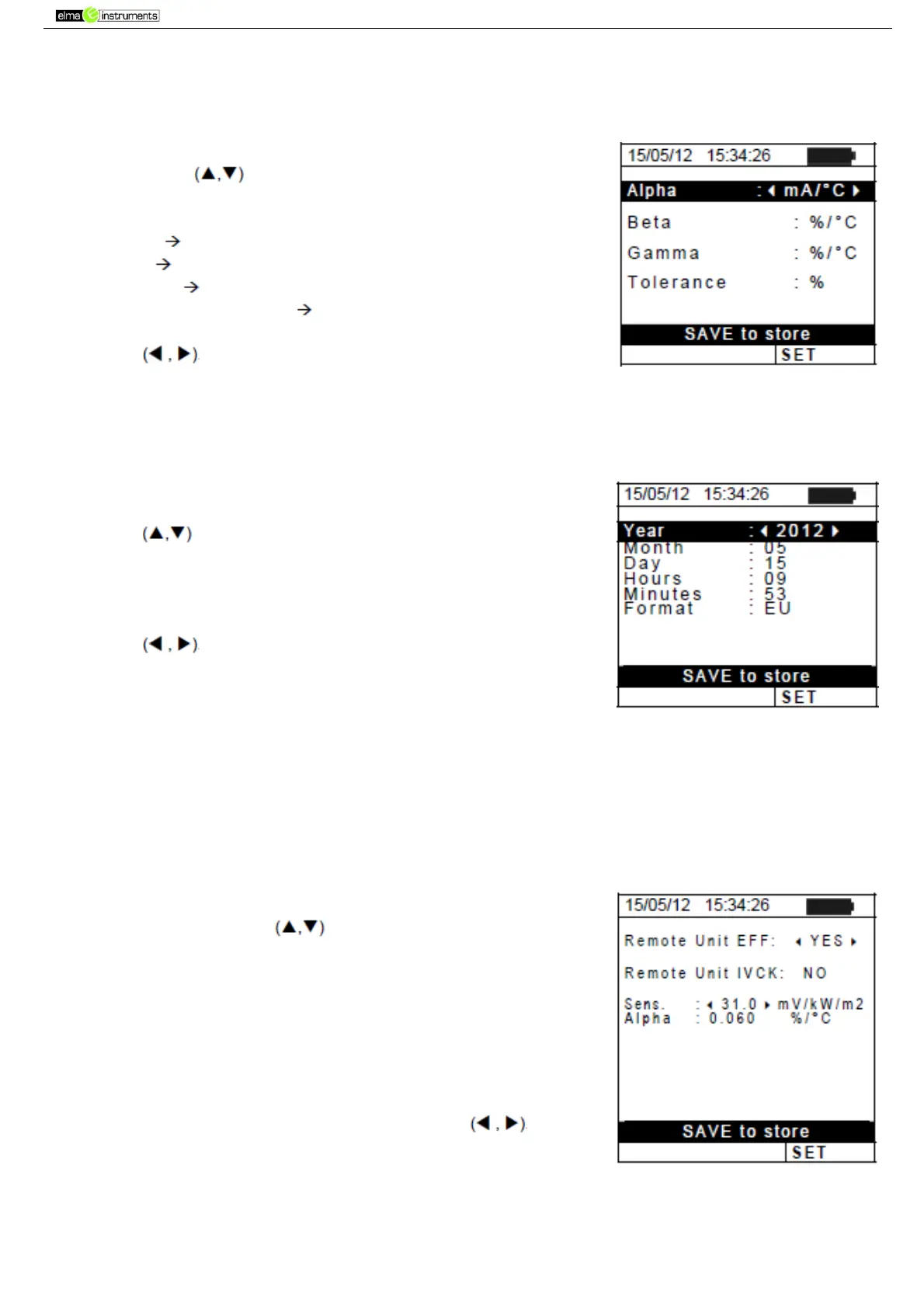
5.1.2. Measuring unit
This section allows setting the measuring units of some parameters included in the
database (DB) for the management of PV modules (see § 5.6) when measuring IVCK.
1. Position the cursor onto “Measuring Unit” by using the
arrow keys and confirm with ENTER.
2. The display shows the screen which allows setting the
measuring units of the following parameters:
Alpha possible selection: “%/°C” and “mA/°C”
Beta possible selection: “%/°C” and “mV/°C”
Gamma expressed in “%/°C”
Voc and Isc tolerance expressed in “%”
3. Set the desired measuring units by means of the arrow
keys
4. Press the SAVE key to save the settings made; the
message “Data saved” will be displayed for a few seconds.
5. Press the ESC/MENU key to exit without saving and go
back to the previous screen.
5.1.3. Date and time
1. Position the cursor onto “Date and Time” by using the arrow
keys and confirm with ENTER.
2. The display shows the screen which allows setting the
system’s date/time both in the European (EU) or in the USA
(US) format.
3. Set the desired measuring units by means of the arrow
keys
4. Press the SAVE key to save the settings made; the
message “Data saved” will be displayed for a few seconds.
Press the ESC/MENU key to exit without saving and go
back to the previous screen.
5.1.4. Remote unit/Pyranometer
This section allows selecting the type of remote unit to be used (if available) and setting the
values of typical parameters (Sensitivity and Alpha) of the reference irradiance cell supplied
with the instrument. The values of these parameters, which are printed on the back
label of the cell, depend on the type of PV module being tested.
1. Position the cursor onto Remote Unit-Pyranometer by
using the arrow keys and confirm with ENTER.
2. The display shows the screen which allows selecting the use
of the remote unit for EFF or IVCK tests. Possible options
are:
YES (use of SOLAR-02)
NO (no use of SOLAR-02) In case the remote unit
SOLAR-02 is not used for IVCK tests, it is necessary to
set the values of Sensitivity (Sens.) and Alpha parameter
of the supplied irradiance cell on the instrument.
3. Set the desired values by means of the keys )
4. Press the SAVE key to save the settings made; the message
“Data saved” will be displayed for a few seconds. Press the
ESC/MENU key to exit without saving and go back to the
previous screen



 To Next Page