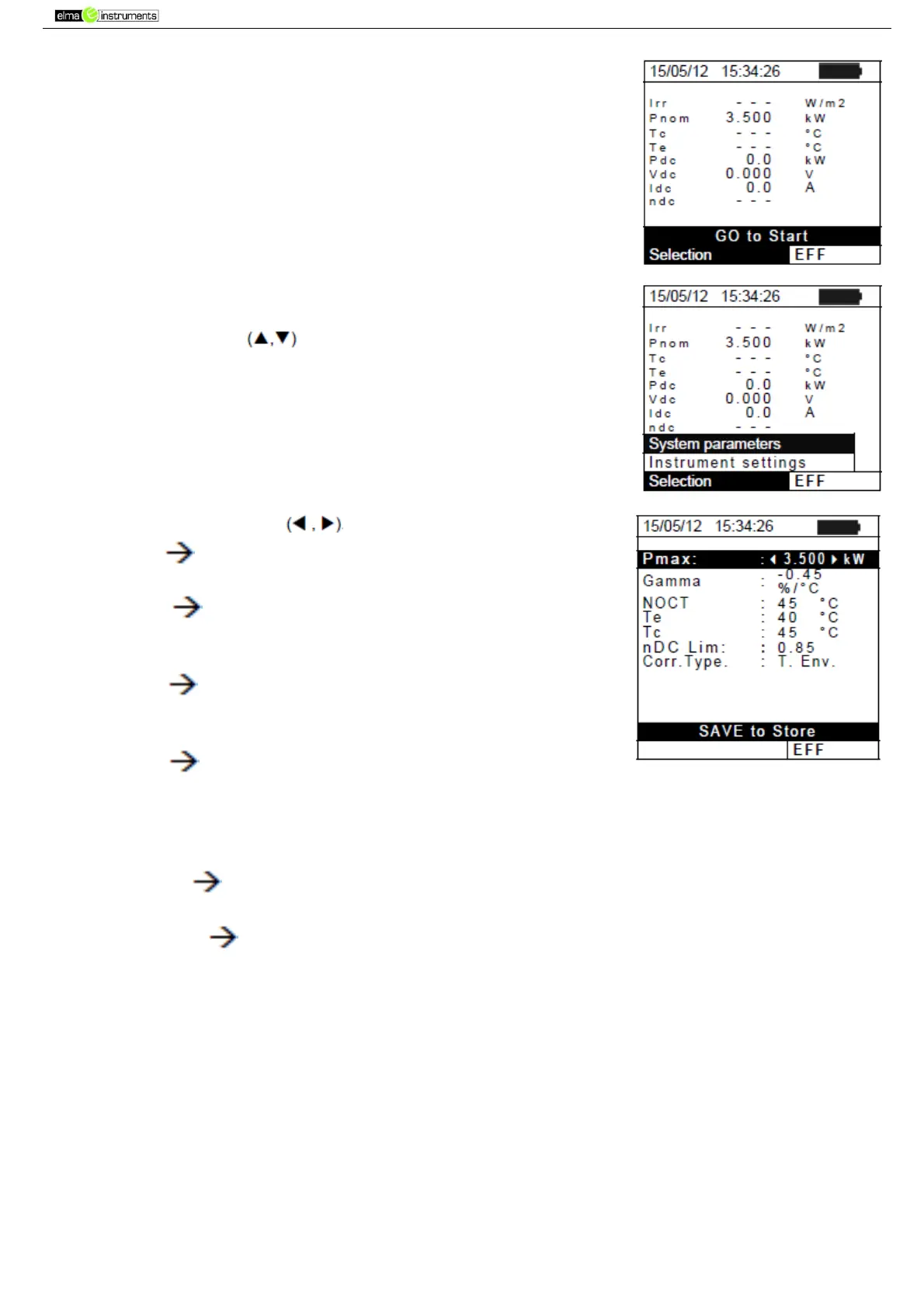
5.2.2. System parameters
1. Position the cursor onto EFF by using the arrow keys (,) and
confirm with ENTER. The display shows the values of the output
electrical parameters of the photovoltaic generator.
2. Press the ENTER key. The instrument shows the following
options: System parameters and Instrument settings
3. Use the arrow keys to select “System Parameters” and
confirm with ENTER. The instrument shows the following screen:
4. By using the arrow keys it is possible to set:
Pmax maximum total rated power of PV installation
expressed in kW
Range coefficient of power variation with temperature,
characteristic parameter of PV modules (range: -1.00 -
0.01%/C)
NOCT rated operating temperature of the cell,
characteristic parameter of PV modules (typically in the
following range: 42 48°C)
Te, Tc setting of default values of environmental and (Te)
and PV module (Tc) temperatures. These values are taken
into consideration by the instrument only when no auxiliary
probe is connected to the remote unit SOLAR-02 (range: Te =
0°C 80°C; Tc = 0°C 100°C)
nDC Lim minimum limit of DC efficiency (default value:
0.85 , range: 0.01 1.15)
Corr. Type Setting of the compensation relationship on
the calculation of Pdc power and the maximization of DC
efficiency (see § 5.2.3).



 To Next Page