Clock 276
NOUG-2.1.0-100 Nexus One User’s Guide
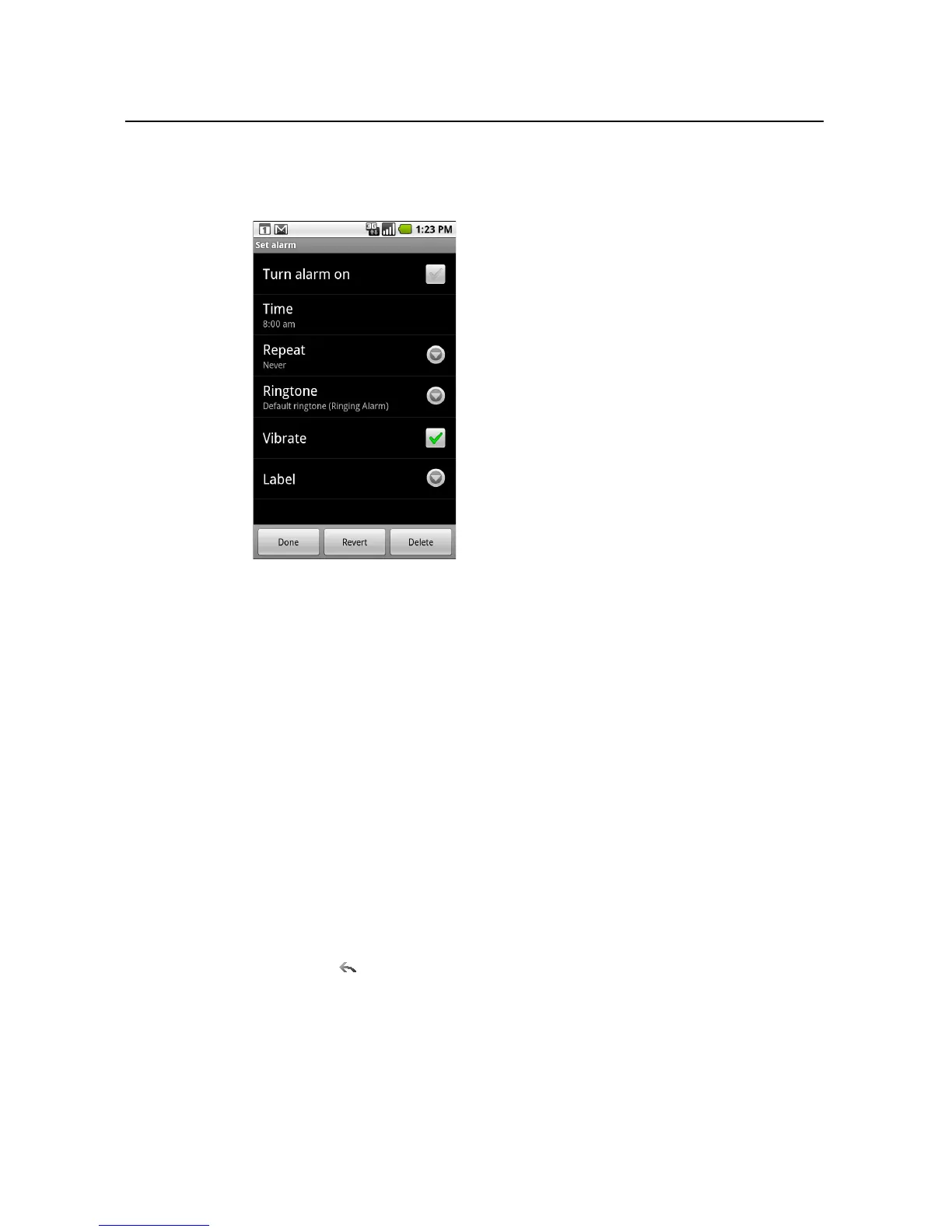
3 Touch an existing alarm to change its time and other attributes. Or touch Add
alarm to add a new one.
4 Touch Time to set the time of the alarm.
In the dialog that opens, you change the time by touching the + or - buttons and
the AM or PM buttons. Or touch a time to type the time you want.
5 Touch Ringtone to select a ringtone for the alarm.
You can select a ringtone that comes with the phone or one that you saved as a
ringtone by using the Music application. See “To use a song as a ringtone” on
page 261.
The ringtone plays briefly when you select it.
6 Touch Vibrate to have the phone vibrate, in addition to playing the ringtone.
7 Touch Repeat to set the days when you want the alarm to sound.
If you don’t set a repeat, the alarm sounds only one time.
8 Touch Label to enter a name for the alarm.
9 When you’re finished, touch Done.
At the time you set, the alarm sounds.
10 Press Back to return to the main Clock screen.



 To Next Page