Contacts 91
NOUG-2.1.0-100 Nexus One User’s Guide
To open a list of your favorite contacts
S Open your contacts and touch the Favorites tab.
The Favorites tab lists the contacts you’ve added to the list (see “Adding a contact
to your favorites” on page 95), followed by a list of your most frequently called
contacts.
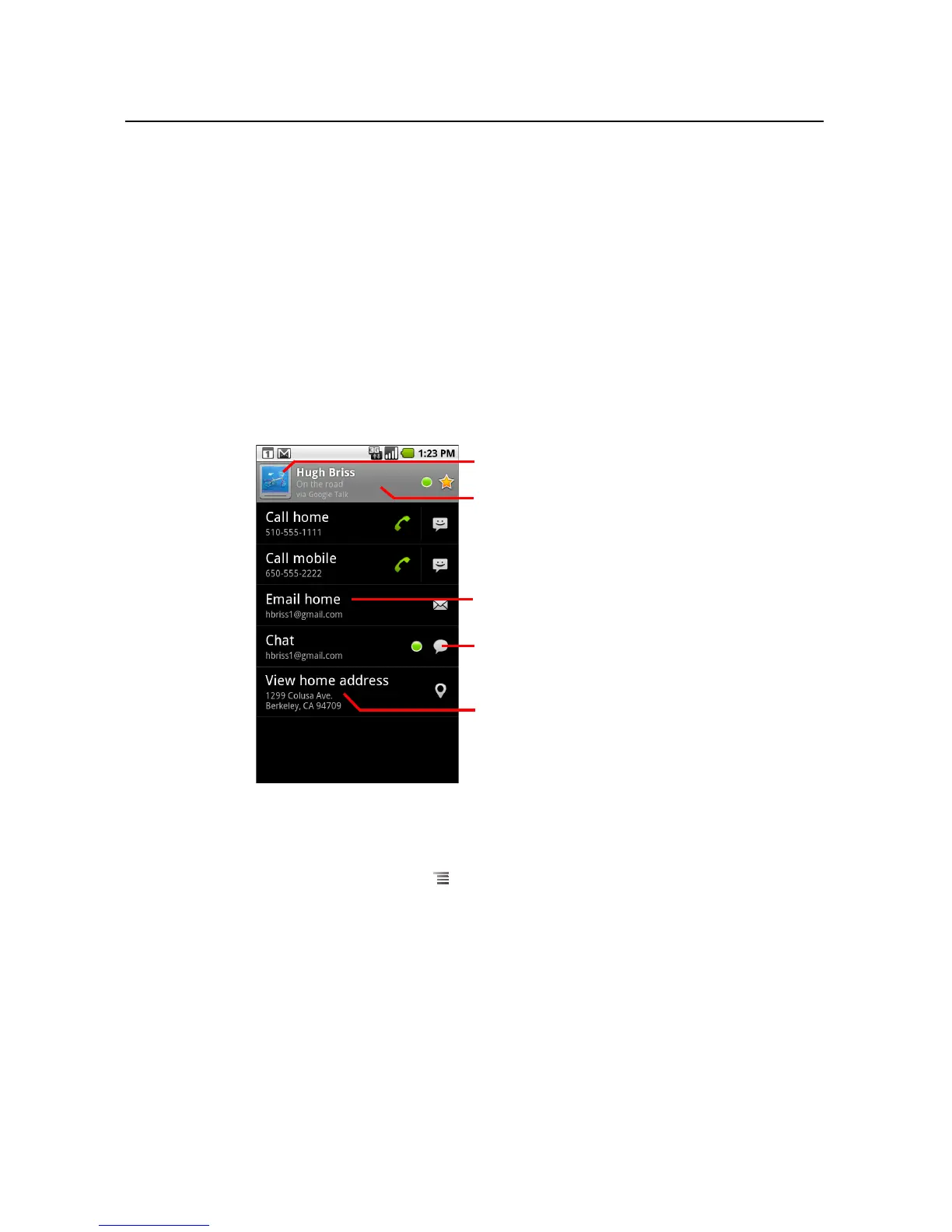
To view details about a contact
1 Open your contacts.
2 Touch the contact whose details you want to view.
Entries for communicating with the contact are followed by details.
Touch a communication method to start dialing, texting, or emailing the contact by
using the listed number, address, and so on.
Touch an address to view it on Google Maps. See “Maps” on page 211.
You can also press Menu and touch Edit contact to edit the contact’s
information (see “Editing contact details” on page 97), or touch Delete contact
to delete all information about the contact.
Touch to open Quick Contact.
Touch an address to view it on Google
Maps.
Touch a contact method to start
communicating with the contact.
Touch an icon to call, email, text, chat,
map, and so on.
The contact’s status and where it’s from.



 To Next Page