7
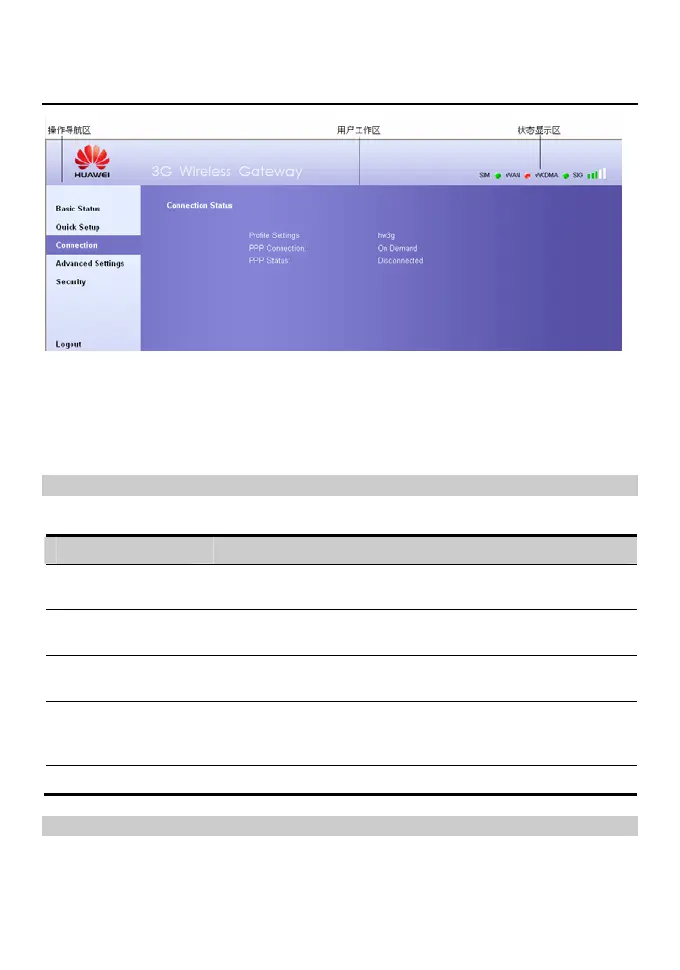
Introduce the Management Page
y Operation navigation area: Shows the main functions of the management console.
y User operation area: Shows detailed information about the gateway and set relevant
parameters.
y Status display area: Shows the information about network connection and signal
intensity in real time.
Functions Operation
The main gateway management console operations is shown in the following table.
Click… To…
Basic Status View the detailed information and relevant parameters about the
gateway, refer to “View the status”
Quick Setup Configure the gateway quick and easy by using the Qucik Setup
Wizard, refer to “Quick Setup”
Connection Refresh the network connection status and connect to the
network, refer to “Connect to the network”
Advanced Settings Set the parameters about the LAN, WAN, user account, system
upgrade, restoration, and reboot in the user work area, refer to
“Advanced Settings”
Logout Exit from the management Console
Status Information
The following table shows the gateway status information.









 To Next Page