32
11 IP Address Distribution
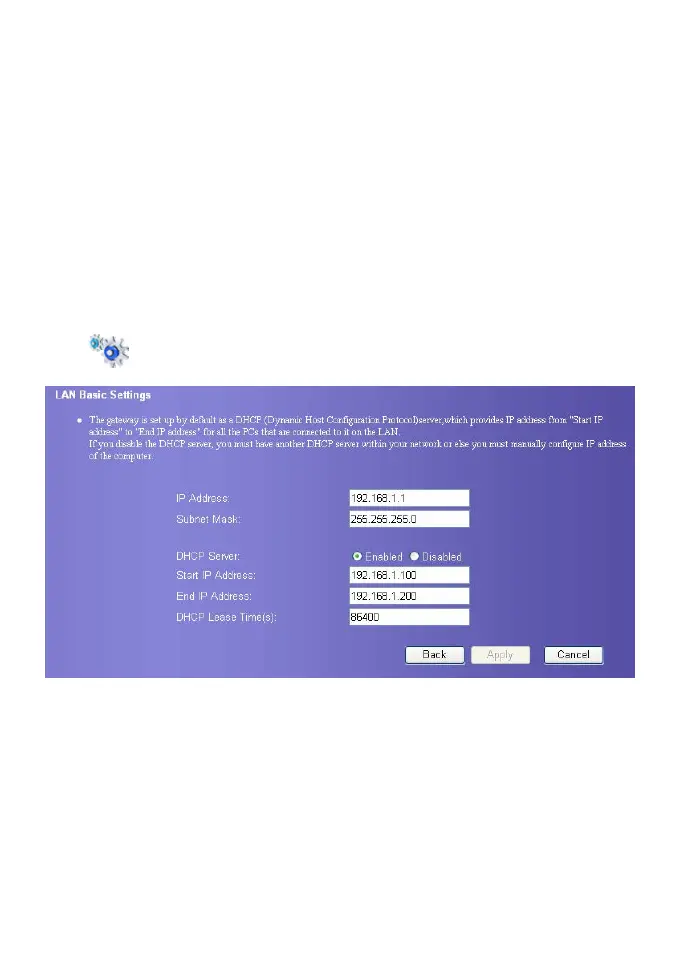
You can configure the IP address Distribution mode of LAN. Your gateway’s DHCP server
can allocate IP address for network devices automatically. If use DHCP server, ensure that
the PC connected with the gateway is configured for obtaining IP address automatically
also, refer to “PC Network Setting”.
Click
to display the DHCP setting page.
y IP Address: The IP address of your gateway. By default, it is 192.168.1.1.
y Subnet Mask: It is used with the IP address to realize flexible subnetting. By default, the
subnet mask is 255.255.255.0.
y DHCP Server: It refers to the Dynamic Host Configuration Protocol server. It is used to
assign the IP addresses dynamically. If the setting is Enabled, the DHCP server can
automatically assign IP addresses for the user PCs. In such case, users do not need to
configure the IP addresses manually. The recommended setting is Enabled.
y Start IP Address& End IP Address: It is used to define the IP address range for random
selection during IP address assignment. That is, it is used to define the IP address range
available for the hosts in the LAN. For example, within the network segment
192.168.1.0/24, the default IP address of the E960 is 192.168.1.1. The host IP address









 To Next Page