4
Step 5: Place the E960
The E960 can be placed horizontally on a table, hanging against wall, or leaning against the
pedestal. Place the E960 on a higher place or near the window, so it can receive better
signal strength.
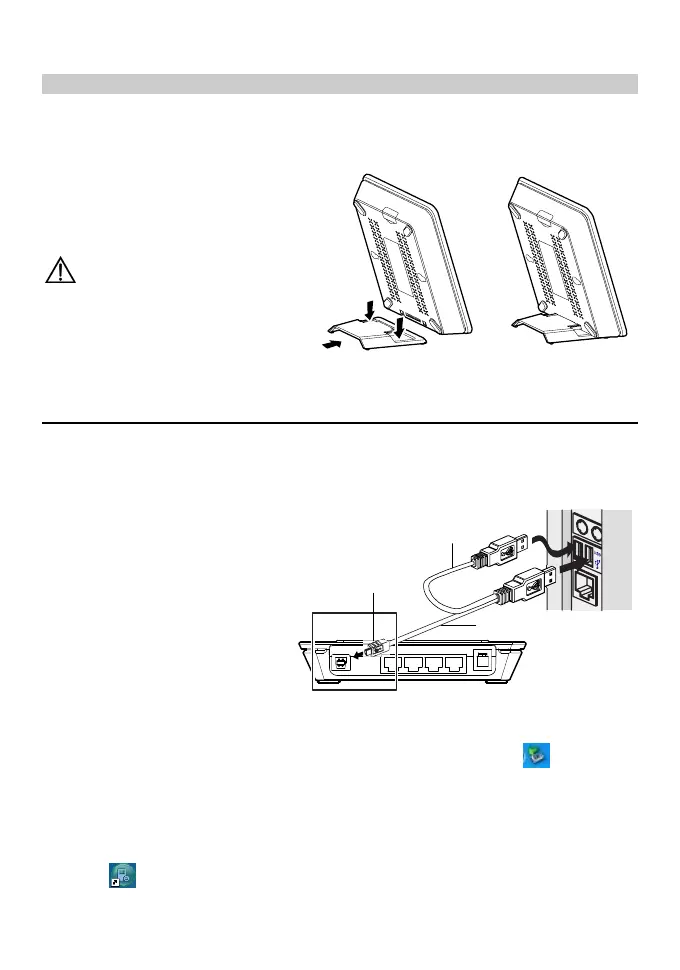
Press the bayonet of the pedestal,
and place the E960 into the pedestal
as shown in the figure. Thus, the
E960 can lean against the pedestal.
Caution:To avoid electrical
devices from interfering by the
wireless signal, place electrical
devices one meter away from the
E960.
USB Modem Mode
In USB modem mode, you can use functions such as voice service, wireless accessing the
Internet, SMS, and phone book only through connecting the PC with a USB data cable;
however, the Ethernet interface and WLAN cannot be used to build LAN.
1. USB data cable
2. Auxiliary USB data cable
3. USB connector
Note:The auxiliary USB
data cable is for additional power
supply. Ensure that all connectors
are plugged in to the corresponding
USB interfaces.
3
2
1
1. Insert the SIM card.
2. Connect the E960 and PC with a compatible USB data cable.
3. The system automatically recognizes the new hardware, and displays
on the lower
right of the desktop. The E960 and PC are connected successfully.
4. If the E960 is connected with a telephone set, you can make calls when you hear the
dial tone.
5. The Mobile Partner installation program of the E960 starts automatically. After the
successful installation, the management program starts automatically, and the shortcut
icon
is displayed on the desktop.









 To Next Page