10
4 Quick Setup
You can use the Quick Setup Wizard to configure the main parameters of gateway quick
and easy.
Click Quick Setup in the operation navigation to open the welcome interface of wizard,
and then click
to enter the PPP Profile Setting page following the page
prompts.
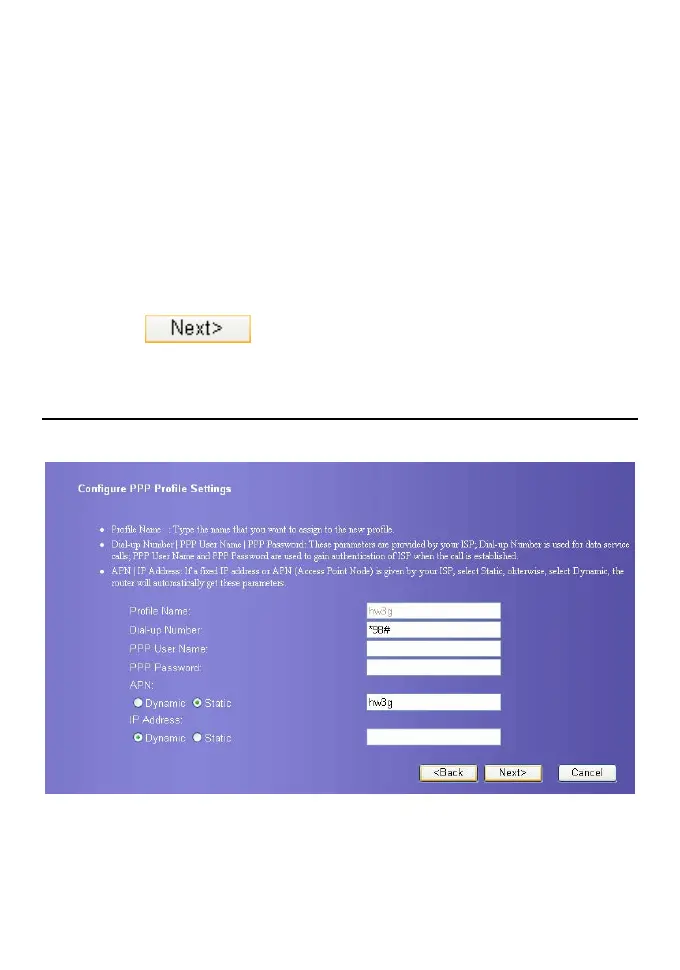
Configure PPP Profile
The interface shows as follow figure.
y Profile Name: Input a character string as profile name when the textbox default is null.
y Dial-up Number/PPP User Name/PPP Password: Input the three parameters provided
by network carrier. The dial-up number is used for PPP dialing, the user name and
password is used for gaining the network service authorization.
y APN/IP address: Select the mode for obtaining the APN or IP address. When the setting
is Dynamic, the network obtains the APN dynamically; when the setting is Static, and









 To Next Page