3
2 Quick Start
Gateway Mode
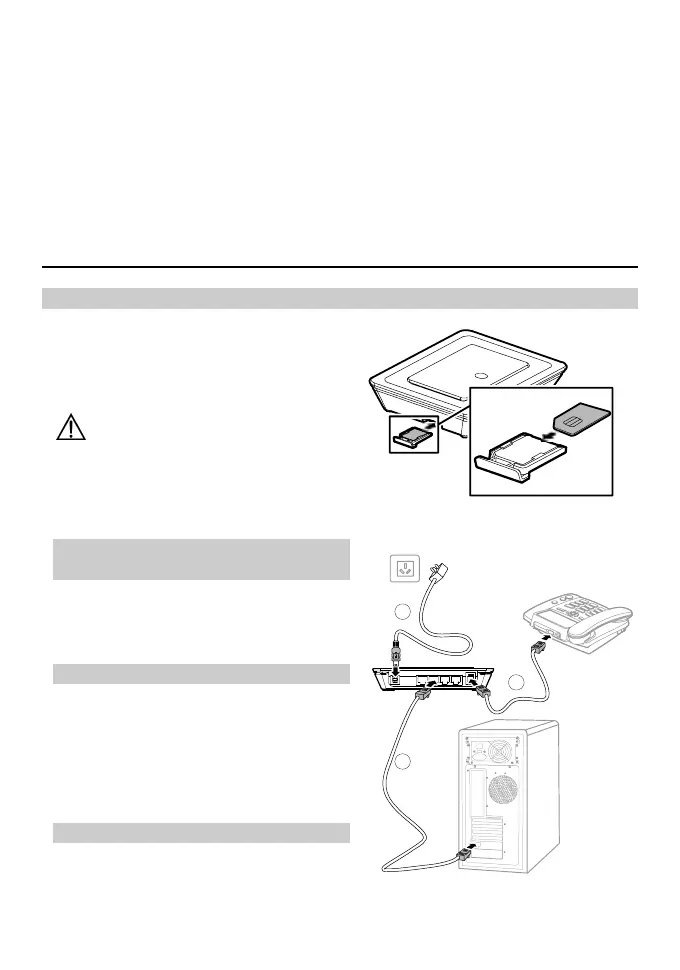
Step 1: Insert the SIM Card
1. Take out the card socket from the E960.
2. Insert the SIM card into the socket with
the golden contact facing upward.
3. Insert the card socket into the E960.
Caution:
When inserting or removing the
SIM card, you must disconnect the
E960 with the power adapter.
Step 2: Connect the Power
Adapter
Please use the E960 compatible power
adapter; otherwise, the E960 can be
damaged.
Step 3: Connect to a PC
If the indicator of the Ethernet interface
connecting with a network cable is on, the
connection is successful. The Ethernet cable
cannot be longer than 100 meters (328 feet).
For better effect, please use the shielded
cable.
Step 4: Connect to a telephone
To avoid the call effect from interfering by
the wireless signal, place the telephone set
one meter away from the E960.
2
4
3









 To Next Page